

Participant
June 22, 2023

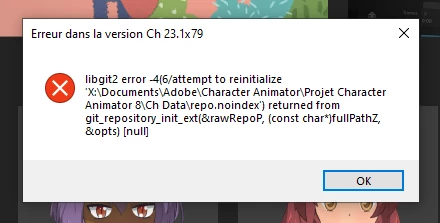
LibGit2 error when switching to the pro version
  • June 22, 2023
  • 8 replies
  • 436 views

When I try to upgrade to the pro version I get this error message that appears.

Thank you for your help.

8 replies

Community Manager
August 9, 2023

Oh, wait. You already have version 23.6? (was thrown off since the earlier error dialog report showed 23.1 build 79)

Are you in starter mode, by chance? In Starter Mode, the "New Project" menu item is a little odd. It just closes the current project and switches to the Home Workspace since creating a new project in Starter mode is based on choosing a puppet (so if you are already there, the menu behavior is pretty confusing now that you mention it). To create a new project in Starter mode, click one of the puppets in the grid of puppets. 


^ To confirm that you're in starter mode, look in the upper right corner of the app window. If it looks like this you're in Starter mode. If you have a CC license, you can click that switch to change to Pro mode and "New Project" will behave more normally again because the Pro Mode workflow is less constrained to a specific set of steps.

Do you still get the error that started the thread in 23.6? Hopefully that part is fixed at least.

Hopefully that helps.

Participant
August 9, 2023

I actually have version 23.6 but unfortunately as I reported nothing happens when I do "file - new project". Fixes are planned for this type of difficulty you say?

Community Manager
August 8, 2023

Strange, it doesn't even bring up a prompt to specify the location for the new project?

FWIW, a release that includes the aforementioned fix that has been in the beta for a couple of months now is in the process of being released, so that should resolve this when you're able to upgrade (to 23.6). Of course, the kind of environment that points the default documents folder to a network share might also mean it'll take longer to roll out that updated version. 

Participant
August 8, 2023

The problem is that I cannot create new projects. Nothing happens when I do "file - new project".

Community Manager
June 27, 2023

Judging by "X:\Documents" it seems like your "My Documents" location is configured to point to a mapped network volume (not uncommon on corporate networks) and Ch puts new projects in that folder by default and creates projects automatically when opened without a recent project to use (so it is never open without a project). In this case, that's causing it to present this error because it can't use that location, but if you create a project in another folder that is local, it should stop hitting it.

Participant
June 27, 2023

The software is installed in the local disk. But it indicates the X: drive and I don’t understand why.

Community Manager
June 22, 2023

@TheOriginalGC's suggestion is a good one. This error should be fixed in the latest beta version, but the workaround in build 23.1 would be to keep the project on a local volume.

The underlying problem is that libgit added extra careful checks of filesystem owners to address a git security issue and some shared volumes set permissions and ownership on created files and folders in ways that set it off.

TheOriginalGC
Community Expert
Community Expert
June 22, 2023

Can you try installing the program on a local drive?