


Custom OCIO path does not correctly apply the import/export settings
I'm trying to automate the colourspace setup at work and have run into a problem. We've tested this on version 7.4.1 and 8.2.0 on Windows 10.
This seems to be related to this thread, though as it's a year old, perhaps the update has been released and may not be working 100% correctly.
This happens on any preset, but just taking ACES 1.0.3 for example, if I load the preset, then the import/export settings are all set to the correct things:
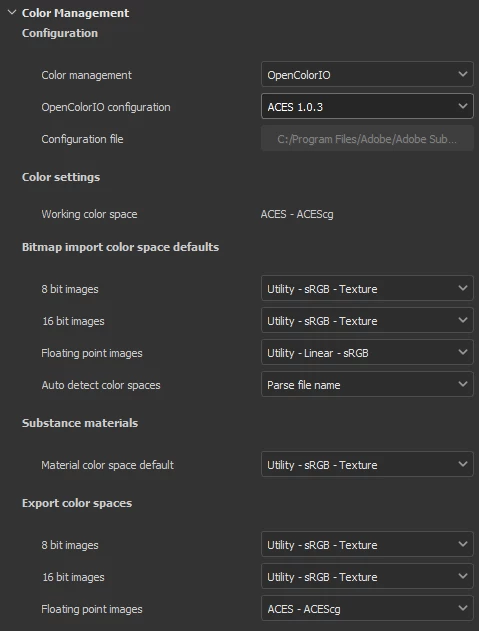
If I switch to custom and point to the same file inside the install folder (C:\Program Files\Adobe\Adobe Substance 3D Painter\resources\ocio\aces_1.0.3\config.ocio), then everything below gets set to the same value as scene_linear value, which in this case is ACES - ACEScg.
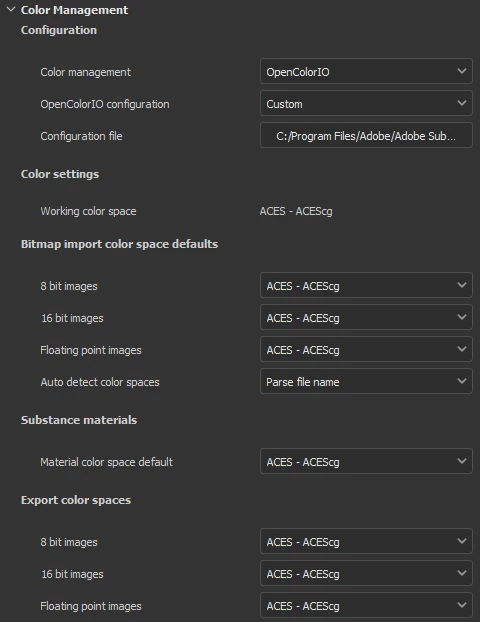
In the case of 8.2.0, it does work when pointing to the C drive, but copying the folder to a network drive will break it again.
I noticed the documentation (https://substance3d.adobe.com/documentation/spdoc/color-management-with-opencolorio-225969419.html#section3) does not match the variables in the example files (eg. substance_3d_painter_bitmap_import_8bit vs substance_3d_bitmap_import_8bit), but switching between the two didn't make any difference.
 AdChoices