


Erase Tool reset (grayscale resource missing) Brush's alignment option trouble
Substance 3D painter version 8.1.0 build 1699 / Windows 10
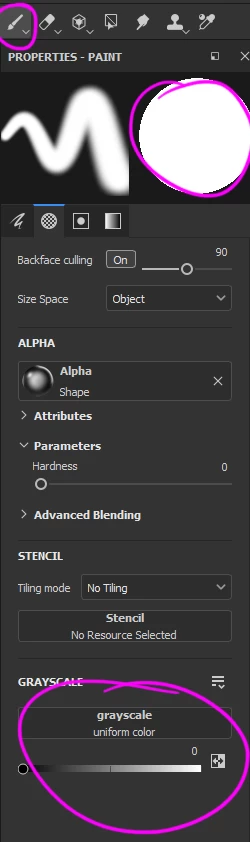
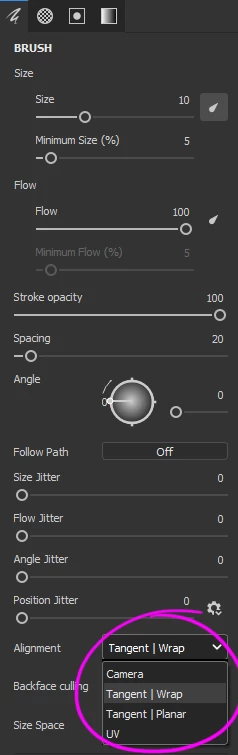
Attached are four images, the first three to explain the Eraser tool issue, and the last one to explain the brush alignment one.
Eraser issue. accidentally right click while I was erasing over and maybe I end clicking in option, but it seems everything works as usual but then I notice that the Grayscale resource is missing and in the upper area the thumbnail says "No material" so far the Tool works as expected, I tried to restore it choosing different option within the search popup but didn"t want to accept anything.
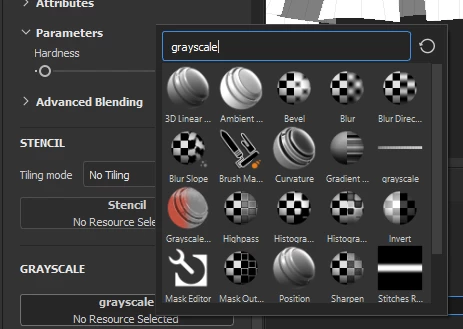
I tried the more logic ones like "grayscale" (as you can see in the third image) but nothing changes.
Is a waste of time try to look the missing resource in that popup? Is there a way to restore the Eraser and Brush preference to the original without re-installing the whole software?
Second and final question. I prefer to work with my brush or eraser using the "UV" alignment option in the brush properties, but everytime I switch between tools, change the alignment to "Tangent | Wrap". I tried to create brushes with that setting but no matter what everytime change the alignment to that option. Is there a way to set the UV as default?
Thank you.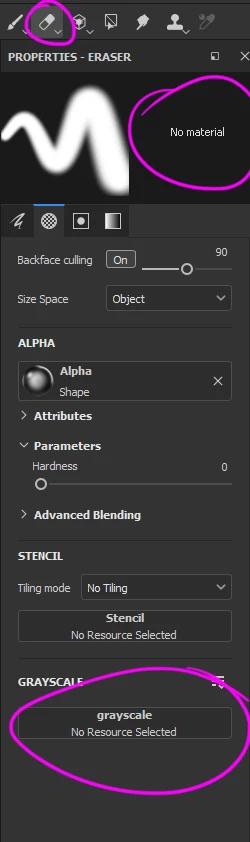
 AdChoices