


Known Participant
July 21, 2026

In a few minutes all VRAM is used

  • July 21, 2026
  • 6 replies
  • 110 views

Since 12.1 (this is 12.1.1) the VRAM usage of Substance Painter is crazy. There's another bug report about performance issues but for me it wasn't clear if it's VRAM related.

What happens:

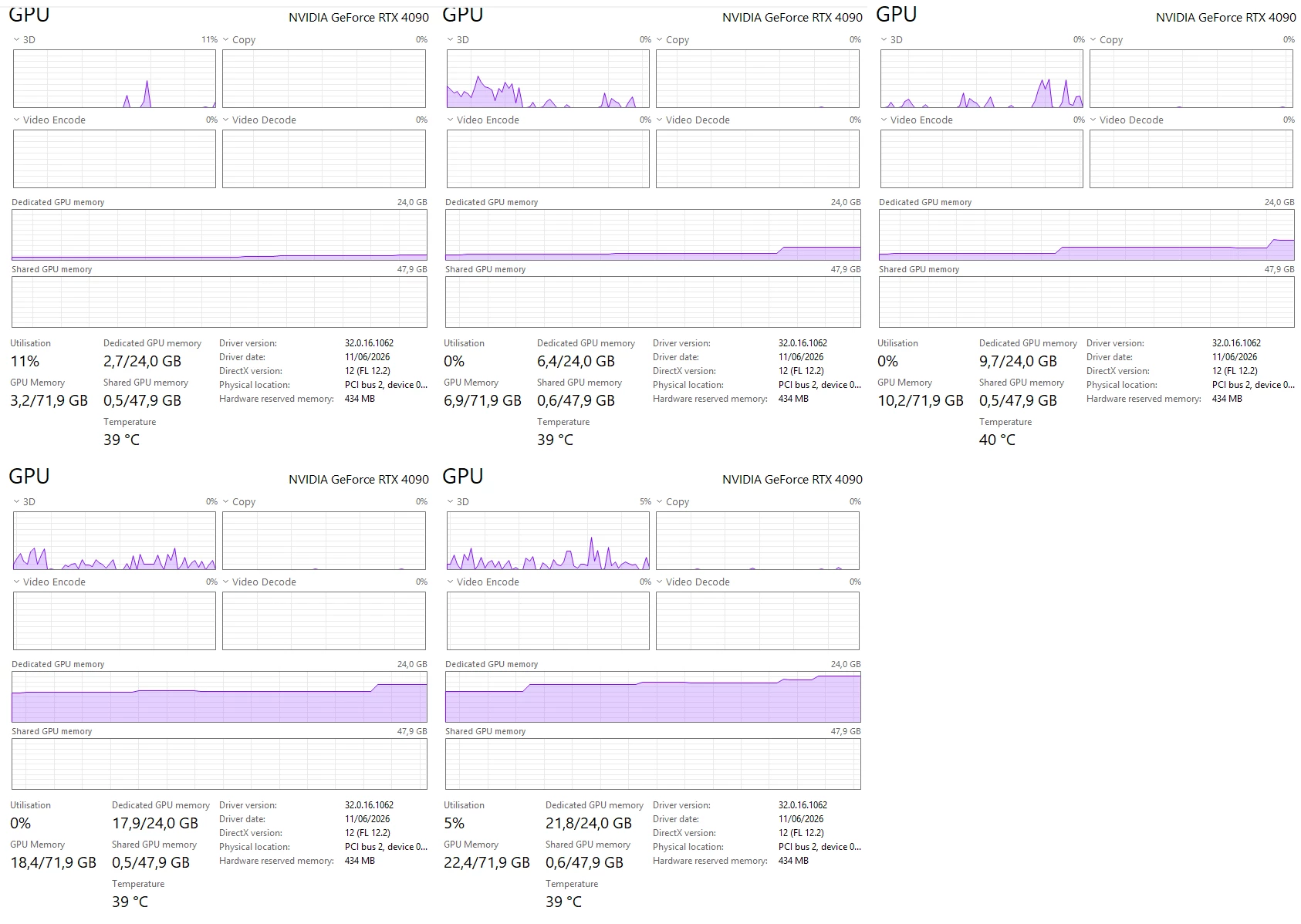
While working on a very small scene which only uses like 3GB of VRAM it skyrockets to the max in the matter of minutes while working on it.

This is 100% a memory leak and happens as well with version 12.1.1

My system is nothing special, Win 11, 64GB, i9-9900K but what makes it a bit more special is the fact I have 2 GPUs, a 3090 and 4090 both with 24GB VRAM.

I tried to force using the 3090 using the options inside Windows Display > Graphics options but that doesn't help, it only switches the issue to the 3090. I'm currently at the Nvidia 610.62 Studio Drivers.

If I quit Substance Painter while it hugs the 24GB it will roughly empty 12GB and after like a minute it gives me back another 10GB of VRAM.

It also doesn't really matter what I do, the screenshot attached is a storyboard where I only hide/unhide materials inside my scene. Top-left has the scene loaded, right bottom after clicking a bit on the eyes in front of the layers. I wanted to take another screenshot where the VRAM was 23.4GB but PC doesn't like all VRAM used.

Hope this can be fixed.
 

6 replies

rolyatb
Participant
August 6, 2026

I have also noticed severe memory leaks since the transition from OpenGL to Vulkan. There have been many threads created in discord and reddit about this issue. I am surprised it is acknowledged here.

OzBozAuthor
Known Participant
August 6, 2026

Just for your information, there are multiple issues and they are working at it. I'm now back on 12.0.3 since that works for me. The issue is not fixed yet in latest 12.1.3 update.

That's the information I got now via mail. If you decide to use the old version, keep in mind you can't load newer 12.1.x scenes.

rolyatb
Participant
August 6, 2026

My issues started in 11.1 and up. I’m glad to see that they are replying to you. I hope that it is actually resolved. So you’re aware there is a free plugin to avoid version locked painter files - it is not perfect depending on your workflow and what features you use, but gets the job done.

Ines Simeon
Adobe Employee
Adobe Employee
July 22, 2026

Hi ​@OzBoz ! Thank you for reporting it, it is indeed an issue on our side and we’re looking at fixing that. You mentioned having another performance issue, would you be able to send me more details about it in an email at this adress : isimeon@adobe.com ?

Paul Gresty
Community Manager
Community Manager
July 21, 2026

Hi ​@OzBoz, I’m passing this across to the Painter team; we’ll give you more info ASAP.