


Participant
September 16, 2022

No longer possible to change OCIO defaults if OCIO envar is set

  • September 16, 2022
  • 4 replies
  • 1060 views

I have an OCIO environment variable pointing to ACES 1.0.3 config, which I share between other DCC software in my pipeline. Up to SP version 8.1.3 (or maybe 8.1.2?) it was possible to customize defaults in "Color Settings", "Bitmap import color space defaults", "Substance materials" and "Export color spaces" sub-sections of the "New Project" window's "Color Management" section. This has worked ever since OCIO support was introduced in SP.


Something has changed however, and currently it's no longer possible to do this, because for some reason all dropdown lists are grayed out. Of course the defaults are completely wrong, so my pipeline is broken at the moment.
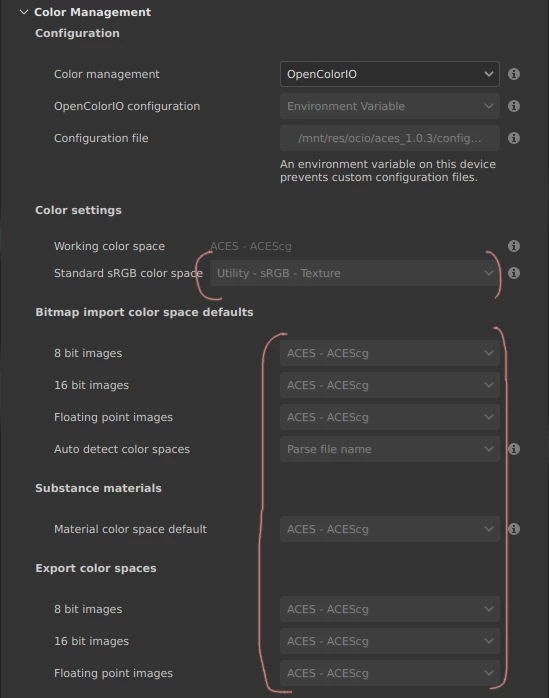


Was there any change introduced lately that now prevents from modifying OCIO defaults if OCIO envar is set? If so, then what was the rationale?


Or is it a bug?


(Steam, SP 8.1.3, Debian Bookworm)


    4 replies

    Participant
    May 29, 2024

    Hello, 


    I have the same problem like you've had with the OCIO settings. Did you find out the solution? 

    davescm
    Community Expert
    Community Expert
    September 17, 2022

    From reading the documentation, it appears that Painter is not using those greyed values but ignoring them. I assume they were greyed to stop folk setting them when they are ignored and complaining that they have no impact.


    Dave

    The KriteAuthor
    Participant
    September 17, 2022

    Okay, this was indeed mentioned in the changelog:


    [Color Management] Disable OCIO settings access when env-var is present


    But if the greyed-out unchangeable defaults are what SP uses under-the-hood for images of specific depth, then those defaults are all wrong. 8-bit images cannot even support ACEScg due to lack of bit depth, for example. And now this cannot be changed at all.


    What was wrong with being able to change the defaults if OCIO envar is present? Can someone please explain it to me?


    davescm
    Community Expert
    Community Expert
    September 17, 2022

    According to the documentation, 'If the OCIO environment variable is present, and specifies a valid configuration file, it will override and disable the settings in UI.'  So those greyed out and incorrect settings should not be having any impact.


    https://substance3d.adobe.com/documentation/spdoc/color-management-with-opencolorio-225969419.html


    The change was made in version 8.1.2. See release notes below:

    https://substance3d.adobe.com/documentation/spdoc/all-changes-188973073.html


    Dave