

Participating Frequently
August 28, 2023

Opacity Issue

  • August 28, 2023
  • 4 replies
  • 187 views

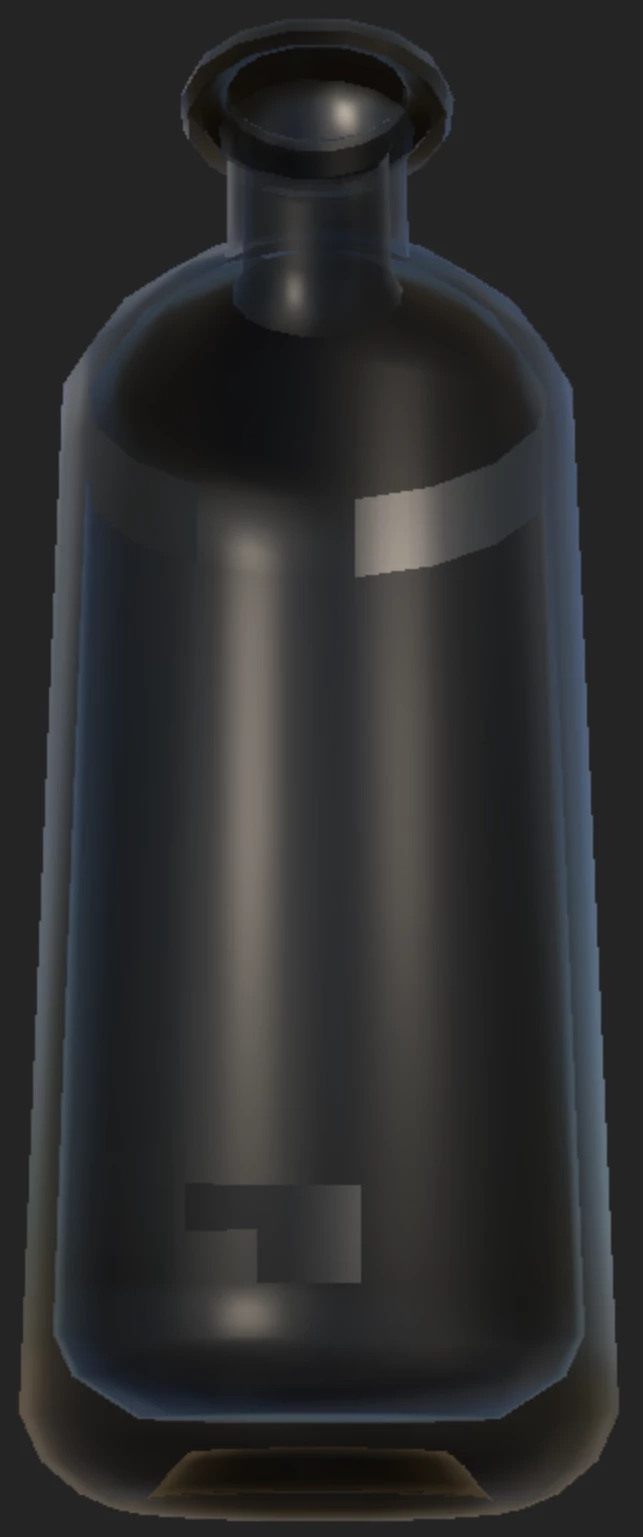
What causes these weird rectangular shapes on my glass bottle in Substance Painter?
 

4 replies

Participating Frequently
August 30, 2023

I would just add the modeling in a scene for rendering. So I don't think it is an urgent issue for now.

Cyril Dellenbach
Community Manager
Community Manager
August 30, 2023

As long as they're not appearing in the Iray Rendering, it is probably not related to the UVs or the modeling (except that the edges of the model are thin).


What is the final purpose of the model? If you only want to add it in a scene for rendering, I wouldn't care because it won't be visible (like in Iray).

However, if the model is supposed to go to Unreal Engine or Unity, I would first check that the problem doesn't occur in these engines.


Best regards,


Cyril Dellenbach (Micro) | QA Support Artist | Adobe
Participating Frequently
August 29, 2023

Hi Cyril, thanks for the quick response. These artifacts are not showing up when using the Iray rendering in Substance Painter. So do you think this issue wasn't by UV and modeling in C4D?

Cyril Dellenbach
Community Manager
Community Manager
August 29, 2023

Hello @Jaehyuk31868766j3o5,


Are these artifacts showing up when using the Iray rendering? If not, it is probably only a limitation of the 3D view. Unfortunately, when the shell of a 3D model is really thin, artifacts like the ones from your screenshot may appear when using the Opacity.


The issue shouldn't appear in most of the rendering software.


Best regards,


Cyril Dellenbach (Micro) | QA Support Artist | Adobe
