


Painter 11.1.3 | Output color spaces Not Compatible after reopen
Windows 11 | Painter 11.1.3 | Nvidia GeForce RTX 3080Ti | 128 GB RAM | ADM Ryzen 9 5900X 12 Core
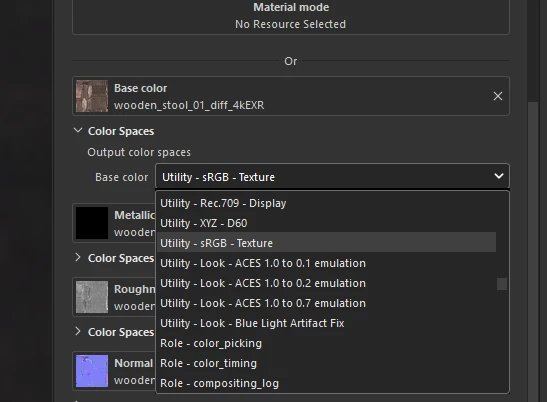
When I create a new File I set a OCIO (Custom, ACES 1.2 or ACES 2.0 doesn’t matter). Then I load in external texture files and set their Output color space. It doesn’t matter if I set this manually or automatic via OCIO rules All good and works like that:
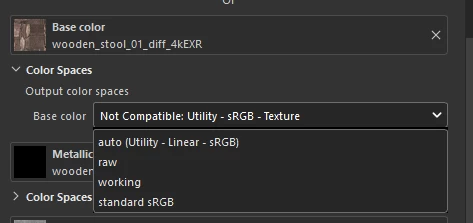
After saving and reopen the file I lose all the “Output color space” OCIO rules/settings. It displays not compatible and only the defaults are available.
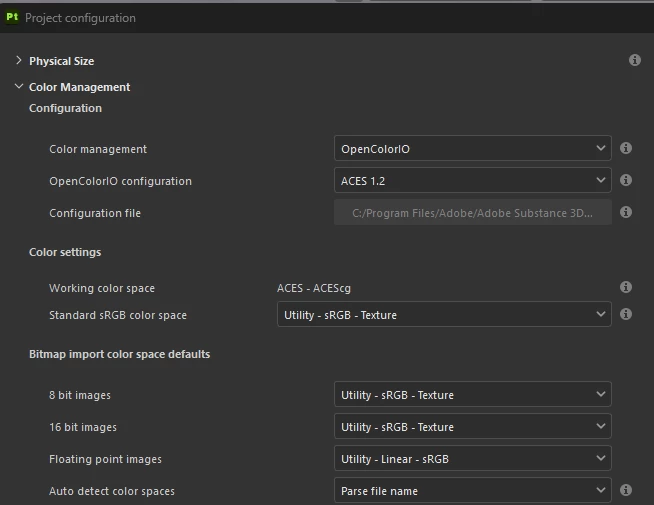
When I check the Project Configuration it is still using the correct OCIO file and there is also no Error/Warning in the LOG:
Does anyone else has this issue? It is a critical Bug in our case because textures load wrong and are not correctly exportet. Also it is very confusing. Sadly we can’t go to Painter Version 12 yet because of the python version switch.
Best regards,
Timo
 AdChoices