


Open for Voting
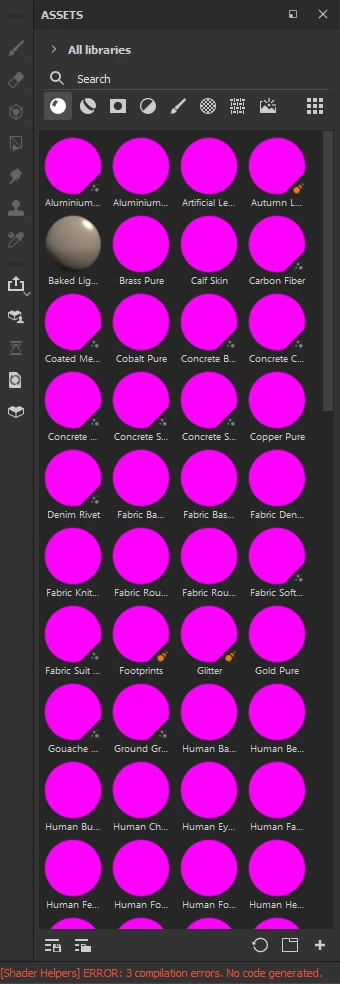
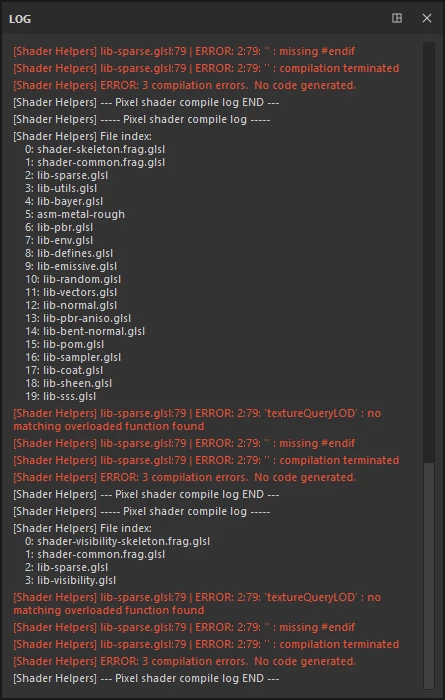
Shader Helper not compiling due to multiple errors, even on fresh installs and wipes.
Today when I was looking to do some outfit variants, I was met with 3D Painter refusing to launch, at first I suspected it being due to this project being a couple months old, though I was met with the same issue on empty projects. Though I'll get straight to the point and state everything I tried and did:
- Reinstalled Substance 3D Painter though Adobe Creative Cloud. (Still same issue)
- Tried downgrading my version through Adobe Creative Cloud. (Still same issue)
- Tried ripping out the starter-assets to see if the problem can be prevented by not having said problematic files. (Still same issue)
- Reinstalled it AGAIN (Still same issue)
- Cleared all local content, cache data, etc. (As in it might as well be the first time it was installed, plus to clear that possible issue of older steam versions also being installed. (aka I only have the one now))
- Restarting my computer. (Still same issue)
- Scowered the web for other cases of this (couldn't find a solved instance)
- Read the shader-doc information on lib-sparse.glsl as that was my main starting point to debug from (didn't help)
I'm bloody clueless on what in the hell happened but it seems no matter my version or if I get rid of Painter's starter-assets, I can only imagine this being an internal issue inside Substance Painter or a convoluted backend issue on my machine.
Last bit of info will just be a couple screenshots for the possible poor souls that run into this issue so they can identify it quicker as well:
 AdChoices