


Participant
November 20, 2025

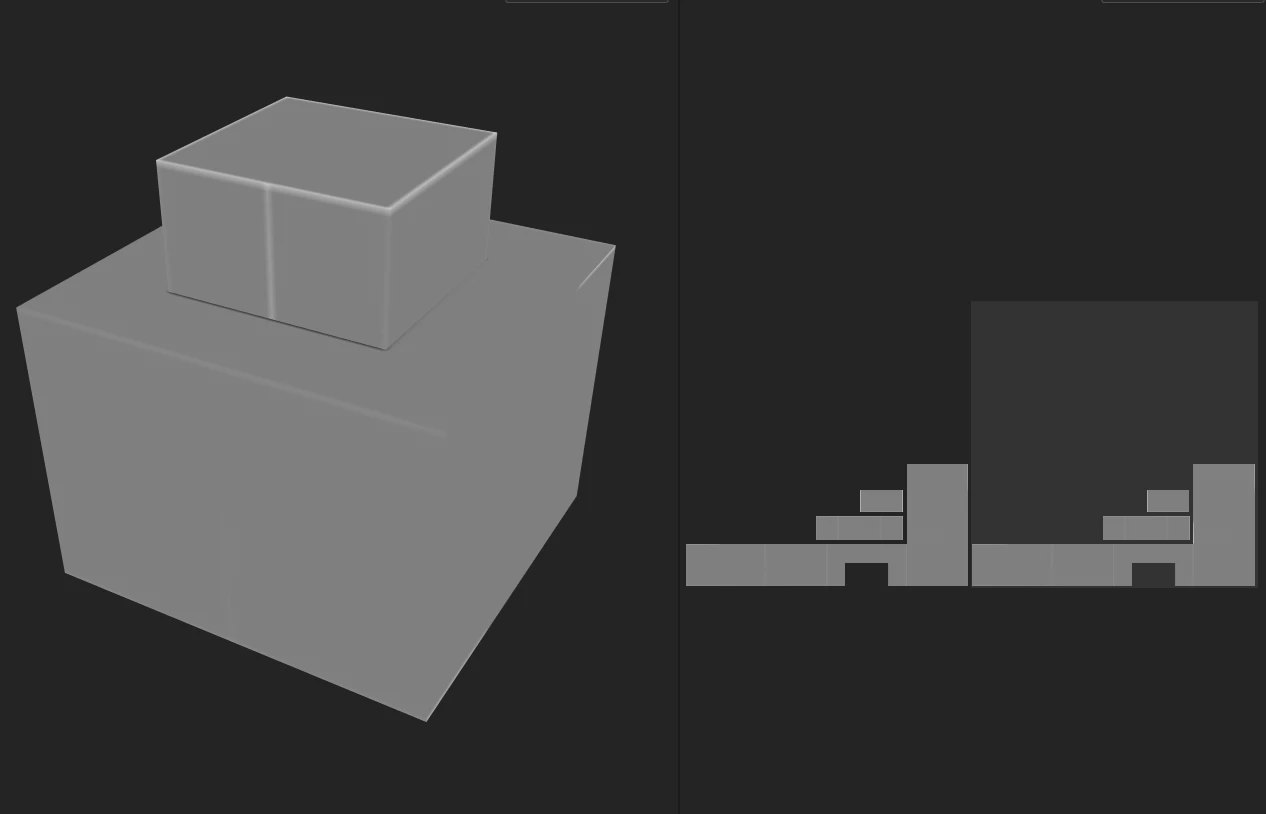
When baking textures, even on a flat surface, the curvature map detects the UV seams as if they were

  • November 20, 2025
  • 2 replies
  • 100 views

In Texture Bake mode, even if the model’s geometry is perfectly flat, if there are polygon edges or UV seams within that flat area, the curvature bake still produces white lines.

Please let me know if there is a proper setting to avoid this or if it is a bug.
If it is a bug, I would like it to be fixed.
Thank you.
    2 replies

    Participant
    November 21, 2025

    Thank you for your reply.

    I’m not planning to use UDIMs for this model.
    The reason some UVs are placed outside the main UV area is that this model is for a game and is symmetric, so this layout helps save texture space.
    If I paint on the UVs inside the 0–1 area, the texture will also appear on the mirrored side.
    Also, if I stack the UVs of the opposite side within the 0–1 area, it causes issues during baking.

    Is there any way to stack the UVs without moving them outside the 0–1 area, while avoiding baking problems and preventing the white seam lines from appearing?
    Thank you.

    Cyril Dellenbach
    Community Manager
    Community Manager
    November 20, 2025

    Hi @gotok78974243,


    The example you gave here isn't a good one. You basically have overlapping UVs (considering you're not using a UDIMs workflow) with UVs out of their map.


    This is a very uncommon workflow, but if you want me to take a look, you can send it at cdellenbach@adobe.com


    Best regards,


    Cyril Dellenbach (Micro) | QA Support Artist | Adobe