


Corey610
Participant
January 23, 2025

Bogus Activation Limit Notices

  • January 23, 2025
  • 7 replies
  • 376 views

Dreamweaver Version 21.4

Windows 10

Basic steps: Starting an Adobe application

Expected result: The app should start with no warning

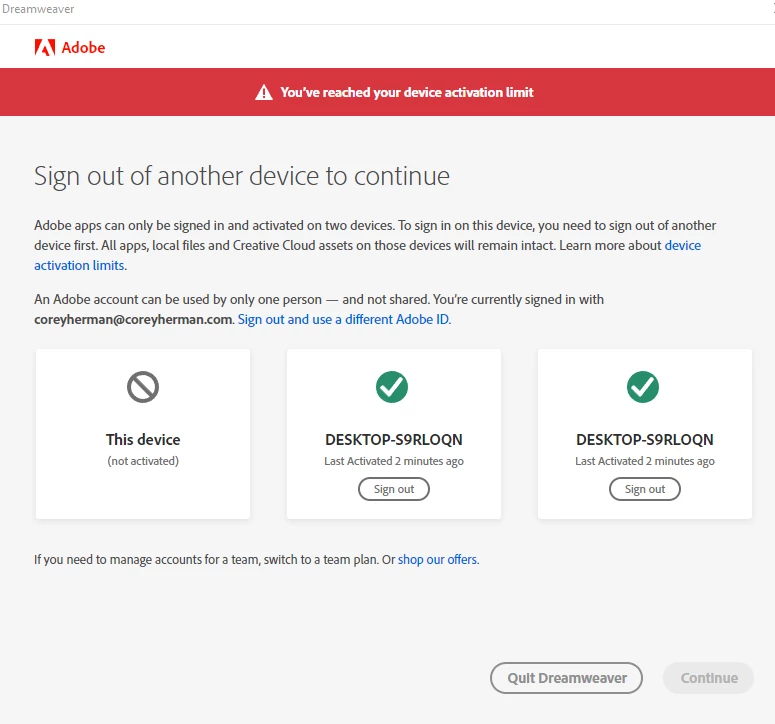
Actual result: I get the activation limit warning that I've included as a screencap


Starting today, everyt time I try to open an Adobe application, I get a bogus notice that i have reached my machine activation limit.

I'm attaching a screenshot from when I tried to start Dreamweaver. This has happened to me several times today.


In the listing of machines that are currently signed on, they are all the machine I'm currently using.


Any help to stop this problem would be great.
7 replies

kglad
Community Expert
Community Expert
January 24, 2025

@Corey610 


my problems with this spontaneously resolved more than a year ago and haven't recurred.  hopefully, that'll be your experience, too.


but, if they do recur, sign out from all computers using https://accounta.adobe.com/activated-devices

Corey610
Corey610Author
Participant
January 24, 2025

For me, the problem has stopped, but I wholly expect it to come back.... just because that's how I think.

kglad
Community Expert
Community Expert
January 23, 2025

what a mess.


do you have any vpns?


do you have 2fa enabled?

Participant
January 23, 2025

in my case, photoshop will have me log-in, then deactivate another computer (even though the one I'm on is one of the activated computers) - try to use it and it randomly closes. On reopen, it'll have me log-in again and then deactivate the SAME computer I just activated a moment ago.

Other cases, I can log-in and activate the computer in photoshop, which will then force illustrator to close. Illustrator will then ask me to log-in and deactivate the computer I just activated a moment ago. When done, photoshop will then close out and the loop continues.

kglad
Community Expert
Community Expert
January 23, 2025

@vilacron 


after opting to sign out from all, are you unable to sign in?

vilacron
Participating Frequently
January 23, 2025

the problem still persists even after signing out

kglad
Community Expert
Community Expert
January 23, 2025

just opt to sign out from all when signing in.