


Ann Bens
Community Expert
Community Expert
August 29, 2023

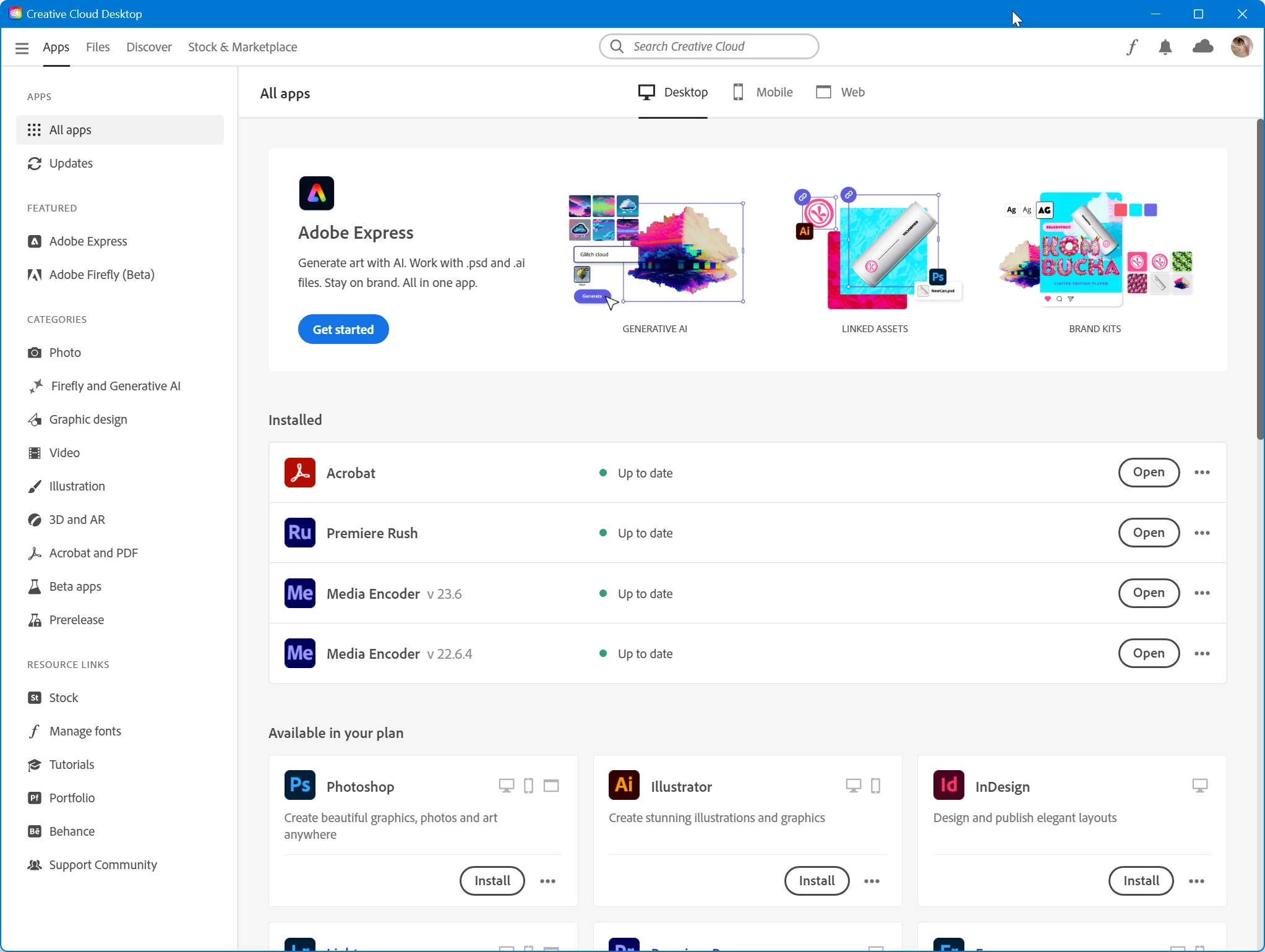
CC desktop app only showing 4 installed apps
  • August 29, 2023
  • 12 replies
  • 570 views

Cannot even uninstall: it says it required for other Adobe apps which are all closed.

12 replies

Ann Bens
Community Expert
Ann BensCommunity ExpertAuthor
Community Expert
August 31, 2023

Ah, I don't work anymore: retired. Have but one machine. Install everything myself.

OS might have been the culprit. I live in the Netherlands but use an English US Windows OS.

Any way, all is well now.

Thanks.

Kalvyn Rasquinha
Community Manager
Community Manager
August 31, 2023

@Ann Bens do you have Creative Cloud installed at work? Specifically, does an admin deploy a package to your machine or did you install everything yourself?


What we're seeing in the log is that there is a locale mismatch. The Creative Cloud app is expecting en_US however it appears that the OS is sending en_GB. Could you share a screenshot of Preferences > Apps with the "Default install language" visible from the Creative Cloud app? Try switching between "English (North America)" and "English (International)" to see if that makes the apps visible.

Kalvyn Rasquinha
Community Manager
Community Manager
August 30, 2023

Thanks, @Ann Bens . I've created a JIRA issue for the team to investigate.

Ann Bens
Community Expert
Ann BensCommunity ExpertAuthor
Community Expert
August 30, 2023

Already uploaded a log file.

File: AdobeLogs_20230830_091721_672-win-GS.zxp

kglad
Community Expert
Community Expert
August 30, 2023

tou successfully reinstalled using the cc app, and the app still fails to show open and shows install after restarting your computer?

Kalvyn Rasquinha
Community Manager
Community Manager
August 30, 2023

@Ann Bens could you collect and upload a log file and share the name with me? In the menu of the Creative Cloud app, Help > Create log file, for instructions.

Ann Bens
Community Expert
Ann BensCommunity ExpertAuthor
Community Expert
August 30, 2023

@kglad again, the quickest resolution is to reinstall the currently installed apps.


Tried that but no show will try again this evening.

kglad
Community Expert
Community Expert
August 30, 2023

again, the quickest resolution is to reinstall the currently installed apps.


and, if there's some reason you don't want to do that, you can uninstall the one's listed as installed and then try to uninstall the cc desktop app.  if that fails, you can proceed to the cleaner step.


but again, i recommend just installing over your current installs to get the cc desktop app to recognize what's already installed on your computer.

Ann Bens
Community Expert
Ann BensCommunity ExpertAuthor
Community Expert
August 30, 2023

@kglad Cannot un install programs as they are listed as not installed (see screenshot).

@Kalvyn Rasquinha Nope All apps are English so is my OS Windows.

Kalvyn Rasquinha
Community Manager
Community Manager
August 30, 2023

Hi @Ann Bens , did you happen to change the language for installing the apps recently?