



Color Theme Imported to "Libraries" is Wrong Color Both Visually & When Used via Eyedropper
NOTE: This is my second post regarding this issue. The first post I made got resolved and I don’t think there’s a a way to re-open the post. I replied to it “issue resolved itself” and that got marked as the Answer. But it actually did not resolve itself and presented itself again. The issue persists.
Original Issue:
I have a color theme that I use inside of Premiere Pro, to which I’ve imported to Libraries, that I use to quickly apply color variations to captions in Essental Graphics via eyedropper.
Typical behavior: When I have text highlighted, I hit the eyedropper icon next to Appearance > Fill inside the Essential Graphics panel and choose a color from my color theme.
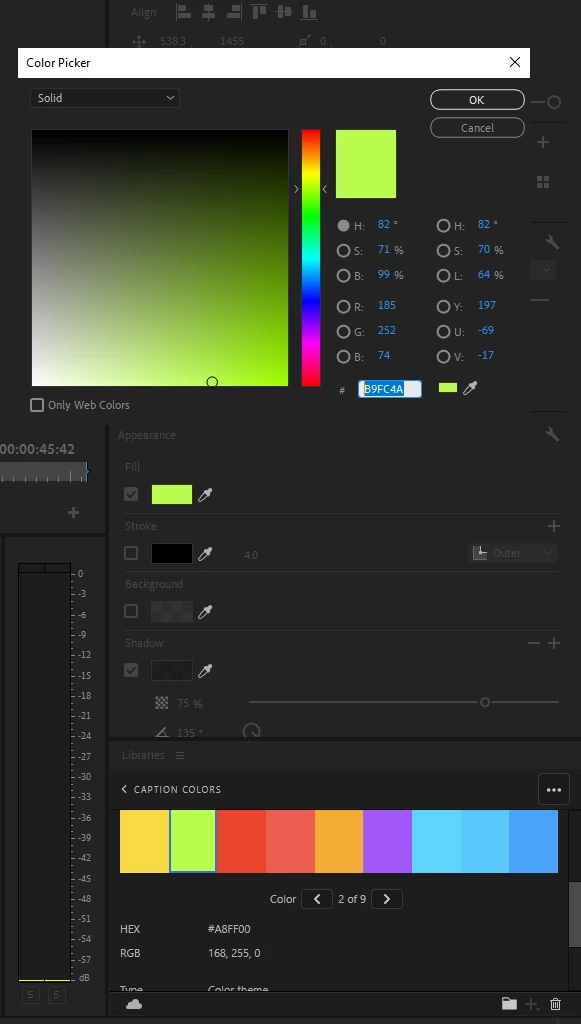
Irregular behavior: I had a power outage blip a month ago, and since returning online with my computer, the color is now desaturated both visually, and when I use the eyedropper. It picks a completely different color than what the HEX code states. Meaning, the HEX is still correct, but the eyedropper does not choose that color.
For example: My Green is #A8FF00 where the HEX is displayed correct when I hover my mouse over the ‘Color Theme’ inside the Library itself, but the eyedropper chooses #B9FC4A for some reason. (Image below)
Any idea what’s going on here? It is as if the Libraries tab is on a different color profile than the rest of the application.
What I have already tried:
- Reinstallation of my current Premiere Pro version (24.6.5), installing latest Premiere Pro version (26.0.2) and creating a brand new project from scratch. Neither worked, issue remained.
Also, the issue does not present itself in other Adobe programs as far as I can tell. In Photoshop for example (latest v27.4), the colors are correct in both displayed HEX and the actual color picked up from eyedropper.
I am cautious about what to try next because I don’t want to lose my preset imports, saved profiles, etc.
 AdChoices