


Participating Frequently
June 20, 2025

Colours Glitching in CC Desktop App

  • June 20, 2025
  • 10 replies
  • 485 views

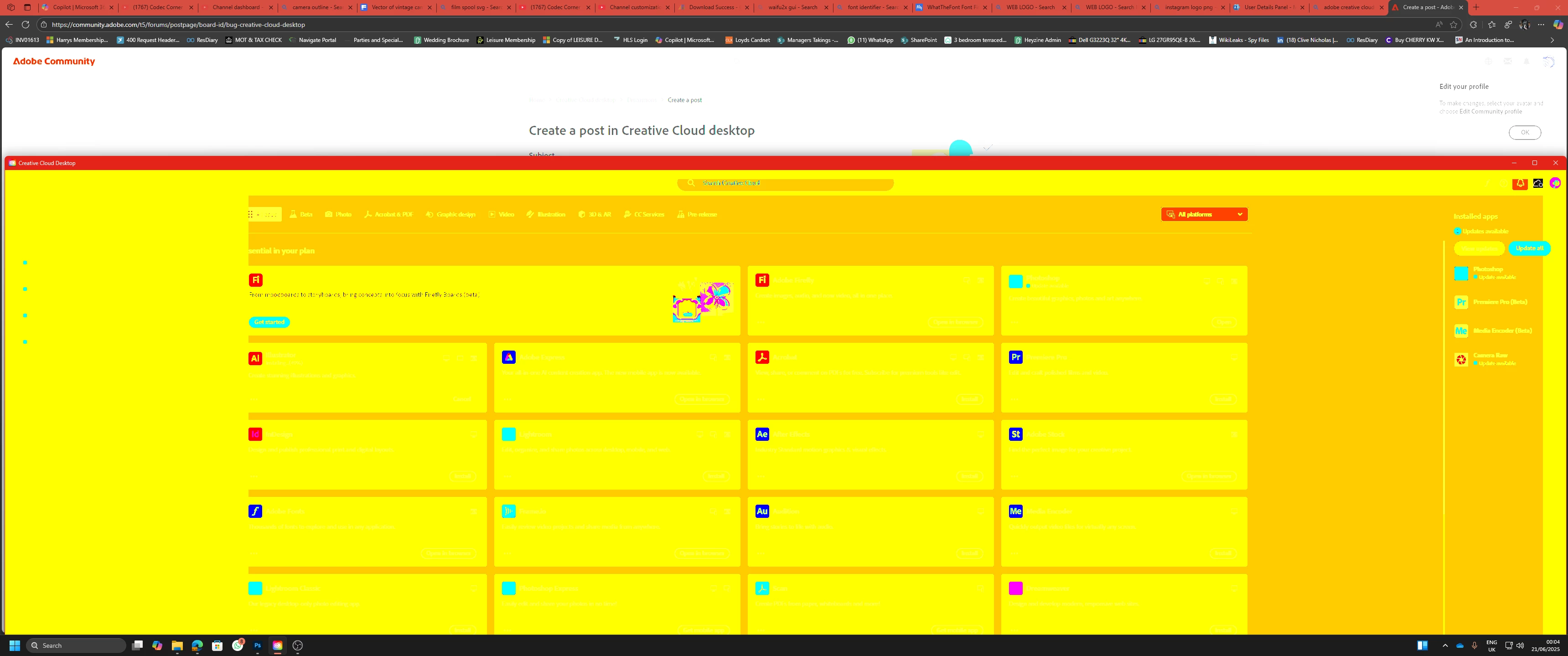
When I open the Creative Cloud Desktop app, the colours glitch massively to the point of often becoming unreadable - anyone else experienced this? The colours chnage and flicker as i move my mouse around the screen. Issue does not appear in a monitor view on OBS so I am thinking it may be an issue with Nvidia's RTX auto HDR feature as OBS forces SDR howeve rmy monitor is HDR1000. Using Nvidia Driver 576.52 on an RTX 3070.
10 replies

Participant
July 16, 2025

can u tell me how to do that

Tarun Saini
Community Manager
Community Manager
July 16, 2025

Hi @zaid7655,


Thanks for reaching out! We're sorry to hear about this. Please ensure all the drivers are updated. Also, check if you're on an updated version of the operating system. 


Did you try restarting the device to check if that helps? Also, try using the Creative Cloud Cleaner tool to uninstall the app using the link- https://adobe.ly/4kDJult and reinstall it again.


Let us know if that helps.


Regards,

Tarun


kglad
Community Expert
Community Expert
June 21, 2025

thanks for that info.

Participating Frequently
June 20, 2025

After a clean install of the driver, the issue was fixed as all customizations were reset. After re-enabling features one by one, the issue seems to be caused by Nvidia's "RTX Dynamic Vibrance" Setting

Peru Bob
Community Expert
Community Expert
June 20, 2025

No. Choose Custom Installation and the option for a clean installation will be there.

kglad
Community Expert
Community Expert
June 20, 2025

ddu is a cleaner install. use it.

Participating Frequently
June 20, 2025

Do you reccomend using Nvidia's "CLean Install" installation mode or using DDU?

Peru Bob
Community Expert
Community Expert
June 20, 2025

Try rolling back to an earlier Studio driver.

Make sure to choose a clean installation.

kglad
Community Expert
Community Expert
June 20, 2025

reset the cc desktop app by making sure it's in the foreground, then press:

Win: Ctrl + Alt + R
Mac: Cmd + Opt + R


if that fails, repair per https://helpx.adobe.com/download-install/kb/creative-cloud-install-stuck.html


if that fails and you have windows, open your control panel > add/remove programs > cc desktop app > repair


and restart your computer 

Participating Frequently
June 20, 2025

I've swapped over to Studio drivers version 576.80 and unfortunately still having the same issue 

kglad
Community Expert
Community Expert
June 20, 2025

make sure your video card driver is the studio, not game version.