


Inspiring
August 20, 2024

Creative Cloud Added Fonts dialog is not loading some fonts

  • August 20, 2024
  • 6 replies
  • 414 views

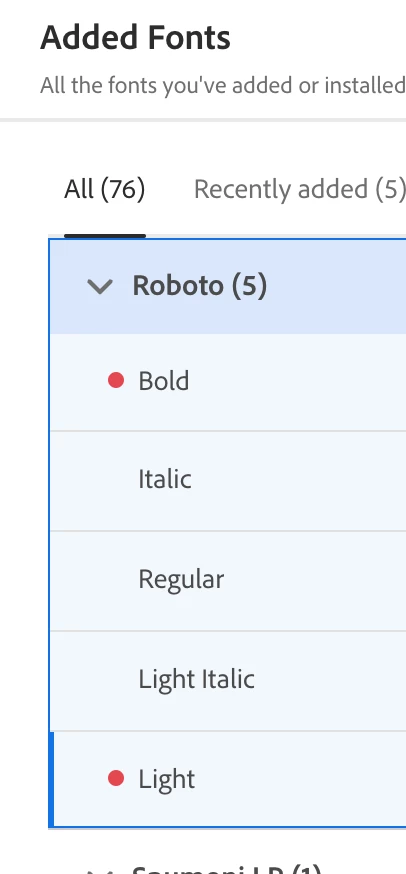
For one typeface, a couple of its fonts are not loading, and red dots appear to the right of the weight names. Clicking the retry icon spins but it still doesn't load. Any ideas?


Mac OS 14.6.1 and Creative Cloud 6.3.0.207
6 replies

kglad
Community Expert
Community Expert
August 23, 2024

thanks for the update.

Inspiring
August 23, 2024

I am embarrassed to say that I found the problem. The Roboto fonts that refused to be installed via the Creative Cloud app had already been installed on my system—maybe even as Google fonts. So, the lesson here is the CC app does not to download fonts already installed as local fonts on a system. Sorry for the hassle.

Inspiring
August 23, 2024

Ha! I'm trying to keep it all in the family, but it's probably the best option.

kglad
Community Expert
Community Expert
August 23, 2024

why don't you just download what you want and you can use whenever you like, https://fonts.google.com/selection

Inspiring
August 23, 2024

@kglad I did every single step, including wiping my disk clean of all things Adobe, reinstalling everything, restarting my computer and I still can't install those two Roboto fonts.


You mentioned something about a corrupt account. How could that be and I still can install apps and other fonts? And is that an Adobe account? I've had the same account since Adobe started having accounts.


Thanks.

kglad
Community Expert
Community Expert
August 20, 2024

at least, try the reset


reset the cc desktop app by making sure it's in the foreground, then press:

Win: Ctrl + Alt + R
Mac: Cmd + Opt + R


if that fails, repair per https://helpx.adobe.com/download-install/kb/creative-cloud-install-stuck.html


if that fails and you have windows, open your control panel > add/remove programs > cc desktop app > repair

if that fails, uninstall using the correct uninstaller from https://helpx.adobe.com/creative-cloud/help/uninstall-creative-cloud-desktop-app.html#sa_src=web-messaging and then reinstall using*


if that fails, do a clean cc install carefully following each applicable step:

uninstall every cc app including preferences per https://helpx.adobe.com/creative-cloud/help/uninstall-remove-app.html

then uninstall the cc desktop app, again using the correct uninstaller per https://helpx.adobe.com/creative-cloud/help/uninstall-creative-cloud-desktop-app.html#sa_src=web-messaging

clean your computer of cc files per http://www.adobe.com/support/contact/cscleanertool.html

check for, and if available, update your os

if windows is your os, repair all ms visual c++ versions that can be repaired (use google if you don't know how to do this)

if windows is your os update your ms visual c++, if it can be updated (use google if you don't know how to do this)

restart your computer (don't skip this)

reinstall the cc desktop app using the "alternative download links" at the bottom of the page at https://helpx.adobe.com/download-install/kb/creative-cloud-desktop-app-download.html

use the desktop app to install your cc programs/trials>

if that fails, you probably have a corrupt user account. google your os and how to create a new one.