
Participating Frequently
October 5, 2023

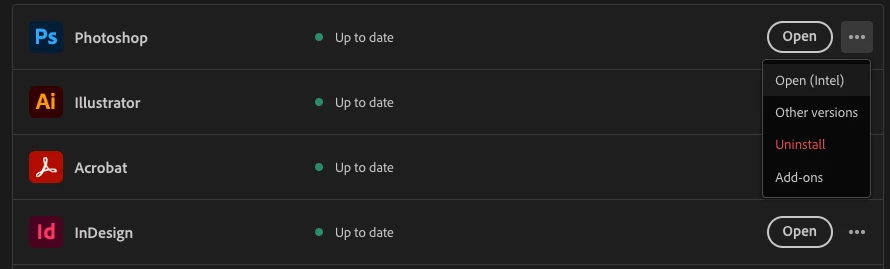
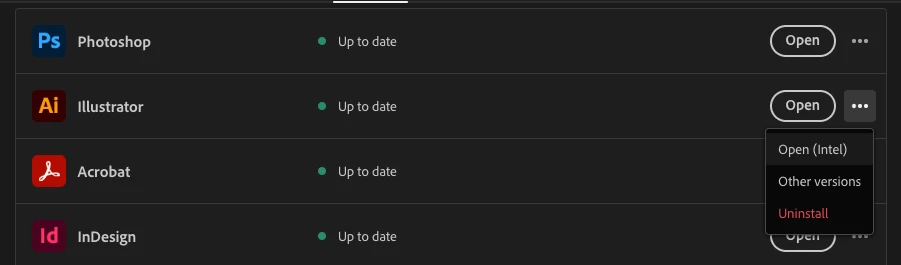
M1 MacBook Pro, but Photoshop and Illustrator show as "Intel" in CC Desktop app?
  • October 5, 2023
  • 2 replies
  • 293 views


Yesterday, I notice Illustrator wasn't updating PSD files after I made changes to them. Looked in the links panel in Illustrator, and the option to refresh the link was greyed out. So, not auto updating, can't refresh, and my only option was to replace the link. (Which required selecting all instances, and clicking the image name and hitting enter repeatedly.)

Today I checked to see if I had multiple versions of PS or ILL installed, and there was only the previous PS. Clicking on options for these two apps offers the option to "Open (Intel)". 

This laptop is Apple Silicon. Why do I have Intel versions installed? I thought these apps were already optimized for Apple Silicon?

2 replies

kglad
Community Expert
Community Expert
October 5, 2023

post in the photoshop forum unless you think this is a cc desktop issue in which case reset the cc desktop app by making sure it's in the foreground, then press:

Win: Ctrl + Alt + R
Mac: Cmd + Opt + R


if that fails, repair per https://helpx.adobe.com/download-install/kb/creative-cloud-install-stuck.html


if that fails, uninstall using the correct uninstaller from https://helpx.adobe.com/creative-cloud/help/uninstall-creative-cloud-desktop-app.html#sa_src=web-messaging and then reinstall using*


if that fails, do a clean cc install carefully following each applicable step:

uninstall every cc app including preferences per https://helpx.adobe.com/creative-cloud/help/uninstall-remove-app.html

then uninstall the cc desktop app, again using the correct uninstaller per https://helpx.adobe.com/creative-cloud/help/uninstall-creative-cloud-desktop-app.html#sa_src=web-messaging

clean your computer of cc files per http://www.adobe.com/support/contact/cscleanertool.html

check for, and if available, update your os

if windows is your os, repair all ms visual c++ versions that can be repaired (use google if you don't know how to do this)

if windows is your os update your ms visual c++, if it can be updated (use google if you don't know how to do this)

restart your computer (don't skip this)

reinstall the cc desktop app using the "alternative download links" at the bottom of the page at https://helpx.adobe.com/download-install/kb/creative-cloud-desktop-app-download.html

use the desktop app to install your cc programs/trials

NOTE: win 11 users that have trouble with the latest win 10 installer often have success with the older win 10 installer.

Participating Frequently
October 5, 2023

Macbook Pro M1
Ventura 13.5.2
Latest version of Illustrator, Photoshop and CC Desktop app.