


Participating Frequently
December 5, 2025

Reverting to previous versions of Premier Pro is unavailable

  • December 5, 2025
  • 4 replies
  • 201 views

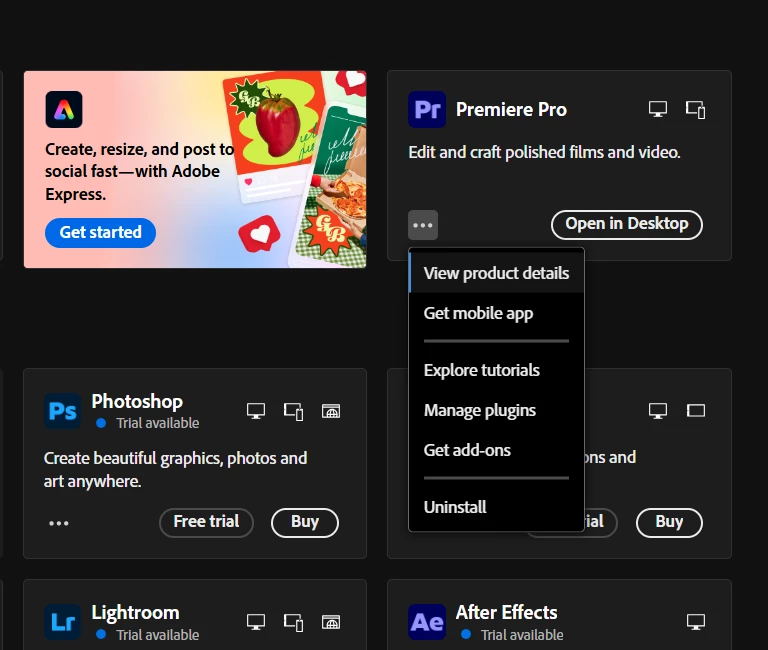
I have tried to revert to an older version of premier pro due to the latest update having constant issues of crashing every time I open or creating a project. However, when I go to the drop down menu after selecting the three dots, the option of "other verisons" is absent I have a screenshot of the issue below "other versions" should be under "get add ons". Has anyone had this issue before and is there a way to fix it? Screenshot 2025-12-04.png
4 replies

kglad
Community Expert
Community Expert
December 5, 2025

when the update is a major version update, you're given the option to remove the older versions preferences.

Peru Bob
Community Expert
Community Expert
December 5, 2025

To reset the Creative Cloud desktop app, make sure it's in the foreground, then press:
Win: Ctrl + Alt + R
Mac: Cmd + Opt + R

If that doesn't work, try uninstalling and reinstalling the CC App:
https://helpx.adobe.com/creative-cloud/help/uninstall-creative-cloud-desktop-app.html
https://helpx.adobe.com/download-install/kb/creative-cloud-desktop-app-download.html

Participating Frequently
December 5, 2025

Is there a way to reset the preferences as well? 

R Neil Haugen
Legend
December 5, 2025

There's a preference for allowing for older versions I think ... not at the computer at the moment. If I recall correctly, you set that, and then the option appears where you are.

Everyone's mileage always varies ...