


Participant
March 2, 2023

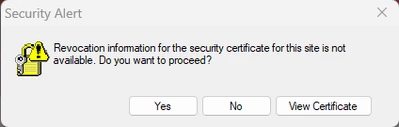
Security Alert "Revocation information for the security certificate for this site is not available"

  • March 2, 2023
  • 3 replies
  • 1278 views

I recently installed Adobe Creative Cloud on my windows computer and whenever I open tjhe laptop these errors are there. I assume these are happening because of CC because they only appeared after I installed the app (and CC is open in the background 24/7.) They aren't intrusive, they just accumulate until do the 3 finger swipe and I accidentally switch to them. Still, is there any way I can stop them generating?
3 replies

Participant
March 4, 2023

I would provide an image of the "View Certificate" dialogue but unfortunately right as I posted this the errors stopped. Annoying.


  • My system has correct date and time
  • I'm on Windows 11 Home version 22H2
  • I'm using AVG Antivirus Free
  • My school uses some sort of special proxy but I can't give any details as I'm not at school now. I'm not using any proxy at home


As these errors don't appear when i'm at home, so my theory is that it has something to do with the wifi at my school - when you connect to it you have to go to a special sign in portal to use the wifi. Until you sign in it blocks everything even though you are connected. I think it confuses the CC application and that's why it sends these errors. I think this might just be a me specific problem with my wifi.


I did uninstall CC desktop but it broke all my apps - I take this to mean I need to uninstall every Adobe app + CC desktop and then reinstall all the Adobe apps seperately (something I can't do right now - I'll update when I do though.)

Tarun Saini
Community Manager
Community Manager
March 3, 2023

Hi @Kieran26501641jkbd,


Welcome to the community! We're sorry to hear about your difficulties. In addition to the suggestion provided by @kglad, could you please check if your system has the correct time and date settings? Which version of the operating system you're on? Which anti-virus are you using? Also, are you connected with any proxy server?


You might try uninstalling and reinstalling the Creative Cloud desktop app as described here: Uninstall the Adobe Creative Cloud desktop application.


Let us know if that helps.


Regards,

Tarun

kglad
Community Expert
Community Expert
March 2, 2023

what's view certificate reveal?