


Harsh_Rathod
Participant
March 14, 2026

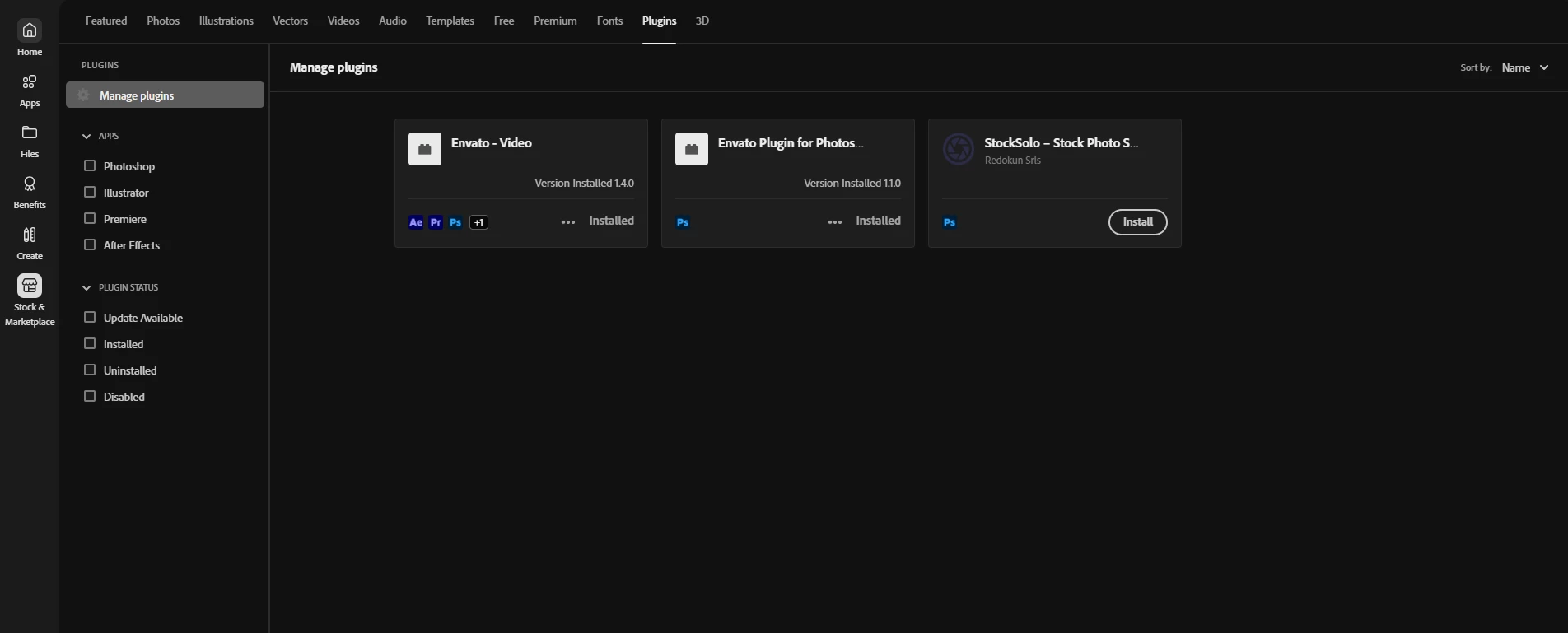
The Explore new plugins section is not appearing in the marketplace
  • March 14, 2026
  • 3 replies
  • 195 views
Creative Cloud Stock & Marketplace

It is only showing the Manage plugins section, but can’t find new plugins. There is no searchbar to find more. There are searchbar in all other tabs except Plugins.

3 replies

Participating Frequently
July 8, 2026

I’m experiencing the same issue. After a fresh installation, I go to Stock & Marketplace → Plugins, but the page is blank and no plugins are displayed.

kglad
Community Expert
Community Expert
July 8, 2026

@meviza 


have your reset your cc desktop app?

Participating Frequently
July 8, 2026

@kglad 

I tried resetting the CC Desktop app using Cmd + Option + R on macOS while the app was in the foreground, but it didn’t do anything. The Plugins page is still blank after the reset attempt. Is there another reset method I can try?

kglad
Community Expert
Community Expert
March 15, 2026

@Harsh_Rathod 


do you have windows or mac?

Harsh_Rathod
Participant
March 16, 2026

Windows

kglad
Community Expert
Community Expert
March 16, 2026

Navigate to Windows: C:\Program Files (x86)\Common Files\Adobe\OOBE\Configs\ServiceConfig.xml


copy and paste that xml file’s contents to this forum.

kglad
Community Expert
Community Expert
March 14, 2026

do you have a teams or enterprise subscription?

Harsh_Rathod
Participant
March 15, 2026

I have subscription of Creative Cloud Pro for Individual.