
danieljcox
Known Participant
November 21, 2014

Lightroom: Aperture import not working - stuck on "Checking Aperture Library"

  • November 21, 2014
  • 72 replies
  • 732 views
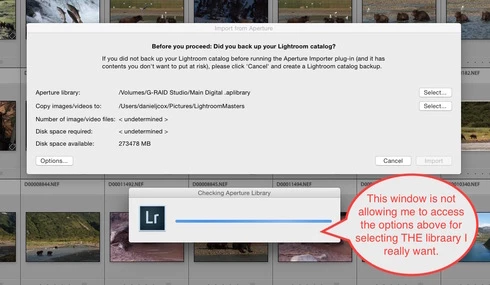
More challenges getting my Aperture Library in to Lightroom. When I select the Plugin Extras and choose Import Aperture Library, Lightroom automatically goes in to some sort of Checking Aperture Library mode. It's not giving me a chance to PICK the Aperture Library I want to Import. I wanted to start with a very small library for a test but it apparently is going right to my monster 1TB Aperture Library. I'm guessing that's the case since it it's checking the Aperture Library that's on the drive the big library is on. There does seem to be an option to tell the program where to go but the auto option kicks in and I can't get to the SELECT button. Screen shot attached. Good grief I wished this was easier. Any one know of a way to stop the auto Checking Aperture Library tool from starting?
This topic has been closed for replies.

72 replies

Rikk Flohr_Photography
Community Manager
October 18, 2019
Posted onto a solved thread that is over 1 year old. Likely unrelated - forking to new thread.

Please reference the new conversation here: Aperture Library Import Issues
Rikk Flohr: Adobe Photography Org
Inspiring
October 17, 2019
Rikk - I am having huge problems with this importer. I am running Lightroom Classic 8.4 on a MBP with1.7 GHz Intel Core i7, and 8GB memory, lots of disk space, running Mojave (10.14.6)
I had all sorts of problems with Aperture prepping the library for the move, presumably because Aperture / Mojave is no longer supported or compatible with Mojave, I cleaned out all the previews except those for adjusted images, made full size previews for those (1,800 adjusted images in a library of 25,000) - I was able to break up the library into a series of smaller libraries each of which imported fine into LR, so I learnt the ropes of the importer.
But the final section of the library (which for some reason Aperture won't let me break down (when I save a project as a new library it somehow includes all the images anyway) is  20,000+ images and I seem to have to import that in one go. And every time I run the importer it gets to somewhere in the 700-1,000 image point and crashes with memory issues. It shows that LR is using 50+gb of memory. I can run activity monitor and see the memory usage climbing up and when it hits about 47-50 it crashes and there's nothing I can do

As a consequence I am restarting LR and restarting the import and it picks up where it left off and seems to be working towards completion, but it will take me something like 30-40 imports to get this done. and each one takes about 10 mins to start because just starting the importer triggers the "checking aperture library" process which takes a good 5 mins, and this happens three times while choosing the various settings needed to run the importer (I am importing previews for adjusted images, I am leaving images as referenced in current location, and I am moving the previews into the same folder).

Is there ANY solution to using the importer properly
Rikk Flohr_Photography
Community Manager
August 13, 2019
Lightroom Classic 8.4 was released today and contained a fix for this issue. Please update to 8.4 and verify that you are no longer seeing the issue. Thank you!
Rikk Flohr: Adobe Photography Org
rbhix
Known Participant
June 8, 2018
I kept my original files in folders and only referenced them in Aperture.  I think Aperture could either reference or import the originals (like iphoto did).  Sounds like you imported them.  If original files are in Aperture libraries, I think you'll have to export them back to Finder folders before you can import them into LR.  Since LR only references the originals; it never modifies them (unlike Photoshop).  I don't remember the steps to export files from Aperture but you can probably find them on the internet (unless you still have the Aperture manual).
Inspiring
June 8, 2018
Thank you for responding!  I finally moved past "checking library" last night, and moved on to importing - but it's been 12 hours and I'm still at 0%.  If I understand what you're saying... you say I could just import the unedited original photo files (I think I know how to find them deep in the aperture system), and re-organize into albums/projects (it looks like Lightroom does sort them by Y/M/D...that helps for the majority of events.  (except I spent years scanning negatives of old family photos (5,000+) and Lightroom will think their date is the date I scanned them... but don't currently need to worry about those guys right now anyway.  My biggest problem is that Aperture is so fragile, and I've got quite a tangled mess of hard drives - I want to simplify and get everything onto one drive (and back it up).

I'll let this so-called aperture import run for the weekend, to see if it moves off of 0%.

I really wish I could multi-task in Lightroom during this import process!  There are plenty of things I'd like to work on!
rbhix
Known Participant
June 8, 2018
I got it to work about 3 1/2 years ago by creating several smaller libraries. Don't know why some of your photos would not transfer.  Personally, even though I'd spent a lot of time post-processing in Aperture; I probably exported and used those photos for whatever back in the day.  For your purposes, the original files could be considered "original negatives." You could import the original files (without post processing) into Lightroom, view them, and post process the most important ones.  I can do better post processing now with Lightroom than I did with Aperture, probably because I know more about the process (and LR has some improved tools).  If you go this route, you can still keep the Aperture library too.
Inspiring
June 8, 2018
Hello?  Anyone one still there?  Four years later, I'm still attempting to import an aperture library (almost 2 TB) into Lightroom.  I've attempted breaking into chunks and importing smaller libraries (by year).  I thought this was working, until I realized that Lightroom was only holding a small fraction of my photos.... i.e. Aperture 2014 Library had 2,500 photos, and Lightroom was only displaying 942 photos from 2014.  I don't know which ones are missing.  Now, I'm wondering if I attempt to import each smaller library again, or attempt my full aperture library, will it import duplicates?

Advice from anyone who has had to start over??? 
Inspiring
January 30, 2017
Doug, 

I'm in a very similar boat. I've been holding out on moving over for an obvious long time.  After watching a few hours worth of videos and reading I felt I was ready.  I've got the latest version of LR and had cleaned out my Aperture lib.  I've got about 1300 projects a referenced Aperture library.  The LR plugin takes 10+ minutes to open the default.  (thanks for the tip from 2 years ago about how to change that)  After about 2 1/2 days my photos finished the import into LR with the exact results I see above with blank thumbnails.  I could open the folders in the develop module and they would open and that was the only way the thumbnail would build.  LR never created the folders that matched to the project name.  It also did not create/copy RAW versions of my originals as I expected.  The worst thing (maybe user error) was I quit LR and when I restarted there was nothing there.  It couldn't find the catalog I created and no link to anything that had been done.  

I've had plenty of success and expected results with smaller libraries but from what I can tell there isn't any way to export a bunch of Aperture projects to separate libraries with out doing it one at a time.  

Ergh.

lee
Participating Frequently
October 3, 2016
It's been two years. I just tried the newest version of Lightroom and it still doesn't work. I literally allowed it to import my Aperture library for six days, and it got only 36% through. In the last five of those, it only did about 2-3% a day. See pictures from Sept 28 and today (Oct 3) for evidence.

Furthermore, I accidentally hit space bar while LR was in the foreground, and it instantly cancelled the import, wasting almost a week of work. No "Are you sure" prompt or anything.

Adobe, when are you going to fix your Lightroom import? You must be using some terrible algorithm. I have only 180,000-190,000 photos, but you can't handle it? I'm using two external Thunderbolt RAIDs, one for Aperture (Promise), one for Lightroom (Drobo), so certainly it's not the disk access.

Any comment, Adobe?


Participating Frequently
November 10, 2015
When I say 6 months, that is a little bit at a time form a load of sorted originals; the number of actual hours is a lot less.....

Essentially they are sorted by month into folders - any sorting after that is left to aperture or Lightroom. So now my photos are mainly sorted into monthly smart collections in Lightroom and then any subsequent handling is done as a nd when required.

I decided how to organise, classify and catalogue as well as new keywords.....in many ways it has been really beneficial and it has also allowed me to review virtually all my photos and iron out a load of mistakes in precious catalogues.

there are things i don't like about LR v. Aperture but in general I'd say that it has been a positive move and greatly improved my ability to access and use my photos