

danieljcox
Known Participant
November 21, 2014

Lightroom: Aperture import not working - stuck on "Checking Aperture Library"

  • November 21, 2014
  • 72 replies
  • 732 views
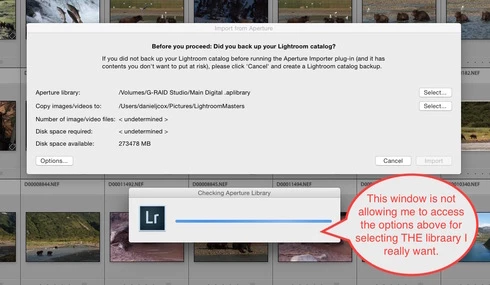
More challenges getting my Aperture Library in to Lightroom. When I select the Plugin Extras and choose Import Aperture Library, Lightroom automatically goes in to some sort of Checking Aperture Library mode. It's not giving me a chance to PICK the Aperture Library I want to Import. I wanted to start with a very small library for a test but it apparently is going right to my monster 1TB Aperture Library. I'm guessing that's the case since it it's checking the Aperture Library that's on the drive the big library is on. There does seem to be an option to tell the program where to go but the auto option kicks in and I can't get to the SELECT button. Screen shot attached. Good grief I wished this was easier. Any one know of a way to stop the auto Checking Aperture Library tool from starting?
This topic has been closed for replies.

72 replies

Inspiring
November 10, 2015
I'd check the hard drives for problems. RAM isn't easy to test, you just swap it for different RAM and see if the problem goes away. The rest of the system components are even more difficult to test without specific hardware to test it...
Inspiring
November 10, 2015
Thanks, Chris. I'll bear this in mind, though, not sure what I would do about it. Maybe chunking my Aperture library will either help me identify the source of the problem, or work around it. That is, perhaps it will be less likely I will bump into the problem if I don't stress my hardware.
Inspiring
November 10, 2015
Wow. It would be nice to be better organized, but I think I'll keep trying the the plug-in for now. Thanks for the response.
Inspiring
November 10, 2015
Thank you! My machine spontaneously restarted on the second attempt. It got a lot further, but ultimately did another nose dive. So, I think I will try breaking it into chunks.
Participating Frequently
November 8, 2015
I have transferred my whole 450 GB Aperture.....by hand - about 40,000 images - JPeg and RAW - the Aperture importer was a joke.

I used the opportunity to review, re-catalogue and re-keyword the whole thing....so far it has taken 6 months but I'm finding that my photos are more accessible and the developing facilities on LR are far more striking than on Aperture.

I operate both apps from the same original files on an outside hard drive where all my originals are kept.
Participating Frequently
November 8, 2015
I have transferred my whole 450 GB Aperture.....by hand - about 40,000 images - JPeg and RAW - the Aperture importer was a joke.

I used the opportunity to review, re-catalogue and re-keyword the whole thing....so far it has taken 6 months but I'm finding that my photos are more accessible and the developing facilities on LR are far more striking than on Aperture.

I operate both apps from the same original files on an outside hard drive where all my originals are kept.
johnrellis
Legend
November 8, 2015
In other threads in the LR user-to-user forum, there have been reports that the Aperture plugin uses inappropriately large amounts of memory when importing large Aperture libraries. E.g. see https://forums.adobe.com/thread/1843588. When an application allocates a huge amount of virtual memory, the entire system can sometimes freeze or (rarely) crash.

Others have reported that if they split their Aperture library into smaller chunks and import the chunks one at a time, the entire conversion generally completes before the next ice age. E.g. see an earlier comment by Victoria above: http://feedback.photoshop.com/photosh....

Others have just done the conversion manually. See this article for help with that: http://lightroomsolutions.com/article...
Inspiring
November 8, 2015
If the whole system restarted - then you're looking at bad hardware, a bug in the OS, or a bug in a low level driver (like a disk driver, maybe video). Applications cannot cause the entire system to shutdown, freeze, or restart.
Inspiring
November 8, 2015
It has been a year since this thread was started. I too am trying to import a 1TB Aperture library. I got as far as 20,000/70,000+ images in several hours, but them my computer unexpectedly quit and restarted at 12:39 am. I'm trying again now. It would be nice if anyone who posted on this thread previously could post again to report what they ultimately did. Thank, those who have already!

I've started over on my import, with a fresh Lightroom library, rather than trying to continue with the one that stopped short. I'm wondering how this might affect what is represented on CC. Will there be duplicates of the 20K that imported into the previous library. Not sure how this all works.
rbhix
Known Participant
August 29, 2015
It finally worked for he when I created several smaller Aperture libraries and imported each into Lightroom. See my comment about six months ago.