

danieljcox
Known Participant
November 21, 2014

Lightroom: Aperture import not working - stuck on "Checking Aperture Library"

  • November 21, 2014
  • 72 replies
  • 732 views
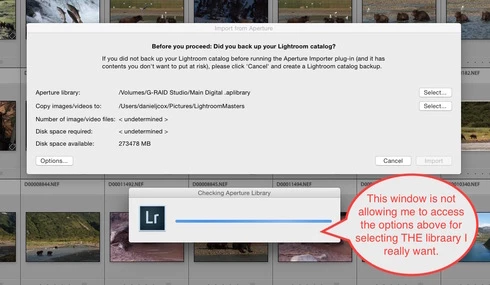
More challenges getting my Aperture Library in to Lightroom. When I select the Plugin Extras and choose Import Aperture Library, Lightroom automatically goes in to some sort of Checking Aperture Library mode. It's not giving me a chance to PICK the Aperture Library I want to Import. I wanted to start with a very small library for a test but it apparently is going right to my monster 1TB Aperture Library. I'm guessing that's the case since it it's checking the Aperture Library that's on the drive the big library is on. There does seem to be an option to tell the program where to go but the auto option kicks in and I can't get to the SELECT button. Screen shot attached. Good grief I wished this was easier. Any one know of a way to stop the auto Checking Aperture Library tool from starting?
This topic has been closed for replies.

72 replies

Inspiring
August 29, 2015
Trying right now but it doesn't appear to be any different that what most of you have experienced. I've got More than 2TB of Aperture libraries I was hoping to bring into LR. Based on this thread that doesn't look likely.
Inspiring
June 4, 2015
I'm also having issues with the Lightroom "Import from Aperture" plug in slowing down. I have about 100K pictures in my ~1TB Aperture library and it imported ~50% in the first 24 hours but only an additional 16% in the last 12 hours.

The confusing thing is that this is the second time I've done the same import and the last time it finished in just over 24 hours. I'm doing the import again because I confused Lightroom by accidently importing my iPhoto library using the same LightroomMaster folder but a different Lightroom catalog. I decided it was easiest to delete the Lightroom catalogs and LightroomMasters folder and start over rather than try to fix this.

I've been trying to figure out what I may have done differently the second time that is causing it to be so much slower, but I can't think of anything that's changed. It's the same computer, same library, same versions of everything, etc. I have address lookup and identify faces turned off in Lightroom (I've read that minimizing preview generation will speed up imports but I couldn't find that setting and in any case I'm using the same setting as the first time).
Inspiring
May 22, 2015
Trying to import now my 1TB 80k pictures library. 34 percent done in about 4 days and import slowing down. Only importing a picture every 20 seconds. Only 4 percent imported last 24h.......

Not looking good....
Participating Frequently
May 14, 2015
I sorry but I just can't get the import button to activate.......unless someone has a great idea, it looks like I won't be using L/R either.
Inspiring
May 13, 2015
Am a lightroom CC user (recent m 4/3 camera purchaser), and am really enjoying it. The sync to mobile makes you very productive in sorting and rating and touching up your work (though not keywords yet).

Am now trying to put my iphoto library into Lightroom and its taking a while. But think it will be worth it to be able to organise it all easily.
Inspiring
April 28, 2015
migrating now - working really well ...... as long as you are using referenced files.
Participating Frequently
April 25, 2015
Has anyone used the new Adobe Lightroom CC version and tried to do an import from a large Aperture library? What was your experience?

Thanks,

Doug
Inspiring
April 25, 2015
Same thing here...

My library is only 181GB - the plugin "thinks" for a few minutes, does not compute the number of files, nor it computes the disk space requirements, and the import button is never enabled.
I have 220GB free on my HD, so, more than enough space...

Is there support available? No, just the "community"...

At least I haven't signed up for CC yet - I have 25 days left to test. If I don't get to import my aperture library, guess what? Do you think I will purchase Lightroom or Photoshop? NO WAY!!!
sphinxx
Participant
March 26, 2015
I too am having the same problem. It did stop auto-checking the wrong place and this morning I was able to select the external drive which is where my aperture library sits. I had to leave it trying to action my drive selection. Hoping that when I get home, It will have completed selecting my external drive and will have re-calculated what it needs to move. Any tips for me?
Inspiring
March 23, 2015
I am having the same problem and I am just doing a small 23 Gb Aperture library to see what I can learn before I try my 1 TB library. I know I've selected a drive that is large enough. The checking Lightroom goes through no problem but the import button remains greyed out. I've tried lots of different options and nothing has helped (man do I wish Apple had kept Aperture going).