

danieljcox
Known Participant
November 21, 2014

Lightroom: Aperture import not working - stuck on "Checking Aperture Library"

  • November 21, 2014
  • 72 replies
  • 732 views
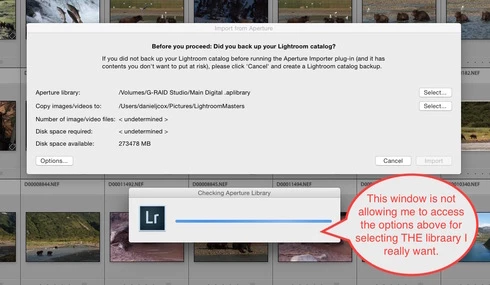
More challenges getting my Aperture Library in to Lightroom. When I select the Plugin Extras and choose Import Aperture Library, Lightroom automatically goes in to some sort of Checking Aperture Library mode. It's not giving me a chance to PICK the Aperture Library I want to Import. I wanted to start with a very small library for a test but it apparently is going right to my monster 1TB Aperture Library. I'm guessing that's the case since it it's checking the Aperture Library that's on the drive the big library is on. There does seem to be an option to tell the program where to go but the auto option kicks in and I can't get to the SELECT button. Screen shot attached. Good grief I wished this was easier. Any one know of a way to stop the auto Checking Aperture Library tool from starting?
This topic has been closed for replies.

72 replies

Inspiring
March 21, 2015
I found that the import button was greyed out when my computer's drive was selected as the destination for the photos. Once I selected my external hard drive (which has enough free space, unlike my computer drive), the "import" button is clickable.
Inspiring
March 21, 2015
Having the same problem with being stuck on the "checking" phase. It's annoying it doesn't actually show that it's making any progress – it just looks like it got stuck. Mine went away after about 10-15 minutes for a 658GB library.
Inspiring
February 26, 2015
It's a real shame that there actually DOESN'T seem to be a reasonable solution because of these two issues:

1. My library is 1.5 TB or more, meaning I would have to split the library into what 10 or 20 chunks? I'm more afraid of what I would lose in that process - what I would miss by accident. And that may be a low number, I may need to split it into 50 chucks to be small enough for the import.

2. I've heard this elsewhere in this forum, but am not sure myself: Lightroom reportedly won't be able to handle a library that large with any kind of working efficiency on a daily basis.

So it seems I have to entirely rethink how my photos are organized (and spend the time to reorganize 1.5TB of photos) before I even consider using Lightroom.

That's a big project.
rbhix
Known Participant
February 25, 2015
Looks like the solution will be to split my Aperture library into smaller chunks. My library is about 60 gb referencing about 500 gb of photos on a 1tb external hard drive. With Apple killing off Aperture, I wanted to try Lightroom. The plugin in Lightroom to import an Aperture library didn't work. After an hour and a half on the phone to New Dehli (with a very nice, helpful agent) we had tried changing various permissions, copying the Aperture3 library to the external drive, and other things. Finally, the agent suggested I create a new Aperture library with only a few photos. The new library imported into Lightroom almost instantly. The conclusion was that my Aperture library was too large, and Lightroom was choking on it. I'll try splitting off several portions of the Aperture library to import singly.
rbhix
Known Participant
February 25, 2015
Having the same problem. My Aperture library is about 60GB. I just subscribed to LR & PS, created a couple of test collections to play with, deleted them and removed their associated folders. Started the Import plug-in. The checking Aperture library blue bar just zips to the end, then the import box says undetermined for number of files and file size. I can click on the Options box, select keep files referenced, and continue. The checking blue bar zips past, goes away, but both number and size are still undetermined, and the import button never lights up.
Inspiring
January 12, 2015
Here's the error entries in the "LibraryImporter.log" on my iMac. I get this same error message repeatedly every time I try to use the Adobe Aperture Import tool and the tool fails to activate the "Import" button:

2015-01-12 00:11:17 +0000, INFO Failed to get info on image versions with error Traceback (most recent call last):
File "/Applications/Adobe Photoshop Lightroom 5.app/Contents/PlugIns/aperture_iphoto_importer.lrplugin/Contents/Resources/python/imageVersions.py", line 350, in
result = getVersionInfoFromDB( unicode( sys.argv[ 1 ], 'utf-8' ) )
File "/Applications/Adobe Photoshop Lightroom 5.app/Contents/PlugIns/aperture_iphoto_importer.lrplugin/Contents/Resources/python/imageVersions.py", line 274, in getVersionInfoFromDB
masterImagePath = os.path.join( currentMasterVolumePath, row[ 2 ] )
File "/System/Library/Frameworks/Python.framework/Versions/2.7/lib/python2.7/posixpath.py", line 75, in join
if b.startswith('/'):
AttributeError: 'NoneType' object has no attribute 'startswith'
Inspiring
January 12, 2015


Aperture import tool in Adobe Lightroom never displays an active "Import" button. It remains greyed-out. The import tool starts and apparently is checking my Aperture library for some things. It appears to finish. However, the import tool never figures out the number of image files ("undetermined") in m Aperture library or the file size ("undetermined" ) of my Aperture library.

The vital statistics for my Aperture file are as follows:
Version: Aperture Library 3.6
Filename: Aperture Library.aplibrary
Filesize: 136.08 GB
# Projects: 403
# Photos: 27,392
Permissions:
myself Read + Write
staff Read
everyone Read

This is all happening on my Apple iMac (iMac (24-inch, Early 2009) running Mac OS X (Yosemite version 10.10.1).

This is very frustrating. Others in your community forum(s) are reporting the same problem there.

Please investigate and resolve this ASAP.

Regards,

Tony
Email: anthony.w.hackenberg@gmail.com
Adobe Customer
Adobe Creative Cloud purchaser
Inspiring
January 11, 2015
This thread is INCREDIBLE helpful to me - thank you everyone! I have a 1.5 TB aperture library, maybe 125,000 images or so. I'm hung on the "checking aperture library" window, and see that my fears may indeed be correct: that my waiting is just beginning.

Not sure where to go from here, but I really appreciate hearing all of your analysis.
-Dan
johnrellis
Legend
December 30, 2014
It will take a while for LR to build previews of so many pics. If they're raws, it could take a day or two. (JPEGs should go faster.) In normal use, importing a couple hundred raws is no big deal and LR would handle it just fine. But 175K...
Participating Frequently
December 29, 2014
Well, I finally got the import to run. It took quite a few days, and imported over 175,000 photos. (Not sure why so many, but whatever.)

The sad thing is that Lightroom is almost unusable. You have to start Lightroom and wait approximately an hour before it will stabilize and be usable. It seems to be loading a lot of data slowly in the background.

I will try it a few more times over the coming weeks and look into how it is.