

danieljcox
Known Participant
November 21, 2014

Lightroom: Aperture import not working - stuck on "Checking Aperture Library"

  • November 21, 2014
  • 72 replies
  • 732 views
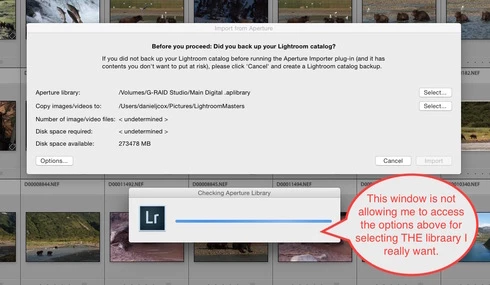
More challenges getting my Aperture Library in to Lightroom. When I select the Plugin Extras and choose Import Aperture Library, Lightroom automatically goes in to some sort of Checking Aperture Library mode. It's not giving me a chance to PICK the Aperture Library I want to Import. I wanted to start with a very small library for a test but it apparently is going right to my monster 1TB Aperture Library. I'm guessing that's the case since it it's checking the Aperture Library that's on the drive the big library is on. There does seem to be an option to tell the program where to go but the auto option kicks in and I can't get to the SELECT button. Screen shot attached. Good grief I wished this was easier. Any one know of a way to stop the auto Checking Aperture Library tool from starting?
This topic has been closed for replies.

72 replies

Victoria Bampton LR Queen
Community Expert
Community Expert
December 22, 2014
I'm no Aperture expert, but "export projects as new library" seems to be the key term. Once they're in Lightroom, you can return to your unified view with no problem.
Victoria - The Lightroom Queen
Participating Frequently
December 22, 2014
Hi Victoria,

That's an interesting suggestion. I wonder how I would go about doing that. I have never done that and indeed hoped never to have to do that, as I always wanted a unified view into everything. I guess I will have to research things. Maybe I can do a "split" that only splits the meta data and leaves the pictures in their original locations.

Thanks,

Doug
Victoria Bampton LR Queen
Community Expert
Community Expert
December 22, 2014
Lightroom (and likely C1 too) can handle catalogs of that size with no problem, but the importer scripts are probably more limited. How about using Aperture to split your library into a few smaller libraries and then importing those? If it's falling over due to library size, that should help.
Victoria - The Lightroom Queen
Participating Frequently
December 22, 2014
I have decided to attempt a migration to Capture One Pro 8.1. I tried migrating my 171,000 photo Aperture Library twice now, on a MacBook Air and a (trashcan) Mac Pro. Both times failed after 120,000 pictures due to memory exhaustion. Capture One jumps from about 5GB used to 60GB RAM used, so they clearly have a memory leak.

I guess the bottom line is this: Nobody actually can handle photo libraries the way Apple's Aperture did, with hundreds of thousands of pictures operating extremely quickly.
Participating Frequently
December 22, 2014
Jeffrey, did you hear anything about this yet?
Participating Frequently
December 8, 2014
Thanks for that reference. I had seen it when it first came out (before the Lightroom import plug-in) and decided that Lightroom wasn't worth using if I had to do it that way. Unfortunately, that is unchanged.

I guess I will upgrade to 10.9 or 10.10 (I hate upgrading, you never know how long it will take you to get everything working again) and try Capture One Pro, see how that goes.
johnrellis
Legend
December 8, 2014
Indeed, it's disappointing that the plugin isn't working very well. However, many LR users have catalogs larger than 160K images. So if you don't find a better alternative, you could consider manually migrating your Aperture library to LR:

http://lightroomsolutions.com/article...
danieljcox
Known Participant
December 8, 2014
Agreed Douglas. Funny how Jeffery Tranberry jumped in at the start but has gone completely silent.
Participating Frequently
December 8, 2014
It's disappointing to hear nothing from Adobe. Well, I guess I will move on from considering Adobe Lightroom as an alternative to Aperture. If it can't handle my 2TB, 160,000+ images then I will find something else.
Participating Frequently
December 6, 2014
Any suggestions?