

danieljcox
Known Participant
November 21, 2014

Lightroom: Aperture import not working - stuck on "Checking Aperture Library"

  • November 21, 2014
  • 72 replies
  • 732 views
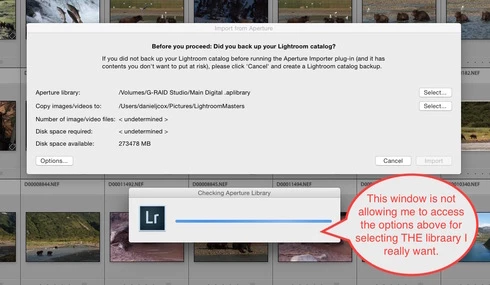
More challenges getting my Aperture Library in to Lightroom. When I select the Plugin Extras and choose Import Aperture Library, Lightroom automatically goes in to some sort of Checking Aperture Library mode. It's not giving me a chance to PICK the Aperture Library I want to Import. I wanted to start with a very small library for a test but it apparently is going right to my monster 1TB Aperture Library. I'm guessing that's the case since it it's checking the Aperture Library that's on the drive the big library is on. There does seem to be an option to tell the program where to go but the auto option kicks in and I can't get to the SELECT button. Screen shot attached. Good grief I wished this was easier. Any one know of a way to stop the auto Checking Aperture Library tool from starting?
This topic has been closed for replies.

72 replies

Participating Frequently
December 2, 2014
Any news here? My Lightroom trial will expire before I even can import things and test it. 🙂
Legend
November 26, 2014
I'm checking with the Lightroom guys to see if they have any suggestions.
Participating Frequently
November 26, 2014
Any other thoughts about this issue?
danieljcox
Known Participant
November 25, 2014
Doesn't it just stink when there is nobody else to blame Operator Errors on? Sorry for your pain. Hang in there.
Participating Frequently
November 25, 2014
Oh. And I'm the operator. 🙂
Participating Frequently
November 25, 2014
18,593 pictures imported.
Participating Frequently
November 25, 2014
And of course... the operator screwed something up and unpowered the external drive and all that work is now lost.
danieljcox
Known Participant
November 25, 2014
Great real world situation that proves we're still in dire need of something more powerful. I appreciate you keeping track of all this and how it's going.
Participating Frequently
November 25, 2014
Just another bullet point on performance.

4,292 seconds to import 2,374 photos.

1.8 seconds per photo, or 0.55 photos per second.

Looks like Lightroom's Aperture import is not useful and is much too slow, and getting slower.
Participating Frequently
November 25, 2014
I just did a brief test. Over the course of 123 seconds it managed to import 78 pictures, a rate of about 2/3rds of a picture per second (or two pictures every three seconds). I'm up to 15,139 pictures imported out of, as I said, over 160,000 (I think it's 168,000, but I have 176,663 in my Aperture Masters directory, so some are probably in the Trash or duplicates or something).

This indicates an import will take about 2 2/3rds days.

I'm thinking maybe I should just use my test upgrade to 10.9.x and try Capture One. Which would be a shame, as I have thousands of my photos in DNG converted originals which are right up Adobe's alley.