

Todd Shaner
Legend
March 16, 2021

P: 10.2 Grain Effects Render Incorrectly In Develop Module

  • March 16, 2021
  • 67 replies
  • 10695 views

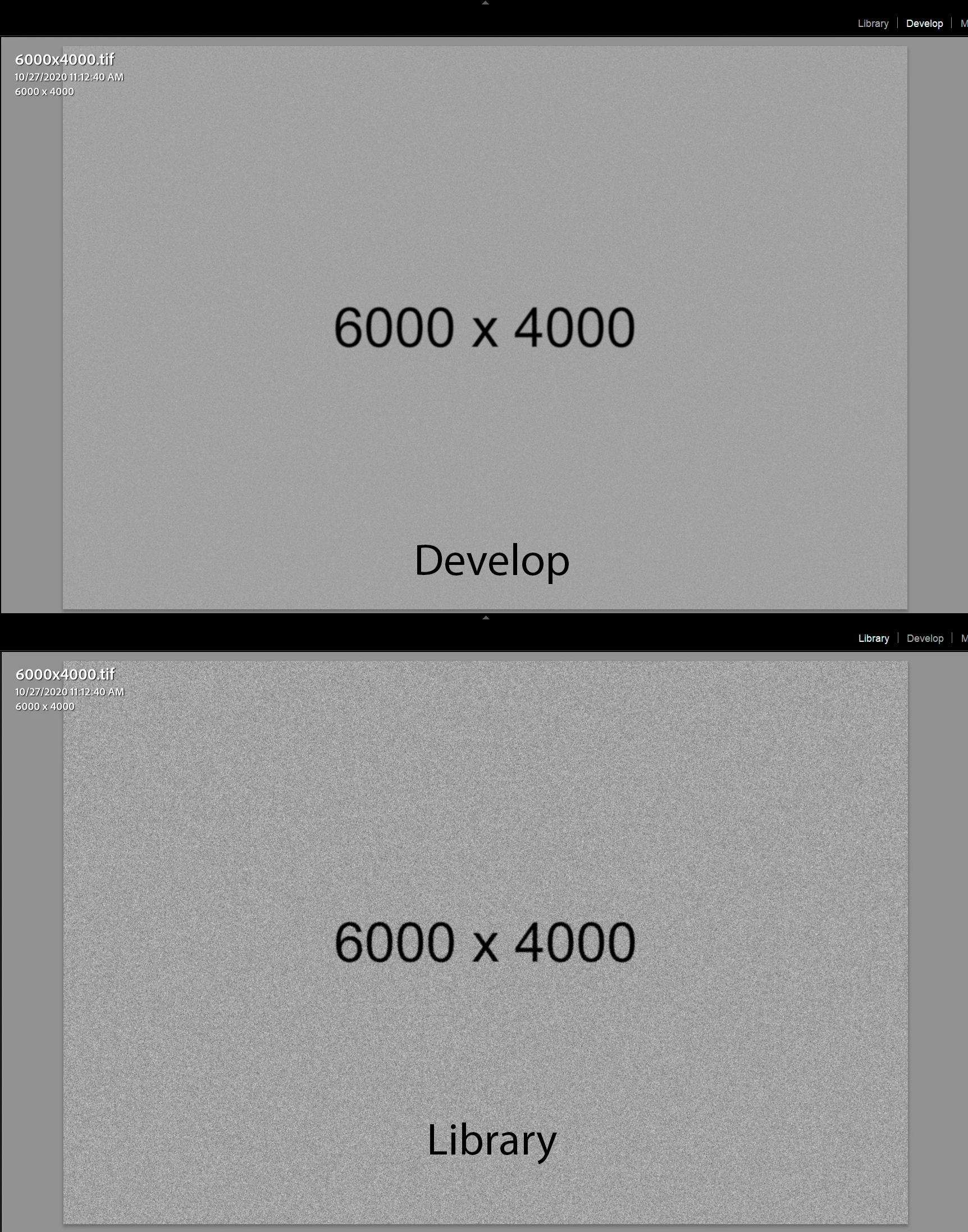
The Develop module no longer properly renders the Grain Effect settings in LrC 10.2, which appear much more pronounced and correct in the Library module and exported files. I tested with GPU enabled and disabled with LrC restarted and the issue persists on my Windows 10 system.


The below screenshots are with LrC 10.2 using Grain settings Amount 100, Size 50, and Roughness 100.
 

This topic has been closed for replies.

67 replies

Participant
January 29, 2022

Very painful that this is still a bug in V.11.


Chiming in to request a fix.

Todd Shaner
Legend
January 7, 2022

What version of LR Mobile are you using, how are you transfering it, what settings are you using, and how are you viewing the transferred file.

Participant
January 7, 2022

Hello, Lightroom shows less Grain when I edit a photo on mobile, but shows a lot of Grain when I transfer it.

Participant
January 7, 2022

Hello, Lightroom shows less Grain when I edit a photo on mobile, but shows a lot of Grain when I transfer it.

Participant
December 22, 2021

Switch to Capture One. I did it and it works great. Adobe doesn't care about their customers. Something really stupid to fix and it's taking them years, and they are not even listening to their clients. 

I took advantage of the Capture One 50% off sale for their perpetual license so I can owe the software not needing to pay every month. It's mine forever. And they even gave me the last version update for free. And of course the grain effect works flawlessly and it can also emulate a much much better noise quality. You can even make it look like film photography indistinguishable, not like Lightroom which is quite bad honestly, and it doesn't even show in the Develop module, so...


I still have Adobe's license for more than a year, but if they keep it that way I won't renew it again when it expires.

Participant
December 22, 2021

I'm already very upset! I'm paying for a lightroom, but it still doesn't work properly! This problem persists over the years. When will it be repaired?

Participating Frequently
December 14, 2021

It's Lightroom 11.1 now and still hasn't been fixed... We're almost at full release cycle here since it started in 10.2.

Participant
December 5, 2021

Hi,

In order to make my images "less digital" sometimes I like to add grain to them depending on what I'm trying to comunicate. The problem is that whenever I add some grain to my pictures I have to zoom in to check how much grain it's adding. If I watch the whole picture it doesn't show any grain, like it's not applying it, but when I export the image it shows much more grain that I'd like, so I have to go back to Lightroom, reduce it, export and check, which is not efficient nor desirable. It's very annoying to be honest.


I'm using the latest Lightroom Classic version (11.0.1) but it has always happened.


Thank you.

Inspiring
November 20, 2021

So it still isn't fixed since months? I thought it's problem only on mine PC.

Participant
November 10, 2021

This is so annoying, sirously considering moving to capture one, i thought this was a 11 problem but i see this thread's going way back.

Known Participant
October 31, 2021

Yes, just wanted to write the same! This huge bug isn't fixed with the new v11!!! 
And also cannot install v9.4 any more, Adobe just deleted this version from the Other versions list! This was the latest correct version! This is nuts guys and we pay for Adobe!! OMG.