

Todd Shaner
Legend
March 16, 2021

P: 10.2 Grain Effects Render Incorrectly In Develop Module

  • March 16, 2021
  • 67 replies
  • 10695 views

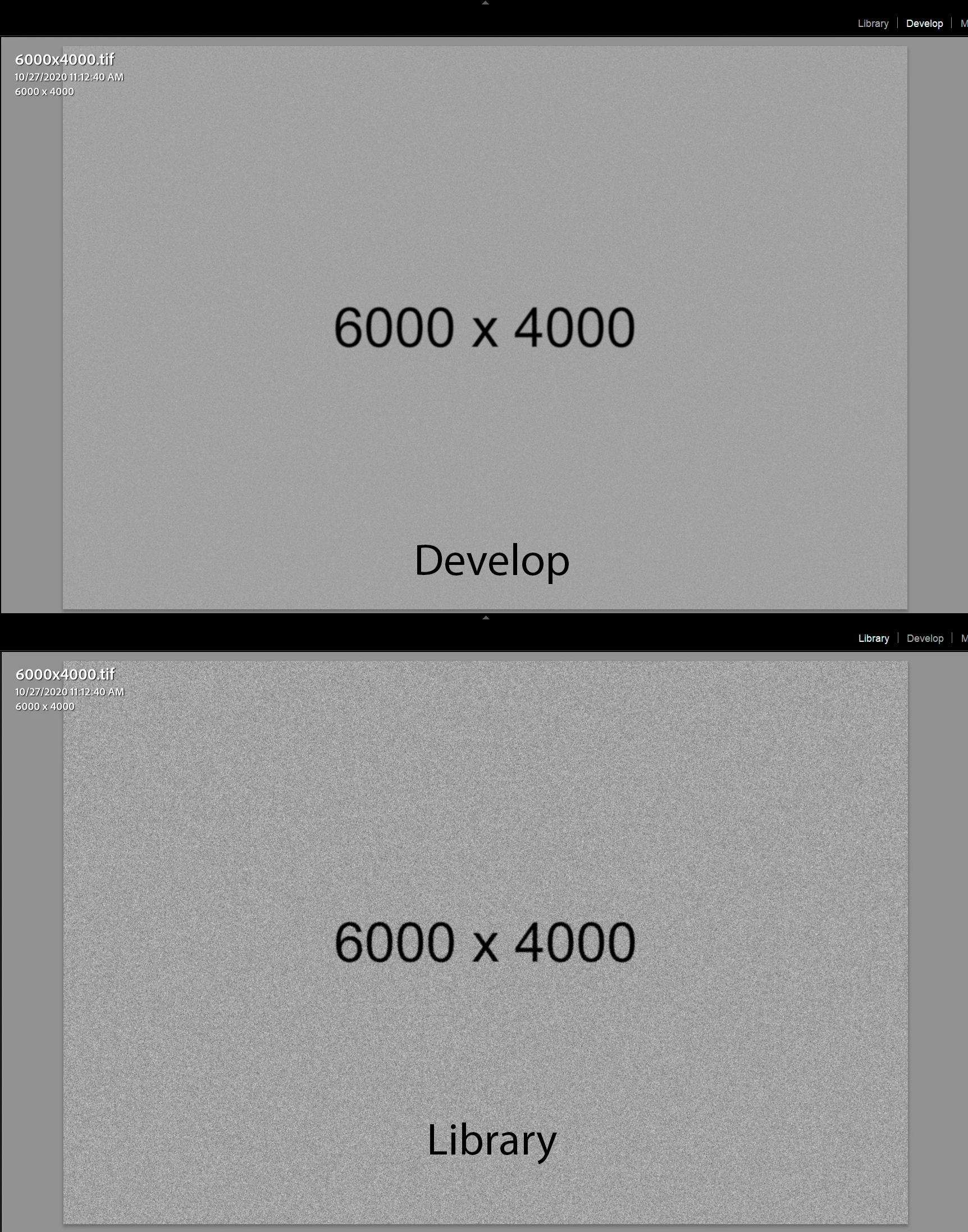
The Develop module no longer properly renders the Grain Effect settings in LrC 10.2, which appear much more pronounced and correct in the Library module and exported files. I tested with GPU enabled and disabled with LrC restarted and the issue persists on my Windows 10 system.


The below screenshots are with LrC 10.2 using Grain settings Amount 100, Size 50, and Roughness 100.
 

This topic has been closed for replies.

67 replies

Participating Frequently
October 26, 2021

...aaand as expected, it's not fixed in 11.0, [s]what a shocker!!![/s]

Participant
September 20, 2021

When I increase the grain slider nothing happenes, I don't see the grain effect but when I export the image the exported image does show the grain effect.


I'm using lightroom 4.4 on a macbook pro running mac os 11.0.1

Participant
October 28, 2021

Hi there,


I have exactly the same problem where I can't see the grain properly until I export, at the moment the only fix I''ve found for it seems to be zooming in on the image as when viewing the full picture, the grain is almost invisible. See if this works for you at least until somebody can find a more permanent fix?


All the best. 

Participating Frequently
August 18, 2021

teams are probably working on October 11.0 release and did not assign enough resources for a proper bugfix update. Same thing happened last year when heal/clone tool was broken for couple of 9.x releases and was not fixed until 10.0, which then added more bugs. And the cycle continues... perpetual beta software

Participating Frequently
August 17, 2021

@todd_shaner_6660895 
sorry for the confusion, Todd, that was kind of sarcasm post with indication at the end " not... [slow clapping here]". Adobe never ceases to amaze me.....

Todd Shaner
Legend
August 17, 2021

Eugene this issue is not fixed in LrC 10.4 on Windows 10. Run the test as outlined in my original post above. What OS are you using.

https://helpx.adobe.com/lightroom-classic/kb/fixed-issues.html#aug-2021

Participating Frequently
August 17, 2021

Super, thanks for fixing this in 10.4... NOT... [slow clapping here]

Inspiring
July 25, 2021

This has been a problem for YEARS! I'm surprised so many of you think this is recent. Like everything with Adobe, I've resigned myself to leaving it alone and adding the grain in a different program. 

I've had this issue (amongst other problems) across multiple computers, FOR YEARS! Adobe does not care and will not fix it.

This is actually one of the milder creative cloud bugs.

Participating Frequently
June 10, 2021

They just don't care about issue severity. This happened more than once, critical bugs that obviously could be fixed relatively fast were dragged along for a couple of updates while proudly fixing some small unimportant issues that weren't blocking anyone's workflow. And they switch to 'ostrich mode' in the relevant support topics when they have nothing to say for themselves. Great company.....

Inspiring
June 10, 2021

Big Sur 11.4 LRC 10.3 ça fonctionne correctement chez moi !

Contrôlez vos paramètres Paramètres du catalogue / gestion des fichiers et surtout faites un reset des paramètres de démarrage de LrC

Big Sur 11.4 LRC 10.3 works fine for me!

Control your parameters Catalog parameters / file management and above all reset LrC startup parameters

Yves Crausaz, Suisse, retraité actif dans le monde de la photo et des arts graphiques.
Known Participant
June 10, 2021

It is the LrC v10.3 update, and STILL having this grain issue on my Mac! I really don't understand, why not fix this! AMD vga in my Macs. Catalina on macbook, Mojave on desktop. Raw files, origanal photo, not tested with smart previews. (did not tested with jpegs, but don't care jpegs)

Same issue: moving the grain slider to MAX, and still a moderate grain effect is visible only. Library, Develop, same. If I zoom in 100%, it shows the correct amount (heavy grain), but at 50% not. So Fit view, 50% view not correct grain rendering. 
This problem exist since November I guess, still no fix. And we pay for this... 
I have to use v9.4 to work with th sw.