

Todd Shaner
Legend
March 16, 2021

P: 10.2 Grain Effects Render Incorrectly In Develop Module

  • March 16, 2021
  • 67 replies
  • 10695 views

The Develop module no longer properly renders the Grain Effect settings in LrC 10.2, which appear much more pronounced and correct in the Library module and exported files. I tested with GPU enabled and disabled with LrC restarted and the issue persists on my Windows 10 system.


The below screenshots are with LrC 10.2 using Grain settings Amount 100, Size 50, and Roughness 100.
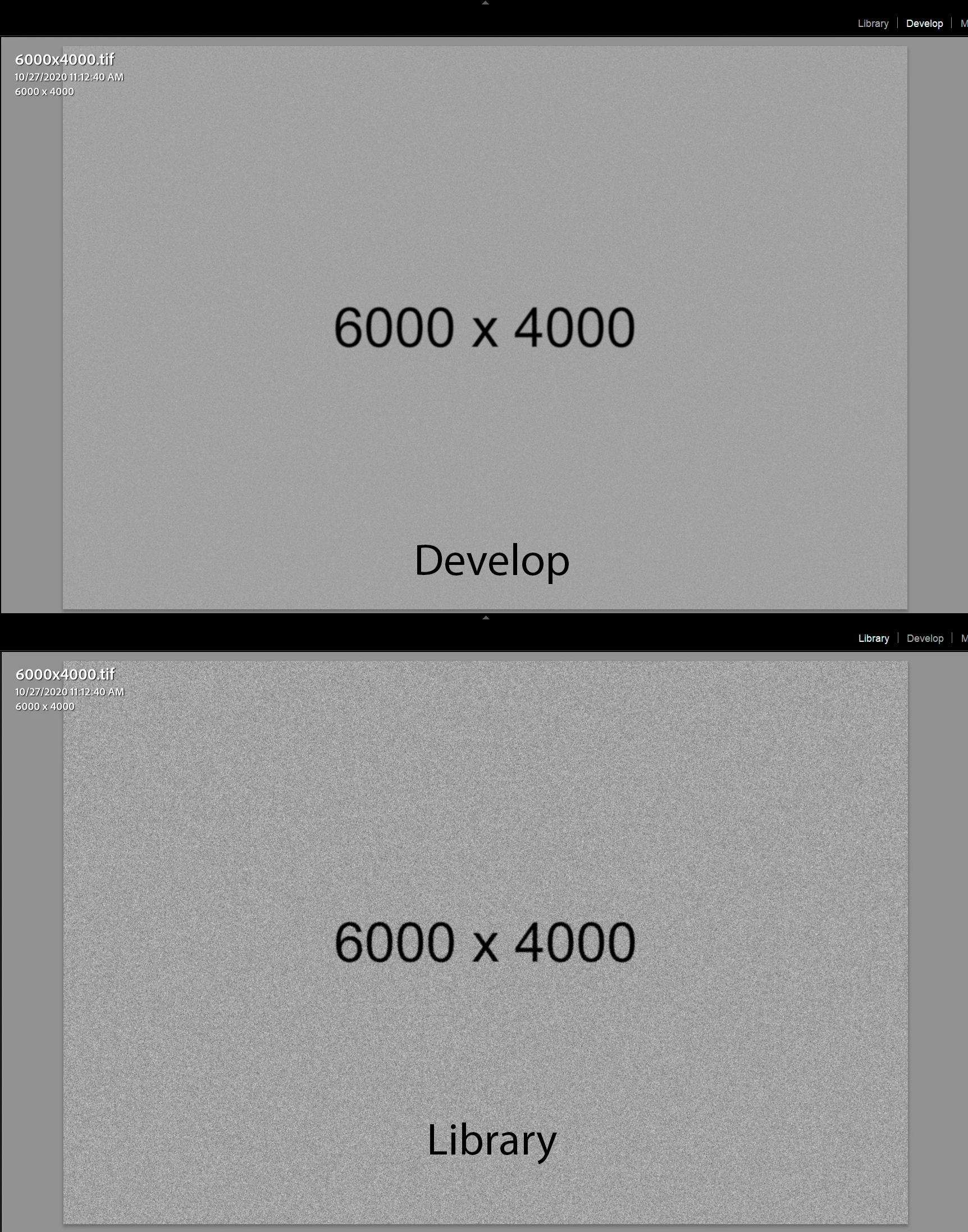
 

This topic has been closed for replies.

67 replies

Participant
March 17, 2021

I think I'm having an issue with the way noise/grain is being rendered in the editing view on my images (.jpg)

When switching between photos, the correct grain is being rendered for a split second before the full photo loads with apparent incorrect grain values. The fully loaded image seems to be rendering a de-noised version, showing little noise even when setting the grain slider to 100. Seems to have started happening after the new update.

(M1 MacBook)

Todd Shaner
Legend
March 17, 2021

My example uses the full-size 6000x4000px original photo with Use Smart Previews Preferences setting turned off.

Participating Frequently
March 17, 2021

Smart Previews turned off

Victoria Bampton LR Queen
Community Expert
Community Expert
March 17, 2021

In Preferences > Performance, is Prefer smart previews for editing turned on or off?

Victoria - The Lightroom Queen
Participating Frequently
March 17, 2021

Can also reproduce the same, grain is not rendered correctly in develop when in fit, zoomed in works fine. Win 10 20H2 x64, LrC 10.2, 4K display 150% scaling, tested with GPU ON and OFF, Smart Previews disabled. Please consider issuing a 10.2.1 hotfix for this. Otherwise with how the things have been going, next 10.x update might fix more bugs and break something else from the main/critical functionality. This way we'll at least get a proper relatively stable fallback version with the most recent new features (10.2 looks like a good candidate for this so far, except this issue). It's getting frustrating being stuck in this loop (2 bugs down, 3 new ones pop up, rollback as workaround/etc). As a suggestion to the test/dev team: consider adding automated testing for develop mode (and maybe library Loupe mode) to validate on-screen render and export results against reference images to cover all develop tools. This could benefit both devs and users a lot. Or at least consider adding a policy of thoroughly checking functionality of the develop tool across modules after something has been tweaked and fixed in it.

Todd Shaner
Legend
March 16, 2021

Yes, at 60% and higher zoom view the Library and Develop previews look near identical. With LrC 10.0 and earlier versions even the Develop Fit zoom view looked identical so something has changed with LrC 10.2.

The Library module preview looks identical to the export image file at matching Zoom/Resize settings. For example at 50 % zoom view the Library preview looks identical to a 50% 'Resize to Fit' export file. We need this capability in the Develop module since that is where we adjust the Grain Effect settings (i.e. visual feedback).

Participating Frequently
March 16, 2021

Have you tried comparing the Library and Develop view at 100%.

I can reproduce what you have described while at Fit view which for Nikon D850 NEFs is a zoom level of 36.7%. When I increase the zoom level (using the slider in the Library toolbar) to around 60% and greater any difference between Library and Develop is not visible.