

Todd Shaner
Legend
March 16, 2021

P: 10.2 Grain Effects Render Incorrectly In Develop Module

  • March 16, 2021
  • 67 replies
  • 10695 views

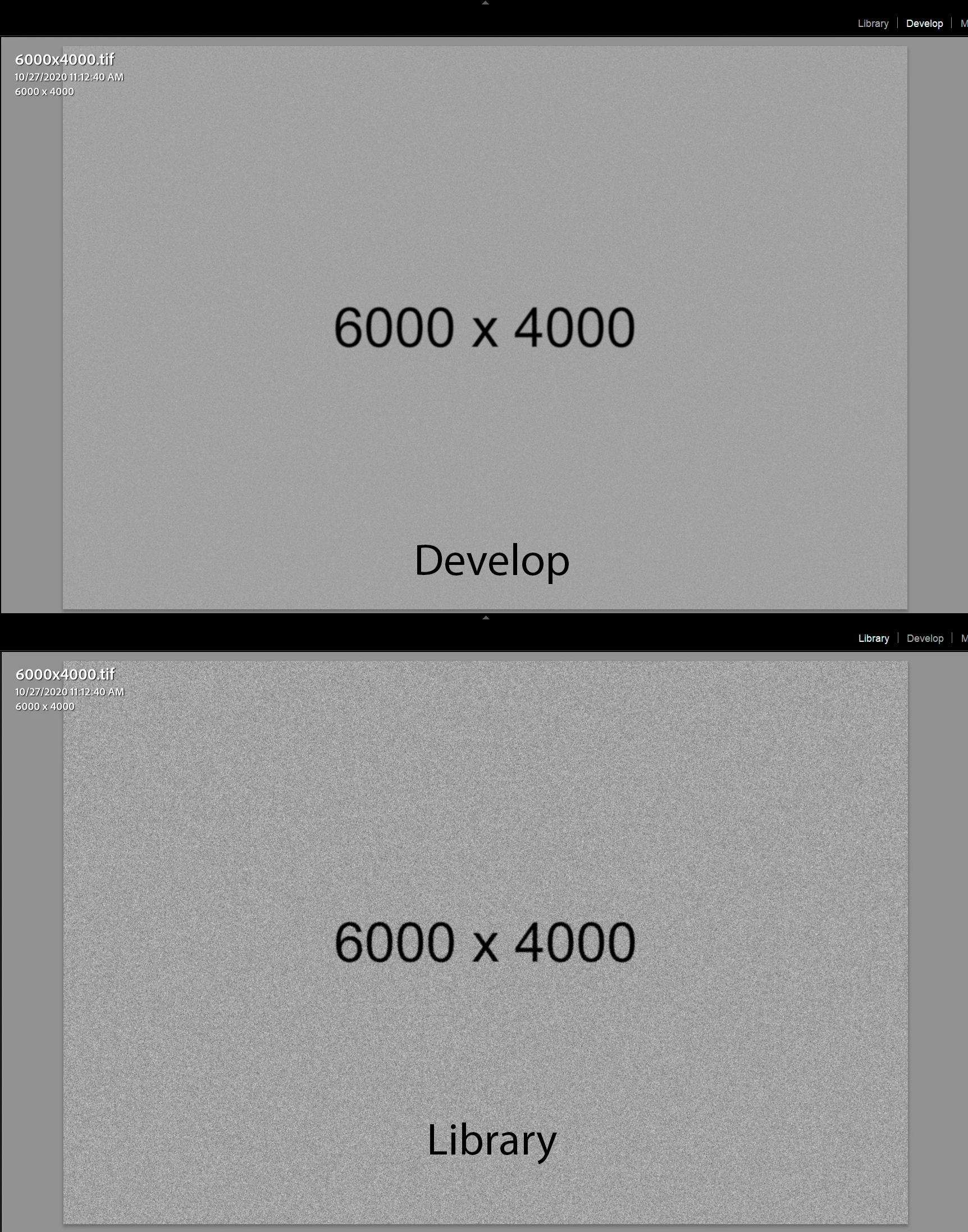
The Develop module no longer properly renders the Grain Effect settings in LrC 10.2, which appear much more pronounced and correct in the Library module and exported files. I tested with GPU enabled and disabled with LrC restarted and the issue persists on my Windows 10 system.


The below screenshots are with LrC 10.2 using Grain settings Amount 100, Size 50, and Roughness 100.
 

This topic has been closed for replies.

67 replies

Participant
March 19, 2021

Just to confirm, I am using Lightroom CC and the main thread is Lightroom Classic. So it appears to be an issue on both versions with the new update.

Also, I am mostly using .jpg format and the main thread is raw, so it suggest it's an issue not restricted to one particular image format.

Rikk Flohr_Photography
Community Manager
Community Manager
March 19, 2021

This thread is being merged into an existing authoritative thread for better tracking and response. Please review the official answer (if any) in the second post on the thread for more information. 

Rikk Flohr: Adobe Photography Org
Participant
March 19, 2021

@Rikk 

This only happens on my Mac after the new update.

My windows 10 version has not been updated yet and doesn't have the same issue. I've set the grain to 100 which should show significant grain, but it appears to de-noise aggressively. 

I've compared the grain rendering between the Mac and PC and it shows a clear difference. I've attached the logs below and a link to a screen recording on the Mac. (drive link at the bottom)

Lightroom version: 4.2 MAS arm64 [ 20210301-0713-6cdd6a3 ] (Mar  2 2021)

NGL Version: 1.24.0.5

WF Version: 3.2 88d676d

Operating system: macOS

OS Version: macOS 11.2.3 (20D91)

Application architecture: arm64

Computer model: MacBookAir10,1 / Apple M1

Logical processor count: 8

Processor speed: 0.0 GHz

Built-in memory: 8,192.0 MB

Real memory available to Lightroom: 8,192.0 MB

Real memory used by Lightroom: 228.8 MB (2.7%)

Virtual memory used by Lightroom: 403,302.5 MB

Memory cache size: 917.0 MB

Internal Camera Raw version: 13.2 [ 738 ]

Maximum thread count used by Camera Raw: 5

Camera Raw SIMD optimization: SSE2

Camera Raw virtual memory: 523MB / 4095MB (12%)

Camera Raw real memory: 0MB / 8192MB (0%)

Displays: 1) 2880x1800

Graphics Processor Info: Metal: Apple M1 - 5.5 GB

Graphics Processor Detail: loaded: Yes, supported: Yes, compute: Yes, init: I4_GPU3, hard: success, soft: success, wl: Yes, bl: No

OS Media Capability: true

Application Folder: /Applications

Settings Folder: /Users/lawrence/Library/Containers/com.adobe.mas.lightroomCC/Data/Library/Application Support/Adobe/Lightroom CC

Library Folder: /Users/lawrence/Pictures/Lightroom Library.lrlibrary

https://drive.google.com/drive/folders/1zanzmyx0sKlQRR9I1FEOldQCxY26pArB?usp=sharing

Participating Frequently
March 19, 2021

Thank you for the suggestion. I know it's not the end of the world and I do have grain presets saved with varying degrees of strength etc. However, it must only be a temporary work around as it is an integral park of my workflow and you can't really judge the aesthetics of grain when you're zoomed in to 100% I find.

I'll stick with LrC 9.4 until my camera arrives sometime in the next week or so and then hopefully I can upgrade to 10.2.1 with a fix in place.

Todd Shaner
Legend
March 18, 2021

"I am also on a 7 day free trial, so timing is of the essence really as I don't want to lock myself into a new annual subscription for something that doesn't work as well as my previous version."

I'm confident Adobe will fix this issue since it should be easy to identify what specific change in LrC 10.2 caused it. For now you can use the Quick Develop Grain Presets and/or create your own custom Develop presets with Grain settings  that you normally use. Granted it's not as "flexible" as using the controls directly, but it should help until Adobe fixes the issue. Just a suggestion.

Participating Frequently
March 18, 2021

Same here with me. I'm currently in the process of upgrading from Lightroom 6.14 to Lightroom Classic 10.2 on a 7 Day free trial. Once it was installed and everything updated, everything seemed fine. All my presets worked after changing them to .xmp, the catalog was successfully updated and it was a smooth transition. However, I immediately spotted that the Develop module FIT mode was way off compared to the Library. It's annoying because when you are trying to set the grain amount, you want to be able to see it correctly to judge the amount. I was having to add grain in Develop, jump to Library to see it rendered and determine if it was right, then back again to try and guess another amount.

To determine if I was going crazy, I opened LR6 again and ran through the same process and everything was as it should be. The only work around I have found after reading pages of suggestions, is to install LRc 9.4. then everything works as it should. This isn't something that works for me though - I only did it out of curiosity - as the reason for updating is that I'm getting a new camera this week that has only been added in this new 10.2 update. I am also on a 7 day free trial, so timing is of the essence really as I don't want to lock myself into a new annual subscription for something that doesn't work as well as my previous version.

Rikk Flohr_Photography
Community Manager
Community Manager
March 18, 2021

That tells me it is likely a Camera Raw bug.  I will get it logged. 

Rikk Flohr: Adobe Photography Org
Rikk Flohr_Photography
Community Manager
Community Manager
March 18, 2021

Please go to Help>System Info… and get us the exact installed version number of your software. 

Is it possible for you to record and post a video showing the change?

Rikk Flohr: Adobe Photography Org
Todd Shaner
Legend
March 17, 2021

@Rikk

Using the same settings as in my screenshots above the file inside ACR 13.2 looks the same as LrC 10.2 Develop module. After opening the file from ACR into PS it matches the rendering observed in the LrC 10.2 Library module. ACR 13.2 is exhibiting the same issue with Grain Effect preview rendering as LrC10.2.

Rikk Flohr_Photography
Community Manager
Community Manager
March 17, 2021

Todd, 

Is the result the same in Camera Raw?

Rikk Flohr: Adobe Photography Org