

Todd Shaner
Legend
March 16, 2021

P: 10.2 Grain Effects Render Incorrectly In Develop Module

  • March 16, 2021
  • 67 replies
  • 10695 views

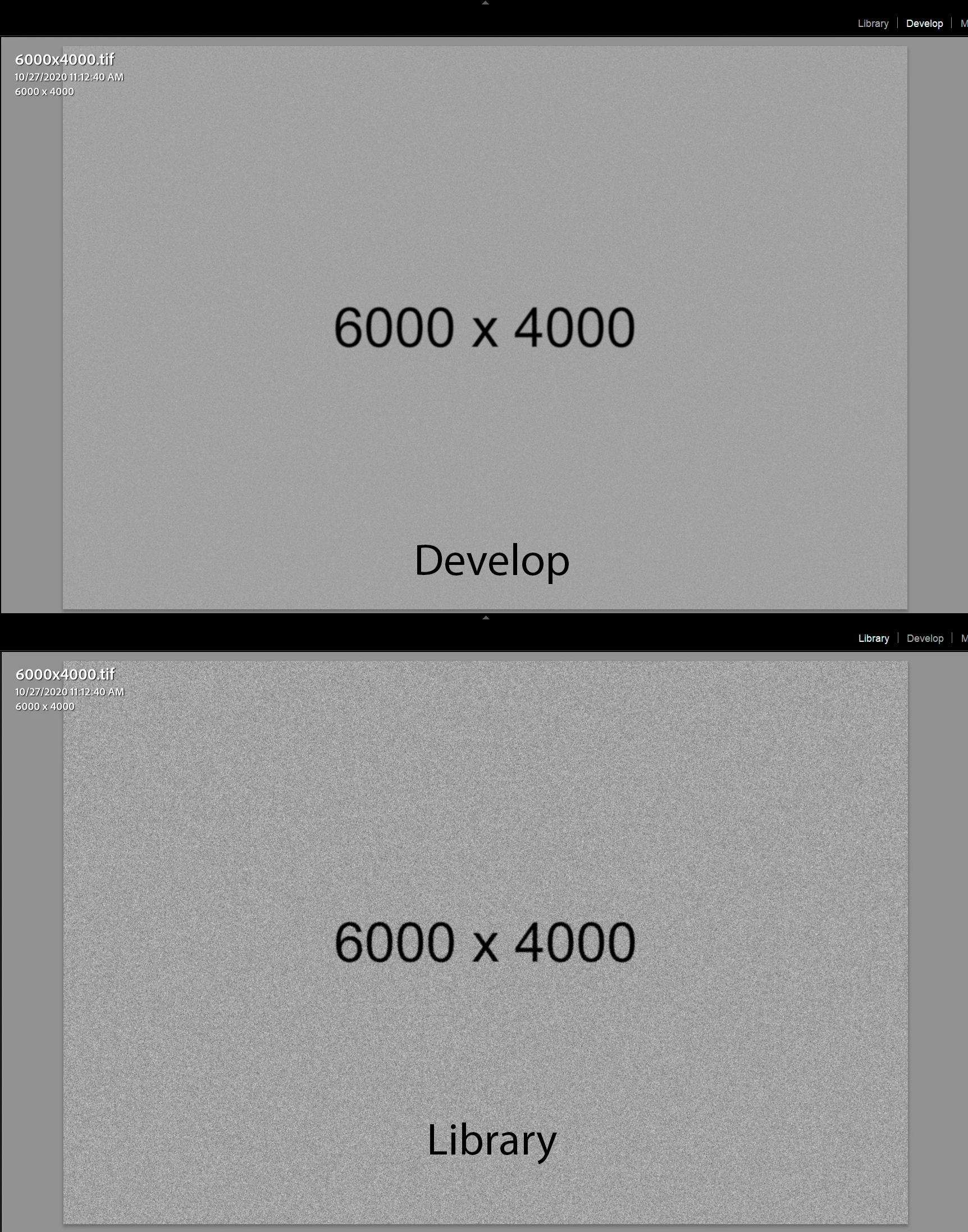
The Develop module no longer properly renders the Grain Effect settings in LrC 10.2, which appear much more pronounced and correct in the Library module and exported files. I tested with GPU enabled and disabled with LrC restarted and the issue persists on my Windows 10 system.


The below screenshots are with LrC 10.2 using Grain settings Amount 100, Size 50, and Roughness 100.
 

This topic has been closed for replies.

67 replies

Inspiring
April 21, 2021

Bonjour même problème, et pas seulement limité au format .tif, ici exemple vidéo depuis un Raw de Olympus (.orf) (paramètres système sous la vidéo)


Version Lightroom Classic: 10.2 [ 202103041821-226a1211 ]
Licence: Creative Cloud
Paramètre de langue: fr
Système d'exploitation : Mac OS 10
Version : 10.16.0 [20D91]
Architecture de l'application : x64
Nombre de processeurs logiques: 6
Vitesse du processeur : 3.1 Ghz
Version SQLite: 3.34.0
Mémoire intégrée : 40 960.0 Mo
Mémoire réelle disponible pour Lightroom : 40 960.0 Mo
Mémoire réelle utilisée par Lightroom : 6 851.2 Mo (16.7%)
Mémoire virtuelle utilisée par Lightroom : 19 380.7 Mo
Taille de la mémoire cache : 1 377.4Mo
Version interne de Camera Raw: 13.2 [ 738 ]
Nombre maximal de liens utilisé par Camera Raw  : 4
Optimisation SIMD de Camera Raw : SSE2,AVX,AVX2
Mémoire virtuelle de Camera Raw: 1762Mo / 20479Mo (8%)
Mémoire réelle de Camera Raw: 1830Mo / 40960Mo (4%)
Affichages : 1) 5120x2880

Informations relatives au processeur graphique : 
Metal: AMD Radeon Pro 575X


Dossier de l'application : /Applications/Adobe Lightroom Classic
Chemin d'accès à la bibliothèque : /Users/yvesalexiscrausaz/Pictures/Lightroom Classic/Yves Catalogue principal/Yves Catalogue principal-v10.lrcat
Dossier des paramètres : /Users/yvesalexiscrausaz/Library/Application Support/Adobe/Lightroom

Modules installés : 
1) Adobe Stock
2) DxO PhotoLab 2
3) DxO PhotoLab 2 Importer
4) Flickr
5) HDR Efex Pro 2

Marqueurs Config.lua: None

AudioDeviceIOBlockSize: 512
AudioDeviceName: $$$/dvaaudiodevice/SystemDefaultAndEffectiveDeviceName=System Default (Sortie intégrée)#{comment}DVAAU-4201250: Open the audio hardware preferences page.
AudioDeviceNumberOfChannels: 2
AudioDeviceSampleRate: 44100
Build: LR5x77
CoreImage: true
GL_ACCUM_ALPHA_BITS: 0
GL_ACCUM_BLUE_BITS: 0
GL_ACCUM_GREEN_BITS: 0
GL_ACCUM_RED_BITS: 0
GL_ALPHA_BITS: 8
GL_BLUE_BITS: 8
GL_DEPTH_BITS: 24
GL_GREEN_BITS: 8
GL_MAX_3D_TEXTURE_SIZE: 16384
GL_MAX_TEXTURE_SIZE: 16384
GL_MAX_TEXTURE_UNITS: 8
GL_MAX_VIEWPORT_DIMS: 16384,16384
GL_RED_BITS: 8
GL_RENDERER: AMD Radeon Pro 575X OpenGL Engine
GL_SHADING_LANGUAGE_VERSION: 1.20
GL_STENCIL_BITS: 8
GL_VENDOR: ATI Technologies Inc.
GL_VERSION: 2.1 ATI-4.2.15
OGLEnabled: true
GL_EXTENSIONS: GL_ARB_color_buffer_float GL_ARB_depth_buffer_float GL_ARB_depth_clamp GL_ARB_depth_texture GL_ARB_draw_buffers GL_ARB_draw_elements_base_vertex GL_ARB_draw_instanced GL_ARB_fragment_program GL_ARB_fragment_program_shadow GL_ARB_fragment_shader GL_ARB_framebuffer_object GL_ARB_framebuffer_sRGB GL_ARB_half_float_pixel GL_ARB_half_float_vertex GL_ARB_imaging GL_ARB_instanced_arrays GL_ARB_multisample GL_ARB_multitexture GL_ARB_occlusion_query GL_ARB_pixel_buffer_object GL_ARB_point_parameters GL_ARB_point_sprite GL_ARB_provoking_vertex GL_ARB_seamless_cube_map GL_ARB_shader_objects GL_ARB_shader_texture_lod GL_ARB_shading_language_100 GL_ARB_shadow GL_ARB_shadow_ambient GL_ARB_sync GL_ARB_texture_border_clamp GL_ARB_texture_compression GL_ARB_texture_compression_rgtc GL_ARB_texture_cube_map GL_ARB_texture_env_add GL_ARB_texture_env_combine GL_ARB_texture_env_crossbar GL_ARB_texture_env_dot3 GL_ARB_texture_float GL_ARB_texture_mirrored_repeat GL_ARB_texture_non_power_of_two GL_ARB_texture_rectangle GL_ARB_texture_rg GL_ARB_transpose_matrix GL_ARB_vertex_array_bgra GL_ARB_vertex_blend GL_ARB_vertex_buffer_object GL_ARB_vertex_program GL_ARB_vertex_shader GL_ARB_window_pos GL_EXT_abgr GL_EXT_bgra GL_EXT_bindable_uniform GL_EXT_blend_color GL_EXT_blend_equation_separate GL_EXT_blend_func_separate GL_EXT_blend_minmax GL_EXT_blend_subtract GL_EXT_clip_volume_hint GL_EXT_debug_label GL_EXT_debug_marker GL_EXT_depth_bounds_test GL_EXT_draw_buffers2 GL_EXT_draw_range_elements GL_EXT_fog_coord GL_EXT_framebuffer_blit GL_EXT_framebuffer_multisample GL_EXT_framebuffer_object GL_EXT_framebuffer_sRGB GL_EXT_geometry_shader4 GL_EXT_gpu_program_parameters GL_EXT_gpu_shader4 GL_EXT_multi_draw_arrays GL_EXT_packed_depth_stencil GL_EXT_packed_float GL_EXT_provoking_vertex GL_EXT_rescale_normal GL_EXT_secondary_color GL_EXT_separate_specular_color GL_EXT_shadow_funcs GL_EXT_stencil_two_side GL_EXT_stencil_wrap GL_EXT_texture_array GL_EXT_texture_compression_dxt1 GL_EXT_texture_compression_s3tc GL_EXT_texture_env_add GL_EXT_texture_filter_anisotropic GL_EXT_texture_integer GL_EXT_texture_lod_bias GL_EXT_texture_mirror_clamp GL_EXT_texture_rectangle GL_EXT_texture_shared_exponent GL_EXT_texture_sRGB GL_EXT_texture_sRGB_decode GL_EXT_timer_query GL_EXT_transform_feedback GL_EXT_vertex_array_bgra GL_APPLE_aux_depth_stencil GL_APPLE_client_storage GL_APPLE_element_array GL_APPLE_fence GL_APPLE_float_pixels GL_APPLE_flush_buffer_range GL_APPLE_flush_render GL_APPLE_object_purgeable GL_APPLE_packed_pixels GL_APPLE_pixel_buffer GL_APPLE_rgb_422 GL_APPLE_row_bytes GL_APPLE_specular_vector GL_APPLE_texture_range GL_APPLE_transform_hint GL_APPLE_vertex_array_object GL_APPLE_vertex_array_range GL_APPLE_vertex_point_size GL_APPLE_vertex_program_evaluators GL_APPLE_ycbcr_422 GL_ATI_blend_equation_separate GL_ATI_blend_weighted_minmax GL_ATI_separate_stencil GL_ATI_texture_compression_3dc GL_ATI_texture_env_combine3 GL_ATI_texture_float GL_ATI_texture_mirror_once GL_IBM_rasterpos_clip GL_NV_blend_square GL_NV_conditional_render GL_NV_depth_clamp GL_NV_fog_distance GL_NV_light_max_exponent GL_NV_texgen_reflection GL_NV_texture_barrier GL_SGI_color_matrix GL_SGIS_generate_mipmap GL_SGIS_texture_edge_clamp GL_SGIS_texture_lod 

Yves Crausaz, Suisse, retraité actif dans le monde de la photo et des arts graphiques.
Inspiring
April 20, 2021

Thanks for merging threads, Rikk. One note / clarification: I originally thought that the issue I was seeing was unrelated to this thread as my images do NOT have any grain effect applied. That said, I can confirm that the particulars described above (Zoom over 50% "fixes" the problem) mirror what I'm seeing. IMO, what I'm seeing in the Develop Module or at a Zoom greater than 50% in the Loupe is the "correct" image; what I'm seeing in the Loupe under 50% zoom has additional grain added.

Rikk Flohr_Photography
Community Manager
Community Manager
April 20, 2021

This thread is being merged into an existing authoritative thread for better tracking and response. Please review the official answer (if any) in the second post on the thread for more information. 

Rikk Flohr: Adobe Photography Org
Inspiring
April 20, 2021

Since updating to 10.2, I'm seeing the addition of what looks like grain or noise to my images when Zoom is set to anything EXCEPT "Fit" "Fill" or "100%." 

The problem goes away immediately if I hit "F" for full screen mode (even if I leave the zoom set at, for instance, 25%) or if I enter the Develop module. (This may be related to the way LR is now handling Standard previews and perhaps to the fix that was just implemented to the former color shift bug?)

A lot of my workflow relies on TIFFs of black and white film scans. These are the images where the problem is most apparent.

I'm running LR on macOS 11.2.3.

robertod93911732
Participant
April 8, 2021

Humm.. strange I have this grain issue and a thumbnail preview issue since v10.0.. it is present when using LR v10.x and MacOS Big Sur,  it was not present with LR 9.4..

Because of this bugs i'm still stock with LR 9.4

https://feedback.photoshop.com/conversations/lightroom-classic/lightroom-classic-101-thumbnails-erratic-behavior-with-big-sur/5fd3a0afb5962575127fe16d

Todd Shaner
Legend
April 8, 2021

The issue is not present in LrC 10.0.

robertod93911732
Participant
April 8, 2021

Is this the same issue that was presented on LR Classic 10.0.0 ??  If so, this bug has been around since the release of v10 back in October..  What's going on Adobe?

William Scalia
Participating Frequently
March 22, 2021

I'm having the same issues in Camera Raw 13.2. Grain is rendering strange. 

Participating Frequently
March 19, 2021

Thanks for logging it @Rikk , we'd be very grateful if you can push for a LrC_10.2.1/CR_13.2.1/LR_4.2.1 hotfix release, if possible.

Rikk Flohr_Photography
Community Manager
Community Manager
March 19, 2021

And Camera Raw is also affected

Rikk Flohr: Adobe Photography Org