


Known Participant
July 17, 2022

P: Account Name on Lightroom Classic is incorrect "%20" replaces [Space]

  • July 17, 2022
  • 33 replies
  • 7402 views

For no reason in particular, LR started to show my name as seen below. I have no idea how to fix it. When I log in to my account, it just has first and lastname without the "%20" in it. Does anyone know how to fix this? 


Thanks so much!
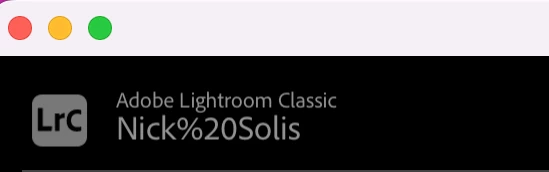
This topic has been closed for replies.

33 replies

Participant
August 9, 2022

My Adobe Account has my Name with my middle name initial like "John F. Kennedy"

But the latest Adobe Versions have problem with displaying spaces in the top left corner... They show the HTML Code (?) %20 instead of actual spaces.

This is how Lightroom Classics look:

Participant
August 7, 2022

Thank you!

AxelMatt
Community Expert
Community Expert
August 3, 2022

I can confirm this also.

Lightroom 11.4.1

Windows 10 21H2

My System: Intel i7-8700K - 64GB RAM - NVidia Geforce RTX 3060 - Windows 11 Pro 25H2 -- LR-Classic 15 - Photoshop 27 - Nik Collection 8 - PureRAW 6 - Topaz Photo AI
Inspiring
August 3, 2022

Hi… This is really trivial but it bothers me everytime I look at it. Why is html code for a word space showing? Is there anyway to clean it up i.e. get rid of it? I've restored the preferences, etc.


LrC 11.4.1 release. MacOS Catalina. Thanks all!


marty8080
Participant
August 1, 2022

On starting Lightroom Classic 11.41 with the start-up Catalog unavailable, the registered user name appears as Firstname%20Lastname rather than Firstname Lastname in the upper-left of the application.

If Lightroom Classic is started with the Catalog available, the name renders correctly (with a space character, not the hex %20 code)


Gotburger
Participating Frequently
July 31, 2022

With Lightroom Classic 11.4.1 (Windows 10 Pro, 19044.1826, language setting "swedish") the user name (to the right of the "LrC" icon, upper left corner) is presented with the encoding of national characters rather than the character itself.
This also applies to the white space between first- and family-name: "%20" instead of " ".

National characters are shown "%C3%xx", where xx is specific for the character.

Reproduce by using national characters in the name, e.g "Åke Motörhéad" (for illustration only)


B.T..W. it would be good if the text already entetered also remained when changing the "conversation type". Tedious to re-enter the same information!

F. McLion
Community Expert
Community Expert
July 30, 2022

Can confirm this on my Windows installation.

--- Got your issue resolved? Please label the response as 'Correct Answer' to help your fellow community members find a solution to similar problems. ---
Participating Frequently
July 28, 2022

Just a "me too" report. Latest everything on macOS Monterey. 

Known Participant
July 27, 2022

Since LRc 11.4, my username is showing as follows, with a %20 :

The %20 didn't used to be there.

My Windows username is "Julien Pierre", with a space. This is the username you get when you install Windows 10 with a local account, rather than a a Microsoft account. You are prompted for first and last name during the OS installation. A space is automatically added to the username by the OS.

The behavior can easily be reproduced by creating another local user and running LRc under it.


While this is a cosmetic regression, it looks pretty silly to have the space character escaped.

Pentax K-1 II . Panasonic Lumix GX85.i7-5820k OC 4.3 GHz32GB DDR4-26668x1 TB striped SSDnVidia GTX 9602 x 32UHD59-B 32" 4K displays1 x Asus PB238Q HD display10Gbe Ethernet112TB NAS
Known Participant
July 25, 2022

I just noticed it on my LrC on a windows 10 computer. I haven't upgraded Lightroom in a while