

marchyman
Participating Frequently
Oct 30, 2018 2:43 AM UTC
Released

P: Apply During Import missing from Import window

Using "add" to add items to the catalog.  If I click the import button the right side of the import window is correct and looks like this:
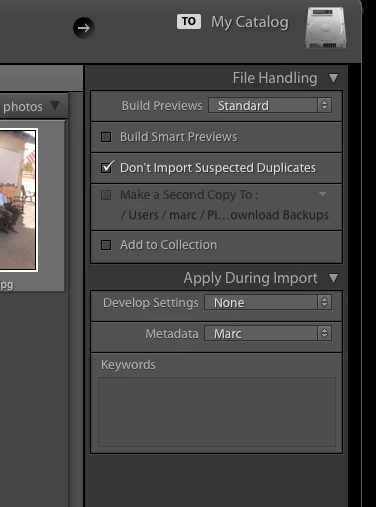


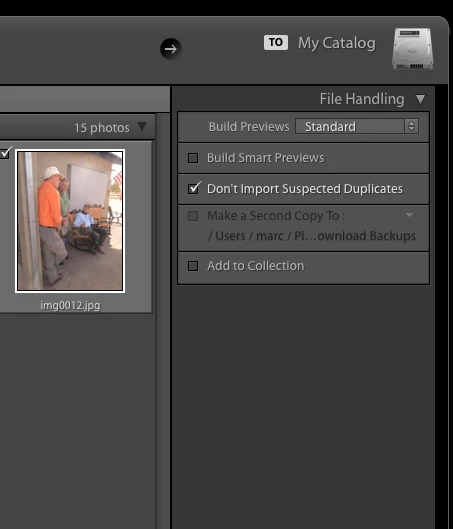
Note the "Apply During Import" section.   However, if instead of clicking import I drag a folder to the Lightroom icon the "Apply During Import" section is missing.  It also look like the last used develop and metadata settings are applied to the images.

This is a regression.  Now the import window looks like this.
This topic is closed to new replies. Start a new post to keep the conversation going.

25 replies

Community Expert
Nov 10, 2019 11:26 AM UTC
The bug is fixed with the update to Version 9. There will be no fixes for previous versions.
Translate
My System: Intel i7-8700K - 64GB RAM - NVidia Geforce RTX 3060 - Windows 11 Pro 26H2 -- LR-Classic 16 - Photoshop 28 - Nik Collection 9 - PureRAW 6 - Topaz Photo AI
Participating Frequently
Nov 10, 2019 8:48 AM UTC
THIS IS STILL A PROBLEM FOR ME USING V8.4.1 A YEAR LATER ... WHEN WILL IT BE FIXED ? 10/11/19
PETER
Translate
max1979l
Inspiring
Nov 5, 2019 7:59 PM UTC
It finally works again on my system too (Win10). Thanks!
Translate
Community Expert
Nov 5, 2019 6:23 PM UTC
Lightroom 9.0 German Version:
It worked for me too.
Translate
My System: Intel i7-8700K - 64GB RAM - NVidia Geforce RTX 3060 - Windows 11 Pro 26H2 -- LR-Classic 16 - Photoshop 28 - Nik Collection 9 - PureRAW 6 - Topaz Photo AI
Inspiring
Nov 5, 2019 2:12 PM UTC
Still not working.... I upgraded to 9.0 yesterday and tested this just now, I do NOT have an apply on import section. 
Translate
marchyman
marchymanAuthor
Participating Frequently
Nov 5, 2019 3:07 AM UTC
Yea!  It works as expected, again!  Thanks.
Translate
Rikk Flohr-Retired
Adobe Employee
Nov 5, 2019 2:33 AM UTC
Lightroom Classic 9.0 was released earlier today and contained a fix for this issue. Please give it a try and confirm it is working for you after updating. Thanks for your patience.
Translate
Rikk Flohr: Adobe Photography Org
Participating Frequently
Sep 20, 2019 12:52 PM UTC
I just updated to LR Classic 8.4.1 --- AND IT STILL DOESN'T WORK! Come on Adobe, do you job! I pay you every flippin month to do just that. It's so irritating, THIS USED TO WORK!!! WHY DID YOU REMOVE IT?

Edit: I used to just drag a folder onto the LR icon and import that way. Now I have to make sure LR is open, then drag the folder into the library.
Translate
Inspiring
Sep 19, 2019 4:51 PM UTC
You are brilliant Mayuri Jain. I have been on the phone with Adobe for over two hours and no one could resolve it. 
Translate
Inspiring
Sep 8, 2019 1:21 AM UTC
It happens to me on a new install of LR CC .  I have to close and restart the import dialog box.  System info is:

Lightroom Classic version: 8.4 [ 201908011719-03751b60 ]
License: Creative Cloud
Language setting: en
Operating system: Windows 10 - Business Edition
Version: 10.0.18362
Application architecture: x64
System architecture: x64
Logical processor count: 8
Processor speed: 3.6 GHz
Built-in memory: 65464.5 MB


Translate