

marchyman
Participating Frequently
October 30, 2018

P: Apply During Import missing from Import window

  • October 30, 2018
  • 25 replies
  • 845 views

Using "add" to add items to the catalog.  If I click the import button the right side of the import window is correct and looks like this:
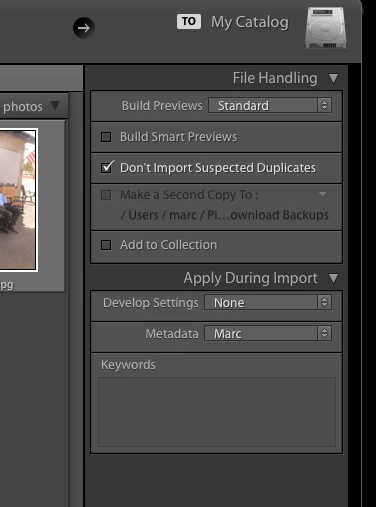


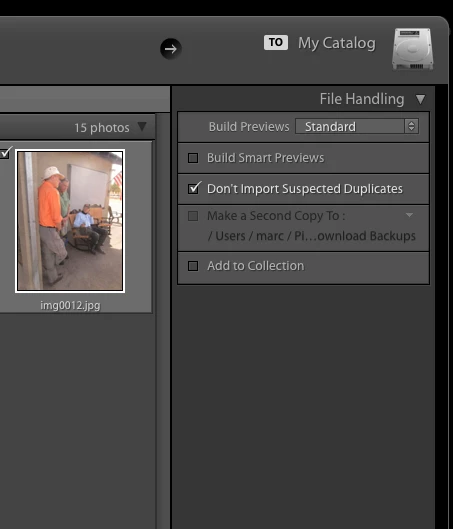
Note the "Apply During Import" section.   However, if instead of clicking import I drag a folder to the Lightroom icon the "Apply During Import" section is missing.  It also look like the last used develop and metadata settings are applied to the images.

This is a regression.  Now the import window looks like this.
This topic has been closed for replies.

25 replies

Participant
September 6, 2019


Thanks Rick, it doezn't happen when I launch import from the import button in the library module only when a memory card was inserted and that started the import. I unticked the import when a memory card is insert check box in the preferences and it doesn't happen any longer, tha ks for your help!

Participant
September 6, 2019

Known Participant
June 2, 2019


With LR off, drag and drop a file to LR in Dock, then there is no "Apply During Import" in the Import window - and thusly no way to apply Development Settings.
If, however, LR is on at the time of drag and drop, then the Import window is fine with "Apply During Import".
Would be awfully nice to, again, be able to apply development settings from auto start.
AxelMatt
Community Expert
Community Expert
April 14, 2019
I've installed the latest version, LR Classic CC 8.2.1 (German version) and there's the same problem.
 
My System: Intel i7-8700K - 64GB RAM - NVidia Geforce RTX 3060 - Windows 11 Pro 25H2 -- LR-Classic 15 - Photoshop 27 - Nik Collection 8 - PureRAW 6 - Topaz Photo AI
Participating Frequently
February 5, 2019
Still no fix for the missing Apply During Import panel? This just happened to me for the first time, been using LR CC for almost a year. I drag the folder from Finder to the LR icon and never had this issue. I updated LR recently, don't know what I had then but now I have LR Classic CC 8.1 build 1200465, macOX 10.13.6. Canceling and restarting the import fixed it but that's just one more quirk to put up with!
Inspiring
December 23, 2018


Why did Adobe get rid of the ability to keyword images on Import? The more things I can do to an image set on import, the better and smoother my workflow is. Keywording is an important part of that process. Please bring it back! 
Sunil_Bhaskaran
Inspiring
December 21, 2018
Thanks for letting us know.
We are aware of this issue.
At present, the workaround is to close the Import window and re-open it.

Thanks,
Sunil
max1979l
Inspiring
December 20, 2018
Same here.

I have been having this issue since a couple of months myself. On the left you see the panels when the auto import is triggered by inserting the memory card, on the right if I do it manually.


Image is not available

What's interesting is that if you like me use a preset, even if you do import when the apply during import panel is not shown, the images still have the develop setting and keywords applied. Since I only import with camera specific presets with generic keywords, this is not an issue for me. I'm just happy LR doesn't crash anymore when ejecting the card like it used to do few updates back.
Inspiring
November 14, 2018


Lightroom Classic-Version: 8.0 [ 1193777 ]
Lizenz: Creative Cloud
Spracheinstellung: de
Betriebssystem: Windows 10 - Business Edition
Version: 10.0.17134
Anwendungsarchitektur: x64
Systemarchitektur: x64
Anzahl logischer Prozessoren: 8
Prozessorgeschwindigkeit: 2,8 GHz
Integrierter Speicher: 32597,4 MB

When I launch Lightroom through autostart by inserting a sd card into my PC there will be no "apply during import" option available. Also not available in the appropiate context menu.


The same issue appears when I use Photo Mechanic 5 (which is much faster for previewing and rating and tagging my photos) to sort and tag my photos and send them to Lightroom from PM 5

regards
Frank
Smit K
Participating Frequently
October 30, 2018
We have logged a bug for this and we are looking into this.
Smit | Lightroom Team