

marchyman
Participating Frequently
October 30, 2018

P: Apply During Import missing from Import window

  • October 30, 2018
  • 25 replies
  • 845 views

Using "add" to add items to the catalog.  If I click the import button the right side of the import window is correct and looks like this:
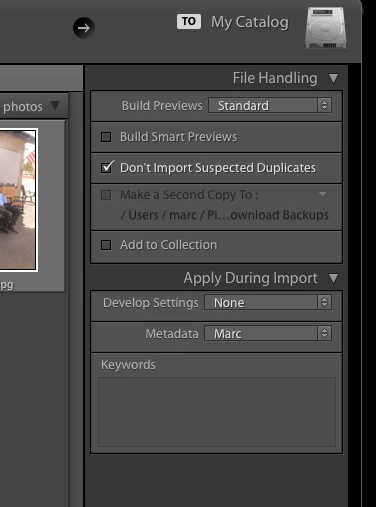


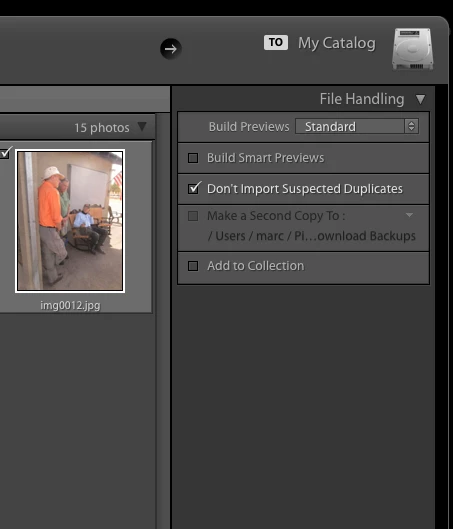
Note the "Apply During Import" section.   However, if instead of clicking import I drag a folder to the Lightroom icon the "Apply During Import" section is missing.  It also look like the last used develop and metadata settings are applied to the images.

This is a regression.  Now the import window looks like this.
This topic has been closed for replies.

25 replies

Sunil_Bhaskaran
Inspiring
October 30, 2018
Looks like this issue happens if the Import window appears immediately after a Lightroom Classic start.
We are investigating.

Thanks, Marco.

Thanks,
Sunil
marchyman
marchymanAuthor
Participating Frequently
October 30, 2018
I tried the right-click on File Handling yesterday.   There was no option to Apply During import.

I quit LR.   I dragged my test folder on top of the Lr Icon (MacOS Mojave on a late 2012 iMac).   The import screen started by showing the Apply During Import, but not my images.   Within about a second the screen refreshed itself and displayed the jpeg images to import, but left out the Apply During Import options.

I cancelled the import and dragged my test folder on top of the Lr icon again.  As noted in my previous response, the Apply During Import AND my images showed up in the import window.   This is a suitable workaround for me until it is fixed.
marchyman
marchymanAuthor
Participating Frequently
October 30, 2018
Good question.  I closed the window and dragged the same folder again it worked that time.

No, I am not using a trial version.  I've been using Lightroom on a Mac since version 4 or 5.
mayurij42806338
Adobe Employee
Adobe Employee
October 30, 2018
Hi Marco,

Could you please try below steps and let us know if you are still facing the issue?
a) Right Click on File Handling section and click on Apply During Import.
b) Relaunch LR 
c) Drag and drop folder to the LR icon and check if "Apply During Import" is still missing.

Also please share your system info.

Sunil_Bhaskaran
Inspiring
October 30, 2018
What happens when you close the Import window and then drag and drop a folder again?
Does this issue reoccur?
I assume you are not using a trial version.

Thanks,
Sunil