

marchyman
Participating Frequently
October 30, 2018

P: Apply During Import missing from Import window

  • October 30, 2018
  • 25 replies
  • 845 views

Using "add" to add items to the catalog.  If I click the import button the right side of the import window is correct and looks like this:
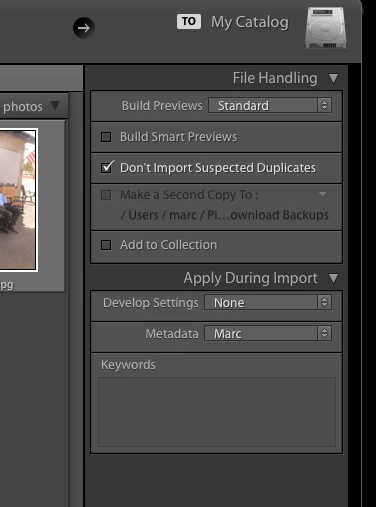


Note the "Apply During Import" section.   However, if instead of clicking import I drag a folder to the Lightroom icon the "Apply During Import" section is missing.  It also look like the last used develop and metadata settings are applied to the images.

This is a regression.  Now the import window looks like this.
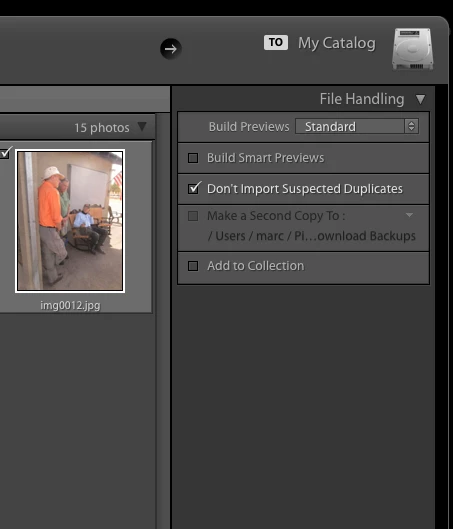
This topic has been closed for replies.

25 replies

AxelMatt
Community Expert
Community Expert
November 10, 2019
The bug is fixed with the update to Version 9. There will be no fixes for previous versions.
My System: Intel i7-8700K - 64GB RAM - NVidia Geforce RTX 3060 - Windows 11 Pro 25H2 -- LR-Classic 15 - Photoshop 27 - Nik Collection 8 - PureRAW 6 - Topaz Photo AI
Participating Frequently
November 10, 2019
THIS IS STILL A PROBLEM FOR ME USING V8.4.1 A YEAR LATER ... WHEN WILL IT BE FIXED ? 10/11/19
PETER
max1979l
Inspiring
November 5, 2019
It finally works again on my system too (Win10). Thanks!
AxelMatt
Community Expert
Community Expert
November 5, 2019
Lightroom 9.0 German Version:
It worked for me too.
My System: Intel i7-8700K - 64GB RAM - NVidia Geforce RTX 3060 - Windows 11 Pro 25H2 -- LR-Classic 15 - Photoshop 27 - Nik Collection 8 - PureRAW 6 - Topaz Photo AI
Inspiring
November 5, 2019
Still not working.... I upgraded to 9.0 yesterday and tested this just now, I do NOT have an apply on import section. 
marchyman
marchymanAuthor
Participating Frequently
November 5, 2019
Yea!  It works as expected, again!  Thanks.
Rikk Flohr_Photography
Community Manager
November 5, 2019
Lightroom Classic 9.0 was released earlier today and contained a fix for this issue. Please give it a try and confirm it is working for you after updating. Thanks for your patience.
Rikk Flohr: Adobe Photography Org
Participating Frequently
September 20, 2019
I just updated to LR Classic 8.4.1 --- AND IT STILL DOESN'T WORK! Come on Adobe, do you job! I pay you every flippin month to do just that. It's so irritating, THIS USED TO WORK!!! WHY DID YOU REMOVE IT?

Edit: I used to just drag a folder onto the LR icon and import that way. Now I have to make sure LR is open, then drag the folder into the library.
Inspiring
September 19, 2019
You are brilliant Mayuri Jain. I have been on the phone with Adobe for over two hours and no one could resolve it. 
Inspiring
September 8, 2019
It happens to me on a new install of LR CC .  I have to close and restart the import dialog box.  System info is:

Lightroom Classic version: 8.4 [ 201908011719-03751b60 ]
License: Creative Cloud
Language setting: en
Operating system: Windows 10 - Business Edition
Version: 10.0.18362
Application architecture: x64
System architecture: x64
Logical processor count: 8
Processor speed: 3.6 GHz
Built-in memory: 65464.5 MB