



johnrellis
Legend
October 24, 2016

P: Applying Auto Tone to a batch of photos loses subsequent develop settings

  • October 24, 2016
  • 49 replies
  • 1454 views

When you apply Auto Tone to a large batch of photos, LR does not consistently update all the photos, and subsequent batch changes to the photos’ develop settings can get lost.  This happens when using any of the mechanisms for batch changes: Photo > Develop Settings > Paste Settings, Auto Sync, Quick Develop > Saved Preset, or via the SDK.

This problem has existed for many years (see all the reports merged below), at least since LR 5, and probably at least since LR 4.

Apparently, when you apply Auto Tone to a batch of photos, internally LR just sets a flag on each photo, deferring the actual computation of the Auto Tone until later. It won’t actually compute the Auto Tone develop settings until the photo’s thumbnail becomes visible in Library or you edit the photo.  But any other develop settings you’ve applied to the photo in the meantime will get silently overwritten by the deferred Auto Tone.

To reproduce the problem: 

1. In Develop, define a develop preset “Test Dark” with only Basic Tone: Exposure checked, with Exposure = -5.00.  

2. In Library grid view, select at least a couple hundred photos.

3. Do Quick Develop > Reset All.  Scroll through all the thumbnails to make sure the reset completes.

4. Do Quick Develop > Auto Tone (with all the thumbnails still selected).

5. Wait a minute or more (you don’t have to wait, but this shows the bug is not timing dependent).

6.  Do Quick Develop > Saved Preset > Test Dark to apply the preset to all the photos.

7. Scroll through the thumbnails and wait for the three white dots in the upper-right corner of each to go away, indicating that the the deferred Auto Tone is finally being applied.  Notice that only some of them are correctly rendered as auto-toned followed by Test Dark (i.e. they are near black).    

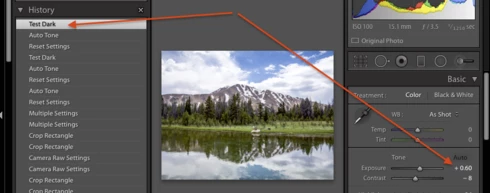
In general, if a thumbnail was off-screen at step 6 when the preset Test Dark was applied, then the Auto Tone will eventually take effect, but the exposure setting of Test Dark will be lost. Further, the develop history will be inconsistent, showing Test Dark as being applied after the Auto Tone, but the exposure slider showing the Auto Tone setting, not the Test Dark settings of -5.00:


Workarounds:

Three workarounds:

- In LR 7.3.1 and later, apply Auto to the batch of photos using a preset, e.g. the built-in preset Classic - General > Auto Settings.

- After applying the batch Auto Tone, scroll through Library grid view and wait until the Auto Tone is actually applied before applying another preset or batch develop setting.

- With all the photos in the batch selected, do Library > Previews > Build Standard-Sized Previews and wait for the progress bar to indicate completion.

A related problem:

A similar problem occurs when synchronized Lens Profile Corrections to many photos, and the workaround is the same.  See https://feedback.photoshop.com/photoshop_family/topics/lightroom-sdk-photo-getdevelopsettings-return...

This topic has been closed for replies.

49 replies

Participant
April 29, 2018

Hi John, many thanks for your help. The workaround with generating standard previews works also for me.

rgds, Hans


johnrellis
Legend
April 28, 2018
This is a very old bug, dating back to at least LR 4, that Adobe has not yet chosen to fix. Now that Auto works much better, more people are noticing the bug. See the first post in this topic for straightforward but tedious workarounds.
Participant
April 28, 2018


Dear all,

the new Auto-Settings have been greatly improved in quality, but they do prevent syncing development setting "Shadows" correctly after application.

I have a reproducable bug here in my newly updated LR CC classic 7.31 on PC.

Procedure:
- Import 139 images (*.CR2) into a new Folder in a new catalogue.
- Apply Auto Settings to all of them (right-click and context menu)
- Set "Shadows" to Zero again for the first Image
- Select ALL images in the folder
- Sync development setting "Shadows" to ALL images in the folder.

Result:
The development setting Zero for "Shadows" has been applied only to the first 10-20 images of the folder and to the last 10-20 and to some in between.
But more then 50% of the 139 images in the folder remain untouched by the sync.

This problem occurrs only after Auto-Settings have been applied to the images in the folder. otherwise the sync of development settings works fine and applies to ALL selected images.

The described problem was observed after the update to 7.31, but I am not sure, whether it came with this update or with an earlier one.

A re-installation of LR CC classic did not solve the issue.

Whether other development settings than "Shadows" are concerned also has not been tested so far.

Dear Adobe quality team, could you please have a look into this?


Kind regards,
Hans


johnrellis
Legend
March 12, 2018
See the first post in this topic for workarounds.
zvonimirm
Participant
March 12, 2018


My steps:
1. select 1200 photos
2. Ctrl U - Auto Settings
3. select only first photo
4. change contrast and shadows
5. select all (viewing first photo with changed contrast and shadows)
6. Sync - checked only contrast and shadows

zvonimirm
Participant
March 12, 2018


Workflow: select bunch of photos, apply Auto settings on all of them. Then I change, for instance, Contrast and Shadows on first photo and try to Sync these settings to all others. It's not working, their settings for Contrast and Shadows stay the same.
johnrellis
Legend
February 16, 2018
See the first post in this topic for workarounds to this long-standing bug.
Inspiring
February 16, 2018


This has been happening for multiple versions and I can't seem to figure out what is causing it.
Basic Scenario:
Import 500 pics from a night football game (shot using flash).
ALL selected.
Hit AUTO in the library view.
Go to Develop. Turn on Auto Sync.
Set noise reduction. (No Issues)
Set sharpening. (No Issues)
Set saturation on team color. (No Issues)

This is where it begins...
Set the Shadows to 10.
Set contrast to 0. (Just started with the new auto alg)

Then I set a filter to select specific pictures rated with stars.
When I go through to crop and further edit, many do not have the shadows or contrast updated to the value I set previously.

I turn on the auto sync. Now it's just for the 30-50 pictures I gave a rating.
Set the contrast and shadow again. (the processing bar shows complete)
move to the next image and it is again NOT the value set just moments before.

I have tried doing a manual sync by just selecting those two elements.

Same thing.

LR is indicating that it has updated, but it really hasn't.

I searched the threads and found just 1 topic on this from 5 years ago. Few comments and no resolution.

Anyone familiar with this? Have a solution?
johnrellis
Legend
December 18, 2017
For workarounds, see the first post in this topic.
Participant
December 18, 2017


I think I had not this problem in Lightroom 7.0.

Here is the workflow:
1. Select all images and use auto develop (command+u).
2. I had the feeling dynamik is to high (18) on auto so I develop one image and set dynamic to (12).
3. I copy my develop settings (only dynamic and process version) to Clipboard.
4. I select a range or all images and paste my develop settings.

My expectation is that all images have now the dynamic 12 but it's hit and miss, sometimes all range gets 12 (when selection is small) or only the focused selected image gets 12.

I cannot select 500 images and apply one by one dynamic 12.

It seems Lightroom 7.1 is not well tested! This is a bug!