



johnrellis
Legend
October 24, 2016

P: Applying Auto Tone to a batch of photos loses subsequent develop settings

  • October 24, 2016
  • 49 replies
  • 1454 views

When you apply Auto Tone to a large batch of photos, LR does not consistently update all the photos, and subsequent batch changes to the photos’ develop settings can get lost.  This happens when using any of the mechanisms for batch changes: Photo > Develop Settings > Paste Settings, Auto Sync, Quick Develop > Saved Preset, or via the SDK.

This problem has existed for many years (see all the reports merged below), at least since LR 5, and probably at least since LR 4.

Apparently, when you apply Auto Tone to a batch of photos, internally LR just sets a flag on each photo, deferring the actual computation of the Auto Tone until later. It won’t actually compute the Auto Tone develop settings until the photo’s thumbnail becomes visible in Library or you edit the photo.  But any other develop settings you’ve applied to the photo in the meantime will get silently overwritten by the deferred Auto Tone.

To reproduce the problem: 

1. In Develop, define a develop preset “Test Dark” with only Basic Tone: Exposure checked, with Exposure = -5.00.  

2. In Library grid view, select at least a couple hundred photos.

3. Do Quick Develop > Reset All.  Scroll through all the thumbnails to make sure the reset completes.

4. Do Quick Develop > Auto Tone (with all the thumbnails still selected).

5. Wait a minute or more (you don’t have to wait, but this shows the bug is not timing dependent).

6.  Do Quick Develop > Saved Preset > Test Dark to apply the preset to all the photos.

7. Scroll through the thumbnails and wait for the three white dots in the upper-right corner of each to go away, indicating that the the deferred Auto Tone is finally being applied.  Notice that only some of them are correctly rendered as auto-toned followed by Test Dark (i.e. they are near black).    

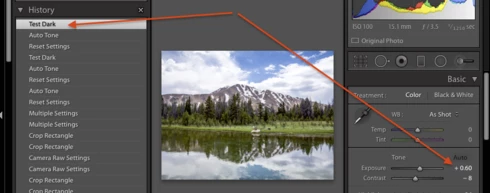
In general, if a thumbnail was off-screen at step 6 when the preset Test Dark was applied, then the Auto Tone will eventually take effect, but the exposure setting of Test Dark will be lost. Further, the develop history will be inconsistent, showing Test Dark as being applied after the Auto Tone, but the exposure slider showing the Auto Tone setting, not the Test Dark settings of -5.00:


Workarounds:

Three workarounds:

- In LR 7.3.1 and later, apply Auto to the batch of photos using a preset, e.g. the built-in preset Classic - General > Auto Settings.

- After applying the batch Auto Tone, scroll through Library grid view and wait until the Auto Tone is actually applied before applying another preset or batch develop setting.

- With all the photos in the batch selected, do Library > Previews > Build Standard-Sized Previews and wait for the progress bar to indicate completion.

A related problem:

A similar problem occurs when synchronized Lens Profile Corrections to many photos, and the workaround is the same.  See https://feedback.photoshop.com/photoshop_family/topics/lightroom-sdk-photo-getdevelopsettings-return...

This topic has been closed for replies.

49 replies

Known Participant
August 29, 2017
Thanks John. Just trying to point out that, aside from the incredible S-L-O-W-N-E-S-S of LR, I don't think this is a bug so much as a clash of functions. I've worked in testing and I wouldn't report this as a bug. What I see are two presets both trying to access the same sliders; one wins, one loses. The only current workaround is to ensure that Auto Tone is 100% done with its job before applying your own preset. That works every time and is, I believe, why nobody at Adobe is treating it as a bug. Give it time, allow one preset to finish before setting the other and everything performs as expected. But that's not the real world.

To address this, they could radically speed up the app (for which we'd all be eternally grateful) and/or offer an Auto Exposure option that simply got the hell away from our sliders, which would solve it instantly IMHO.

Of course, this is Adobe. The third option, and the one they seem to have chosen to take, is to do nothing and keep taking our money.
johnrellis
Legend
August 29, 2017
Known Participant
August 22, 2017
Here's a video that perfectly illustrates the problem. All shots have been imported with auto tone applied and then, after giving LR some time to process, I apply my own "Nikon Property" preset that spreads the sliders to pull as much DR from my D750 as possible. What you're watching here is me moving from shot to shot in the develop module and you can see that my preset has been applied (because it's just numbers - requires no processing) but that, once each image is brought into focus where it can be processed, auto tone resets the sliders to where it wants them to be.  If we had auto exposure, there wouldn't be this conflict.
Known Participant
August 18, 2017
I'm not sure that's exactly the problem John. Given that auto tone needs to access the other sliders in the top develop pane, any other presets that also utilise these sliders are working in competition with auto tone until auto tone has finished. As your custom presets are simply "apply this number here", they should be able to be applied in the background but auto tone needs to apply some processing to each individual image - thus taking some time and, given Adobe, it has to be in the foreground because Adobe never got the memo about multitasking (see Photoshop - which keeps jumping to the foreground as I try to type this.)

This is why I have suggested, multiple times, that the solution to this is to provide an "Auto Exposure" option that just uses the exposure slider. No competition...
johnrellis
Legend
August 16, 2017
These bugs with Auto Tone, Sync, and Copy/Paste all have the following in common: When you apply the settings to the batch of photos, LR defers the actual rendering of the new image until it "needs" it, e.g. when you scroll to make the thumbnails visible or you export the photos.  But it appears to have at least a few places when it forgets to do that deferred rendering: applying a develop setting after Auto Tone, exporting a slideshow, perhaps others.

These are clearly bugs with the same underlying architectural "thinko". But whether it's the exact same code or different instances of code, only the developers know for sure.

The workaround appears to be the same: Do Library > Previews > Build Standard-Sized Previews and wait for the progress bar to indicate completion. 
Jim Wilde
Community Expert
Community Expert
August 16, 2017
John, that might be a different bug than your auto-tone issue. See here (particularly the last 3 or 4 posts): https://forums.adobe.com/thread/2272496
johnrellis
Legend
August 16, 2017
Here's a bug report with similar symptoms and workaround, using Copy/Paste of develop settings: https://feedback.photoshop.com/photoshop_family/topics/make-sure-development-settings-are-applied-be...
Known Participant
October 26, 2016
That's great news Rikk. Please also look into the option of a cut-down version of Auto Tone, setting the Exposure parameter only. I believe this would be much less problematic if for no other reason than the Auto process wouldn't be fighting our presets. You set Exposure, we set Contrast, Highlights, Shadows etc.
johnrellis
Legend
October 26, 2016
Great, thanks!
Rikk Flohr_Photography
Community Manager
October 26, 2016
John, I was able to duplicate off your instructions and have put in a bug for this. 
Rikk Flohr: Adobe Photography Org