



johnrellis
Legend
October 24, 2016

P: Applying Auto Tone to a batch of photos loses subsequent develop settings

  • October 24, 2016
  • 49 replies
  • 1454 views

When you apply Auto Tone to a large batch of photos, LR does not consistently update all the photos, and subsequent batch changes to the photos’ develop settings can get lost.  This happens when using any of the mechanisms for batch changes: Photo > Develop Settings > Paste Settings, Auto Sync, Quick Develop > Saved Preset, or via the SDK.

This problem has existed for many years (see all the reports merged below), at least since LR 5, and probably at least since LR 4.

Apparently, when you apply Auto Tone to a batch of photos, internally LR just sets a flag on each photo, deferring the actual computation of the Auto Tone until later. It won’t actually compute the Auto Tone develop settings until the photo’s thumbnail becomes visible in Library or you edit the photo.  But any other develop settings you’ve applied to the photo in the meantime will get silently overwritten by the deferred Auto Tone.

To reproduce the problem: 

1. In Develop, define a develop preset “Test Dark” with only Basic Tone: Exposure checked, with Exposure = -5.00.  

2. In Library grid view, select at least a couple hundred photos.

3. Do Quick Develop > Reset All.  Scroll through all the thumbnails to make sure the reset completes.

4. Do Quick Develop > Auto Tone (with all the thumbnails still selected).

5. Wait a minute or more (you don’t have to wait, but this shows the bug is not timing dependent).

6.  Do Quick Develop > Saved Preset > Test Dark to apply the preset to all the photos.

7. Scroll through the thumbnails and wait for the three white dots in the upper-right corner of each to go away, indicating that the the deferred Auto Tone is finally being applied.  Notice that only some of them are correctly rendered as auto-toned followed by Test Dark (i.e. they are near black).    

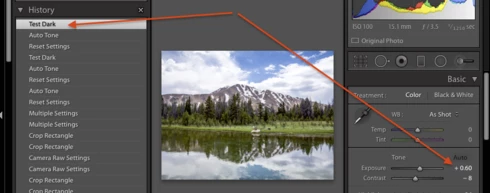
In general, if a thumbnail was off-screen at step 6 when the preset Test Dark was applied, then the Auto Tone will eventually take effect, but the exposure setting of Test Dark will be lost. Further, the develop history will be inconsistent, showing Test Dark as being applied after the Auto Tone, but the exposure slider showing the Auto Tone setting, not the Test Dark settings of -5.00:


Workarounds:

Three workarounds:

- In LR 7.3.1 and later, apply Auto to the batch of photos using a preset, e.g. the built-in preset Classic - General > Auto Settings.

- After applying the batch Auto Tone, scroll through Library grid view and wait until the Auto Tone is actually applied before applying another preset or batch develop setting.

- With all the photos in the batch selected, do Library > Previews > Build Standard-Sized Previews and wait for the progress bar to indicate completion.

A related problem:

A similar problem occurs when synchronized Lens Profile Corrections to many photos, and the workaround is the same.  See https://feedback.photoshop.com/photoshop_family/topics/lightroom-sdk-photo-getdevelopsettings-return...

This topic has been closed for replies.

49 replies

johnrellis
Legend
October 25, 2016
Bob, great tip.  I included it in the Workarounds section in the first post.
Known Participant
October 25, 2016
Thanks Bob. That's a great tip!!

Now, if we could just set Auto Exposure and Crop Factor via a Develop Preset with our other settings, we could get it down to a single pass.
Inspiring
October 25, 2016

Surely you don't have to scroll through the images to get the autotone effects to show. All you do is render new standard previews for the images and have a coffee while they render.


Bob Frost

Known Participant
October 25, 2016
Many thanks to John R Ellis for merging this back in. I figured that, somehow, this thread was written in invisible ink that Adobe is unable to read 😕😕 so I thought I'd come at it from another angle. Silly of me, really.

I was also hoping for the addition, alongside Auto Tone, of Auto Exposure that would just set Exposure and leave me with control over all the other controls in the Basic Panel. I know I'm not the only one who works this way, setting Exposure with Auto Tone and setting all the other settings with a preset. I see the posts above. I also think this might help to speed the process up, by giving LR just the one parameter to set (via histogram data?) and not having to make 'creative' decisions for us.

Can't hurt to ask. Invisible ink is cheap.
Inspiring
October 24, 2016
Its been a long time since I realized I had this issue and posted. I'm glad, sort of, that I'm not the only one who thinks this is unacceptable. I've had to use a different application for my large projects because I just can't trust Lightroom to do what Itell it to do. If I have to go back and individually check 800+ images, I might as well apply the settings individually as well. This is a real deal breaker for me and the only reason I've decided against paying for another Lightroom upgrade until Adobe can assure me the bug is fixed and promise a refund if it returns...and I know that isn't going to happen.
Inspiring
October 24, 2016


Lightroom AutoSynch and "DevelopSettings->Auto-tone does not apply settings to ALL selected photos. I routinely have 100's of photos selected and attempt to synch or auto-tone but the settings are not applied to all selected photos.

This bug has been present since V3 and is still there in V5. Very tired of this as it kills my workflow.

Running v5.2 of Lightroom on OS/X.

FIX THIS!
Known Participant
October 24, 2016


Every day of my working life I import hundreds of shots. Currently this means three 'pre-grade' passes:

1. Auto Tone applied during import - "ballparks" my exposures. I need to have as many thumbnails on-screen as possible because LR only applies the settings to those that are being addressed by the graphics card. So, after the first screenful have lost their three little dots, scroll down a page, wait. Rinse and repeat.

2. Apply a 4:3 crop. As before, wait, scroll, repeat.

3. Apply a preset that includes a lot of settings, including lens settings, noise and sharpness, highlight, shadow, white and black levels, contrast, saturation, clarity and vibrance but not exposure (set by Auto Tone) or white balance (set in-camera). Wait, scroll, repeat.

This can take hours (literally) and there isn't a shortcut. Here's why:

a. There is NOT an option for Auto Exposure only. Auto Tone settings must be then altered by the preset.

b. There is no option for a crop in a develop preset, so I have to make that pass separately.

Why can we not set a crop factor in develop presets? It's only metadata. It's not baked in. It's just numbers...

Why can we not have an option to set Exposure to "Auto" in develop presets without all the other Basic settings being altered too?

And why do develop presets need to render in order for the metadata to be applied to all images? I understand that, Auto Tone (and the requested Auto Exposure) (would) require(s) rendering to arrive at the numerical setting but almost all other settings applied in my develop preset are purely numerical. Surely those numbers could be applied to metadata regardless of whether the image is being processed for output or not. I understand that, when an image is viewed, the render would need to take place at that stage but as it stands now, if I don't wait, scroll, wait, scroll, those images that never make it to graphics output do not have the preset applied.

The above workflow, slow as it is, saves me hours of work every day. The options I'm requesting would save me even more. Could these please be addressed?
Inspiring
October 24, 2016


I'm running LR6.6.1 on Windows 10. I routinley apply presets with fixed highlights, shadows, whites and blacks, but AFTER applying autotone, so as to set exposure automatically.

I've tried many things for the autotone : on import, with a preset or with autosync in the develop module. To apply fixed values after that, I also tried many things : grid mode and auto sync. And with autosync, I tried by applying a preset as well as by syncing manually. I actually tried avery combination.

I even tried a fresh install on LR, with a brand new catalog with all my pictures freshly imported.

I tried with and without xmp metadata synced.

I'm running out of options.

Sean H [Seattle branch]
Known Participant
October 24, 2016


1. Select all images in a large set (maybe 100+ shots)
2. Hit the AUTO tone button to have LR make auto adjustments
3. Enable AUTO SYNC
4. Change a slider value on a single image while all are selected
5. See that the change is made and is set for several images down the timeline
6. See that the change does not get applied (or is overridden by AUTO) further down the timeline. (bug)

Same issue with copy/paste settings with Auto Sync off.

[ ◉"]
Known Participant
October 24, 2016


...And now things have gone downhill with the 2015.4 update.

Not only does synching develop settings across images still require all shots to be visible, not only does this still not guarantee all selected shots are updated, not only does the number of shots you can apply the changes to each time reduce, but now I'm finding that applying a preset to a single frame does not guarantee the settings will be applied.

I have had to deselect and reselect images and apply a preset two, maybe three times to get the preset settings to be applied. Not talking about the preview here, just the sliders to have changed in line with the preset.

My cache is set to 200GB, BTW, on a fast RAID with TB's of space.

I still wonder if these changes could be applied purely in metadata and the preview updated when you actually view the image. I understand that actions such as white balance pipettes and autotone require processing and therefore need the attention of the GPU/CPU but simply moving a slider to a predetermined setting should not.