
Community Expert
September 22, 2016

P: Badge numbers in Grid view not visible on Sierra

  • September 22, 2016
  • 34 replies
  • 868 views

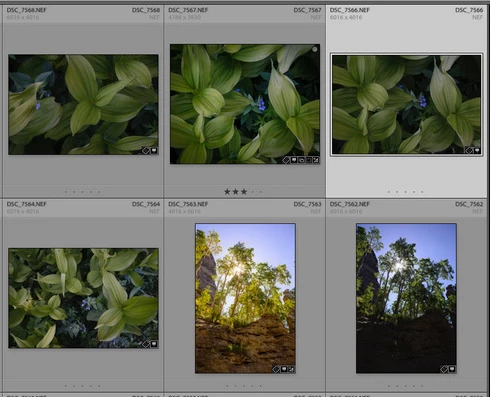
Since updating to LR 2015.7 and Macs OS X Sierra, the badge numbers in the grid view are no longer visible no matter what view I choose (expanded, compact, etc.). For good measure I recalibrated my display and that doesn't make a difference. This is not a problem for 2015.7 using other machines running El Capitan and Yosemite.
This topic has been closed for replies.

34 replies

Inspiring
December 28, 2016
Fixed in CC2015.8. Thank you!
Participating Frequently
December 12, 2016
Is there a thread going about the LR now freezing after deleting several previews in develop mode? I have to now close down LR and reopen every single time. It just started happening today.
Jao vdLCommunity ExpertAuthor
Community Expert
December 10, 2016
This is fixed now. Thanks Adobe!
Inspiring
December 10, 2016
For me, after upgrade to LR CC2015.8 it's ok the numbers are in the left corner of the vignettes.
Yves Crausaz, Suisse, retraité actif dans le monde de la photo et des arts graphiques.
Sunil_Bhaskaran
Community Manager
Community Manager
December 9, 2016
No problem. 🙂
Thanks for confirming.
Participating Frequently
December 9, 2016
Nevermind! So sorry. I just did the update for LR, and they are there. 🙂
Participating Frequently
December 9, 2016
For me, it has nothing to do with Sierra. It's the 2015-7 version of LR. When I go back a version, it is fine.
Participating Frequently
December 9, 2016
The newest one: 10.12.1 
Sunil_Bhaskaran
Community Manager
Community Manager
December 9, 2016
Maggie,
Could you please let us know the version of Sierra you are using?

Thanks,
Sunil
Participating Frequently
December 9, 2016
Sunil...It hasn't been fixed. If you are using CC, it is still without the numbers. I have the latest upgrade.