
Participant
October 8, 2018

P: Blank thumbnails showing up in All Photographs only

  • October 8, 2018
  • 36 replies
  • 1787 views

Ligthroom Classic 7.5 Windows10 32 gig of memory

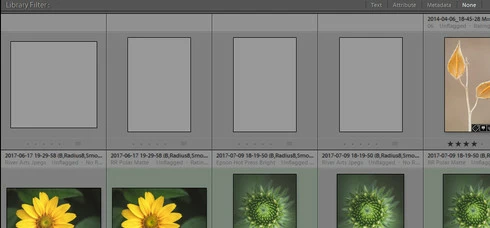
All Photos is showing 4 gray thumbs that I can't delete. The thumbs are not in my folders, which shows a count of 4 fewer photos than all photos does. When I try to delete the 4 empty thumbs it prompts this error message: an internal error has occurred: ?:0: attempt to index field 'rootFile' (a nil value). Also, the thumbs show no metadata, and a right click to locate in the folder in library returns no results.
I have disabled all plugins, no change, synchronize photos, no change, find missing photos, no change. I searched the forum, and the web andhave not found a solution. Any help would be greatly appreciated. 

Bob
This topic has been closed for replies.

36 replies

Rikk Flohr_Photography
Community Manager
Community Manager
December 11, 2024

You’ve posted to an ancient thread. It is highly unlikely that the issue described in this thread, though not impossible, is the same one you are currently experiencing. Rather than resurrect an old thread that is seemingly similar, you are better off posting to a new thread with fresh, complete information, including system information, a complete description of the problem, and step-by-step instructions for reproduction. 


If the issue is the same, we will merge you back into the appropriate location. 

This thread will be locked. 


Thank you!


Rikk Flohr: Adobe Photography Org
Participant
December 11, 2024

I too am experiencing the blank thumbnail error and also started getting the: lightroom ?:0 attempt to index field 'rootFile' error.

Running Lightroom Classic version 13 on OS X Sonoma in Intel macbook pro

Participant
February 27, 2022

I have a bunch of empty spaces in my all photos grid view. there are no photos in these spots either in the cat or on my external. i need to delete these spaces from my catalog? i can not finf help for this issue anywere?

thank you

F. McLion
Community Expert
Community Expert
February 27, 2022

What happens if you try to "show in finder" on an empty space?
Are there exclamation marks on these empty spaces?

Do you see question marks on folders in the folder panel?

Did you delete or move images from within finder?


--- Got your issue resolved? Please label the response as 'Correct Answer' to help your fellow community members find a solution to similar problems. ---
Participant
February 27, 2022

it shows nothing in finder

threre are no question marks

i am so lost thank you

Inspiring
October 12, 2020

I have created a Smart Collection called Not in Collections where the Collection doesn't contain "a b c d e f g h i j k l m n o p q r s t u v w x y z A B C D E F G H I J K L M N O P Q R S T U V W X Y Z '

and Capture Date is in this year. It is show photos like below:


undefined


How can I find out which images are doing that?

Windows 10 latest version of LR Classic on the Photography plan

Inspiring
September 27, 2020

Hi,


I cannot get my zip file from my mac to load on Creative cloud. I changed the extension to PIZ and it will still not accept it.


Thanks 


Duncan

Rick Adams
Inspiring
August 6, 2020
Like the toothache that goes away when you walk into the dentist's office, do you think I could recreate this issue? I duplicated the exact same steps today and the previews work in LrC. Now, the difference could be how I structured the After Effects composition. Today's was a lot simpler so I am considering that maybe additional layers in the previous project could have somehow created the issue. If I experience this again, I'll post here to update the topic. Thank you very much. Have a great day, Rick.
Rick Adams
Inspiring
August 5, 2020
Hello and thank you for your reply.

I really wasn't expecting such a quick response and so, since I discovered I could correct the problem by opening copies in Ps and saving them, I did that for the forty files and I trashed the original files with the preview problem so I could get back to work. After seeing this post, I tried dragging a couple out of the trash and added them back into LrC to try to answer your question. However, after coming back from the trash, the previews work now.

So I will be doing more of these captures from After Effects and if I encounter this issue again, I'll try your suggestion and report the outcome here. Thank you very much for your reply and help. Rick.
Rikk Flohr_Photography
Community Manager
Community Manager
August 5, 2020
In Library Module view the image in Loupe view [ E ]  Zoom in to 3:1 on one of these images and then zoom back to fit.  Does that cure the problem for that image?
Rikk Flohr: Adobe Photography Org
Rick Adams
Inspiring
August 5, 2020
Hello.

From this description, I may have the same issue with LrC 9.3. I captured individual frames from an After Effects composition. I saved the PSD from After Effects to a folder on my HDD. I opened LrC and added the images to my catalogue (they were visible in the import dialogue window).

In the Grid view, the images are all white. In the Develop module, I can see the image as expected and the preview updates in the bottom preview panel for the open image (the other images in the folder stay white).

If I scroll along the bottom panel while in the Develop module (using the arrow keys), the previews appear for the currently selected image and the preview remains for the previously selected image. But once I arrow over to the fourth image in the bottom panel, the first preview reverts back to white again, I can only have three previews visible at one time.

I can develop these in LrC and I can open them in Ps. However, after editing in Ps and saved to disk, the image continues to appear white in LrC.

I have created and deleted Smart Previews, 1:1 previews, and standard-sized previews, none of which have made the images visible in LrC. I have tried synchronizing folder and scanning for metadata updates, but LrC cannot display the changes made in Ps unless I change to the develop module to see the changes made in Ps.

If I open a PSD as a Smart Object in Ps and then save, the new "copy" is visible in LrC. If I open a copy in Ps and then save, the copy is visible in LrC. So there seems to be an issue with the preview in the original PSD and LrC cannot display the preview in Grid view.

System: Mac Pro (2019) OS 10.15.6, 96MB Ram.  Any help would be appreciated. Thank you in advance.
Participant
May 22, 2020
Thank you very much for your help !
Now my catalog is free of ghost images.

Best regards