
Participant
October 8, 2018

P: Blank thumbnails showing up in All Photographs only

  • October 8, 2018
  • 36 replies
  • 1787 views

Ligthroom Classic 7.5 Windows10 32 gig of memory

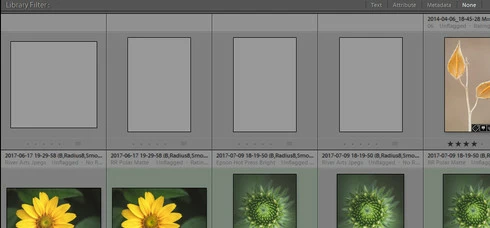
All Photos is showing 4 gray thumbs that I can't delete. The thumbs are not in my folders, which shows a count of 4 fewer photos than all photos does. When I try to delete the 4 empty thumbs it prompts this error message: an internal error has occurred: ?:0: attempt to index field 'rootFile' (a nil value). Also, the thumbs show no metadata, and a right click to locate in the folder in library returns no results.
I have disabled all plugins, no change, synchronize photos, no change, find missing photos, no change. I searched the forum, and the web andhave not found a solution. Any help would be greatly appreciated. 

Bob
This topic has been closed for replies.

36 replies

Rikk Flohr_Photography
Community Manager
Community Manager
May 13, 2020
Try changing the extension to PIZ
Rikk Flohr: Adobe Photography Org
Participant
May 13, 2020
Hello Rikk,

I have the same problem with Lightroom Classic: 9.2.1. and nearly 4000 ghost pictures.

I sent a post here : https://community.adobe.com/t5/lightroom/0-attempt-to-index-field-rootfile-a-nil-value/m-p/11123717?... and someone answered to me, suggesting to come here. Indeed, it seems to be exactly the same problem.

I see your post is 8 months old : can I send you my catalog according to the Procedure ?

If yes, could you explain how to post to my Creative Cloud Folder, because I tryed to do it with the Creative Cloud App, but I have an error message saying that this kind of file (zip) is not accepted. Maybe I do not do what I am supposed to (I do not use the Cloud usually).


Thank you
Best regards

Inspiring
April 7, 2020
Might as well add my statement, too. Seems this has been going on for various members long enough for Adobe to have looked into it and given us some kind of update on their progress in resolving it. Come on, guys ~ we love your products and, more importantly, RELY on them. Help us out soon, OK?? MTBirder (running the latest version of CC and ALL my apps on Mac OS Catalina.)
MountainManJoe
Participating Frequently
March 15, 2020
Thank you. I updated to version 9.2 and the extraneous items are gone.
Rikk Flohr_Photography
Community Manager
Community Manager
March 15, 2020
Please update to 9.2. No further work will be done to 8.4.1
Rikk Flohr: Adobe Photography Org
MountainManJoe
Participating Frequently
March 15, 2020
Count me in as well. Two grey catalog items that I can't interact with or delete. Just happened. LR Classic 8.4.1 for Mac.  Any progress on this at all since it was reported a year ago?
Bob Somrak
Legend
February 29, 2020
Victoria Bampton LR Queen
Community Expert
Community Expert
September 15, 2019
Rikk works for Adobe, so you're safe to send it to him. I've known him for many years, he's a good guy. Otherwise the fix will be coming to a future version, but we don't have a timescale yet.
Victoria - The Lightroom Queen
Inspiring
September 15, 2019
I, too, am having this issue. The photos show blank, metadata won't load (I just get the spinning dots next to the preset dropdown), and I can't delete the photos - returns a nil value like others report. I'm not comfortable with sending my library off to someone I don't know for a fix (I wish he'd share his fix so we can all replicate it on our own). I am using the latest Lightroom Classic update v8.4
Inspiring
September 3, 2019
Why  is there no ETA?
A lot of people have this problem and want it fixed.