
Participant
October 8, 2018

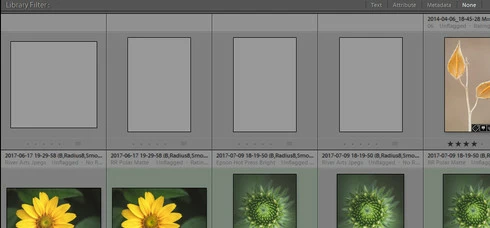
P: Blank thumbnails showing up in All Photographs only

  • October 8, 2018
  • 36 replies
  • 1787 views

Ligthroom Classic 7.5 Windows10 32 gig of memory

All Photos is showing 4 gray thumbs that I can't delete. The thumbs are not in my folders, which shows a count of 4 fewer photos than all photos does. When I try to delete the 4 empty thumbs it prompts this error message: an internal error has occurred: ?:0: attempt to index field 'rootFile' (a nil value). Also, the thumbs show no metadata, and a right click to locate in the folder in library returns no results.
I have disabled all plugins, no change, synchronize photos, no change, find missing photos, no change. I searched the forum, and the web andhave not found a solution. Any help would be greatly appreciated. 

Bob
This topic has been closed for replies.

36 replies

rdl59Author
Participant
November 2, 2018
Sunil,

Any updates on my issue?

Thanks,
Bob
rdl59Author
Participant
October 25, 2018
FYI, I updated to V8 but the issue wasn't resolved, I still have the blank thumbnails under all photographs.
Sunil_Bhaskaran
Community Manager
Community Manager
October 11, 2018
We could reproduce this issue in Robert's catalog.
We are investigating.

Thanks,
Sunil
ArtCDavis
Participating Frequently
October 8, 2018
I have also intermittenetly have this occur with LR Classic 9.5, Win 10 w/32 gig.

rdl59Author
Participant
October 8, 2018
Thank you!
Participating Frequently
October 8, 2018
@1287334 Leggett: We will look into this issue. In order to solve this problem, we need to look into your catalog. One of our Engineering Members will contact you for the same. Please share catalog in case you can do so.