Inspiring
July 4, 2017

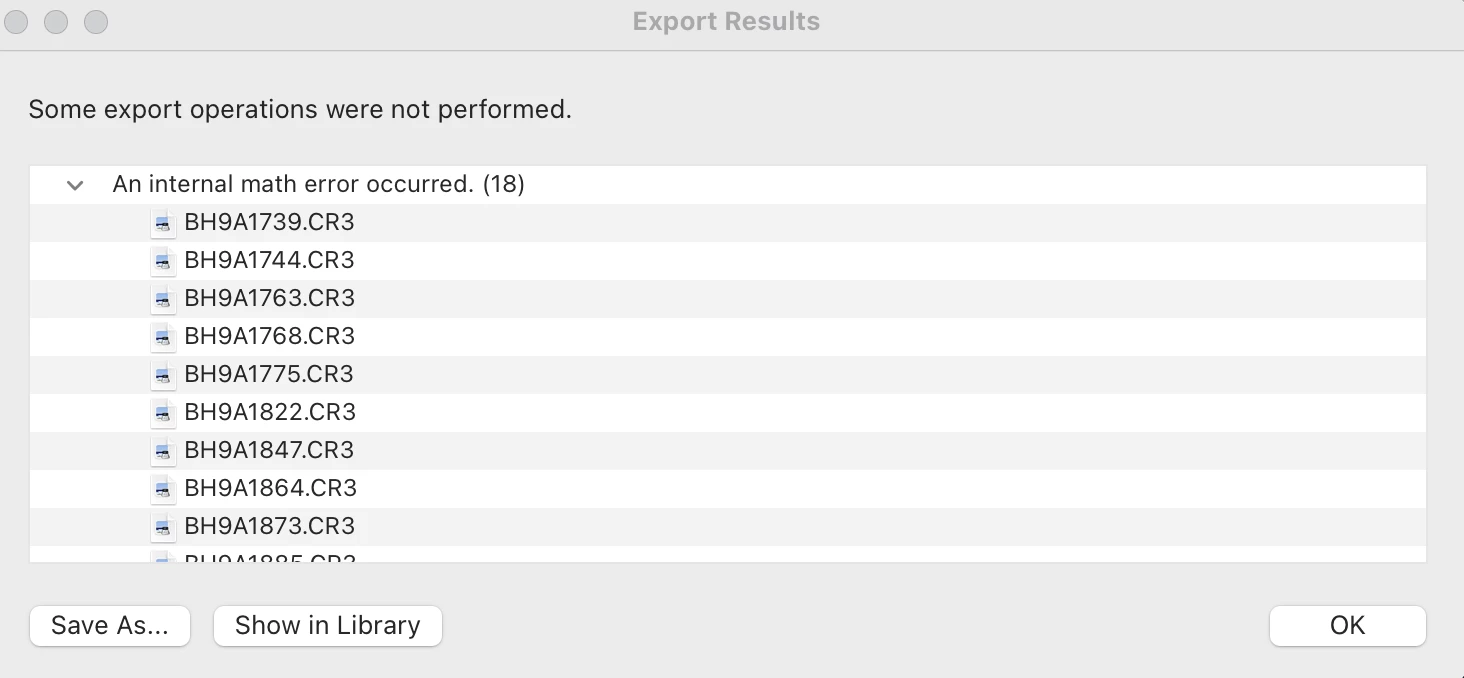
P: Camera Raw, Lightroom Classic: Internal math error on export
  • July 4, 2017
  • 62 replies
  • 7370 views

After exporting this error report populates and states that an internal math error has occurred for 18 of the images. I'm not sure how to fix this. Can someone help me out? 

This topic has been closed for replies.

62 replies

Participant
September 29, 2021

After applying the color preset to raw files, Lightroom indicates internal math error when exporting photos. If the color is not applied they can be exported well. This error does not always happen, it happens in a random way in some photos. Big Sur OS 11.6 and Lightroom Classic version 10.4. I thought that updating the operating system and Lr would solve it. I work from an external hard drive. I have copied the photos to the computer and I have created a new catalog to prevent it from going through the hard disk and the usb, and it does not work correctly either. Could you please give me a solution for this problem, or if someone has found himself in this same case, indicate how to fix this error? Thanks

GoldingD
Legend
September 29, 2021

What plug-ins do you have installed/active? Followin SOP will provide that plus more.


Please post your System Information as Lightroom Classic (LrC) reports it. In LrC click on Help, then System Info, then Copy. Paste that information into a reply. Please present all information from first line down to and including Plug-in Info. Info after Plug-in info can be cut as that is just so much dead space to us non-Techs.


Sample below as of 7/1/2021

Lightroom Classic version: 10.3 [ 202105281559-8dc50eb4 ]
License: Creative Cloud
Language setting: en
Operating system: Windows 10 - Business Edition
Version: 10.0.19043
Application architecture: x64
System architecture: x64
Logical processor count: 8
Processor speed: 4.0GHz
SqLite Version: 3.34.0
Built-in memory: 16317.1 MB
Real memory available to Lightroom: 16317.1 MB
Real memory used by Lightroom: 1302.8 MB (7.9%)
Virtual memory used by Lightroom: 1586.9 MB
GDI objects count: 746
USER objects count: 2288
Process handles count: 1909
Memory cache size: 252.3MB
Internal Camera Raw version: 13.3 [ 807 ]
Maximum thread count used by Camera Raw: 5
Camera Raw SIMD optimization: SSE2,AVX,AVX2
Camera Raw virtual memory: 299MB / 8158MB (3%)
Camera Raw real memory: 303MB / 16317MB (1%)
System DPI setting: 96 DPI (high DPI mode)
Desktop composition enabled: Yes
Displays: 1) 2560x1440
Input types: Multitouch: No, Integrated touch: No, Integrated pen: Yes, External touch: No, External pen: Yes, Keyboard: No
Graphics Processor Info: 
DirectX: NVIDIA GeForce GTX 1070 Ti (27.21.14.6089)

Application folder: C:\Program Files\Adobe\Adobe Lightroom Classic
Library Path: F:\Files\Pictures\Vacations and Day Trips\Photo Trips\24 Photo Trip September 2019\24 Photo Trip September 2019-v10.lrcat
Settings Folder: C:\Users\goldi\AppData\Roaming\Adobe\Lightroom

Installed Plugins: 
1) Aurora HDR
2) ColorChecker Camera Calibration
3) DxO PhotoLab 3
4) DxO PhotoLab 3 Importer
5) HDR Efex Pro 2
johnrellis
Legend
September 2, 2021

"wonder why this feedback post has not been migrated to the community"


I reported it to Rikk Flohr -- they're still working through some missing-content issues, I think.

Inspiring
August 23, 2021

Bom dia, 

Estou enfrentando o mesmo problema, ao concluir as edições no Lr coloco para exportar e todos os últimos catálogos deram problemas em várias imagens. Meu fluxo de trabalho está sendo super comprometido devido a esses problemas, e estou tendo a meses já vários atrasos nas entregas por causa desse problema de exportação. Pagamos uma mensalidade e ter esse problema tem nos complicado. 

Inspiring
August 16, 2021

Hello! I'm facing the same issue. I don't know if this has to do with installing the software again in a new computer, it didn't happen before. Please, Adobe, fix this issue, we are paying for using this software and it's not reliable.

Inspiring
August 14, 2021

This really sucks! I am having the same issue. I have uninstalled, changed various settings and still no resolve. This is extremely frustrating and is impacting my business since I cannot provide the images to my clients. I am now apprehensive about processing my future work cause I'm afraid I will encounter the same issue. Is there any progress? This is unfair considering I am paying for this and I am unable to use the most important component. 

Inspiring
August 11, 2021

Literally can’t get anything done. Just edited 500 photos and can’t export any of them due to “internal math error”. All photos are present. I’m so pissed, come on Adobe. 

Inspiring
August 2, 2021

Why is this still happening, being a known issue since April? No fix yet? I'm about to lose my mind dealing with this multiple times just today. It's absolutely destroyed my workflow and productivity after 8+ years of Lightroom reliance. 🙎

Inspiring
July 21, 2021

I have found that when I run into this issue its bc I synced a good bit of images at one ti.e. if I delete and import the images that are marked as error, then I can then edit and export. Sometimes I sync more than 50, or even 100 images at one time. If I have multiple edits on the image, such as radial filters,etc, then that is when I encounter the problem. I currently run iMac, latest update.  LRClassic. 

Inspiring
July 21, 2021
I had the same problem, a preset for some reason causes this problem, I had 170 photos of which 7 had a problem with this preset. change to another preset and issue fixed.
Participant
July 16, 2021

No me deja exportar desde Lightroom, me arroja el error "se ha producido un error matematico interno"

tampoco me deja pasar de Lightroom a Photoshop. 

Rob_Cullen
Community Expert
Community Expert
July 16, 2021

"an internal mathematical error has occurred"

An Acknowledged bug. See-

https://feedback.photoshop.com/conversations/lightroom-classic/camera-raw-lightroom-classic-internal-math-error-on-export/6065d311414f1176ed90cbef?page=2

Can you Export from the Library (Biblioteca) Grid view?


Regards. My System: Windows-11, Lightroom-Classic 15.3, Photoshop 27.5, ACR 18.3, Lightroom 9.3, Lr-iOS 10.4.0, Bridge 16.0.3 .