
Known Participant
May 18, 2011

P: Change of tones in a photo after upgrading to LR 3.4

  • May 18, 2011
  • 14 replies
  • 552 views

I noticed a change of tones in one of my photos after upgrading to LR 3.4.

This is how it used to look (and as it was uploaded to Flickr):
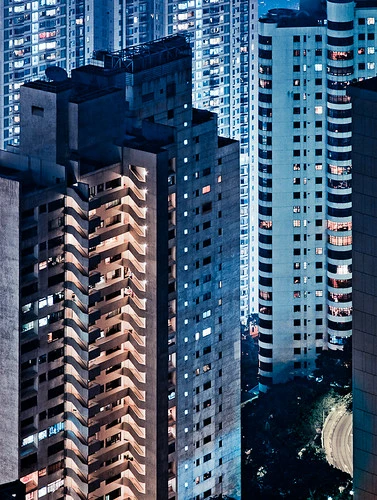

And this is how it looks now in LR3.4:

Image is not available


Note especially the small patch of road on the lower right corner: it has distinctly green color cast in the current version. There are other changes in tone elsewhere in the photo, but they are much more subtle than the road.

And as you can see from the history panel, the image has *not* been modified by me at all in Lightroom since it was uploaded to Flickr (which is the version above). So it seems that some sort of bug has caused this color shift. Which is not nice.

Fortunately this is (at least so far) the only image which seems to be affected.

Using latest version of Mac OSX here, LR running in 64bit mode.

This topic has been closed for replies.

14 replies

Known Participant
August 10, 2011
Thanks for digging into this and for the explanation. I'll just need to re-edit the photo to try to match the tones then...
Adobe Employee
August 4, 2011
Here's an update on this issue from the engineer:

In LR 3.4, we fixed a bug where applying Recovery could lead to undesirable color shifts, such as skin tones turning red. Normally we wouldn't make a rendering change without adding a new process version, but we heard from a lot of customers about this issue and wanted to provide a fix sooner rather than later.

With this fix, images with existing edits can change, especially if a strong Recovery setting was applied.

In the example provided by Miemo, a strong Recovery (+100) had been applied, and there was also a local color correction in the bottom-right. With the fix to the other issue, the Recovery preserves the original hues, but that unfortunately throws off the local color correction painted in earlier.

For the example image provided, our recommendation is to remove the local color correction, which will also remove the green cast.
Inspiring
June 13, 2011
Becky,

Can you please let us know under what circumstances this is to be expected?

Thanks, Beat
Adobe Employee
June 13, 2011
Miemo, we were able to repro this with your image. I've logged the bug.

Becky
Known Participant
June 13, 2011
Rikk, just tried that but the new export on Flickr looks exactly like the one in LR (i.e. bad). So it's not a color management issue, if that's where you were heading with your idea..
RikkFlohr: Inactive
Inspiring
June 13, 2011
I am curious. If you export to Flickr again, do the two images on Flickr match each other?
Victoria Bampton LR Queen
Community Expert
Community Expert
June 13, 2011
Ah brilliant, I'm sure she has it in hand then
Victoria - The Lightroom Queen
Known Participant
June 13, 2011
I actually did deliver the file to Becky soon after the original messages via email, was just wondering if they've been able to reproduce the issue and/or find the fix for it...
Victoria Bampton LR Queen
Community Expert
Community Expert
June 13, 2011
Hmmmm, looking at the Export to Flickr date in the History panel in the screenshot, it must have been a 3.x.

If Becky doesn't get to reply here, and you're happy to drop me the file (victoria@lightroomqueen.com), I'll see if I can reproduce it on various 3.x builds and drop it to Becky direct.
Victoria - The Lightroom Queen
Known Participant
June 13, 2011
The upgrade was from 3.3. to 3.4, but can't be sure which version I had in use when editing the photo in question. It's been months since I've needed to take a look at that particular photo.