
Known Participant
May 18, 2011

P: Change of tones in a photo after upgrading to LR 3.4

  • May 18, 2011
  • 14 replies
  • 552 views

I noticed a change of tones in one of my photos after upgrading to LR 3.4.

This is how it used to look (and as it was uploaded to Flickr):
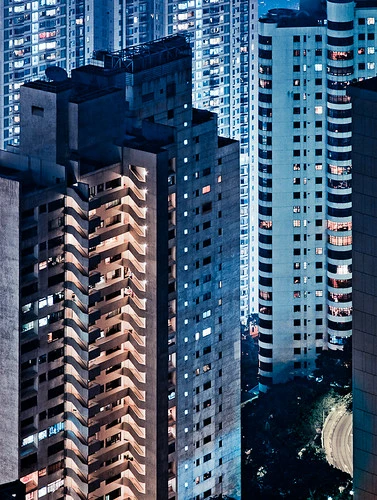

And this is how it looks now in LR3.4:

Image is not available


Note especially the small patch of road on the lower right corner: it has distinctly green color cast in the current version. There are other changes in tone elsewhere in the photo, but they are much more subtle than the road.

And as you can see from the history panel, the image has *not* been modified by me at all in Lightroom since it was uploaded to Flickr (which is the version above). So it seems that some sort of bug has caused this color shift. Which is not nice.

Fortunately this is (at least so far) the only image which seems to be affected.

Using latest version of Mac OSX here, LR running in 64bit mode.

This topic has been closed for replies.

14 replies

Victoria Bampton LR Queen
Community Expert
Community Expert
June 13, 2011
Miemo, can you please confirm which version you upgraded from - was it 3.3 to 3.4, or from an earlier version?
Victoria - The Lightroom Queen
Known Participant
June 13, 2011
Becky, any news on this from the debugging developers?
Known Participant
May 19, 2011
I can send the link to the original raw-file for debugging purposes to official representatives of Adobe to an adobe.com email address. Won't be able to make it public here, I'm just about to send this particular photo to Getty Images and don't want to have copies of it circulating in full resolution.

I can be contacted via email at info(at)miemo.net
Adobe Employee
May 18, 2011
Hi Miemo,

To troubleshoot, it would help to have the original file. Can you post a link to the file, using a utility like yousendit?

Thanks,
Becky