
Known Participant
October 19, 2025

P: Compare after soft proofing shows only edited version

  • October 19, 2025
  • 11 replies
  • 601 views

I think I found a bug in LrC when soft proofing.


Typically when you edit a picture and then hit the compare button, you are shown on the left the original picture and on the right the edited picture, like on the top part of the following screenshot.

But if you do soft proofing this comparison is broken, as you can see in the bottom part of the following screenshot, where I am being presented left and right with the same edited photo.
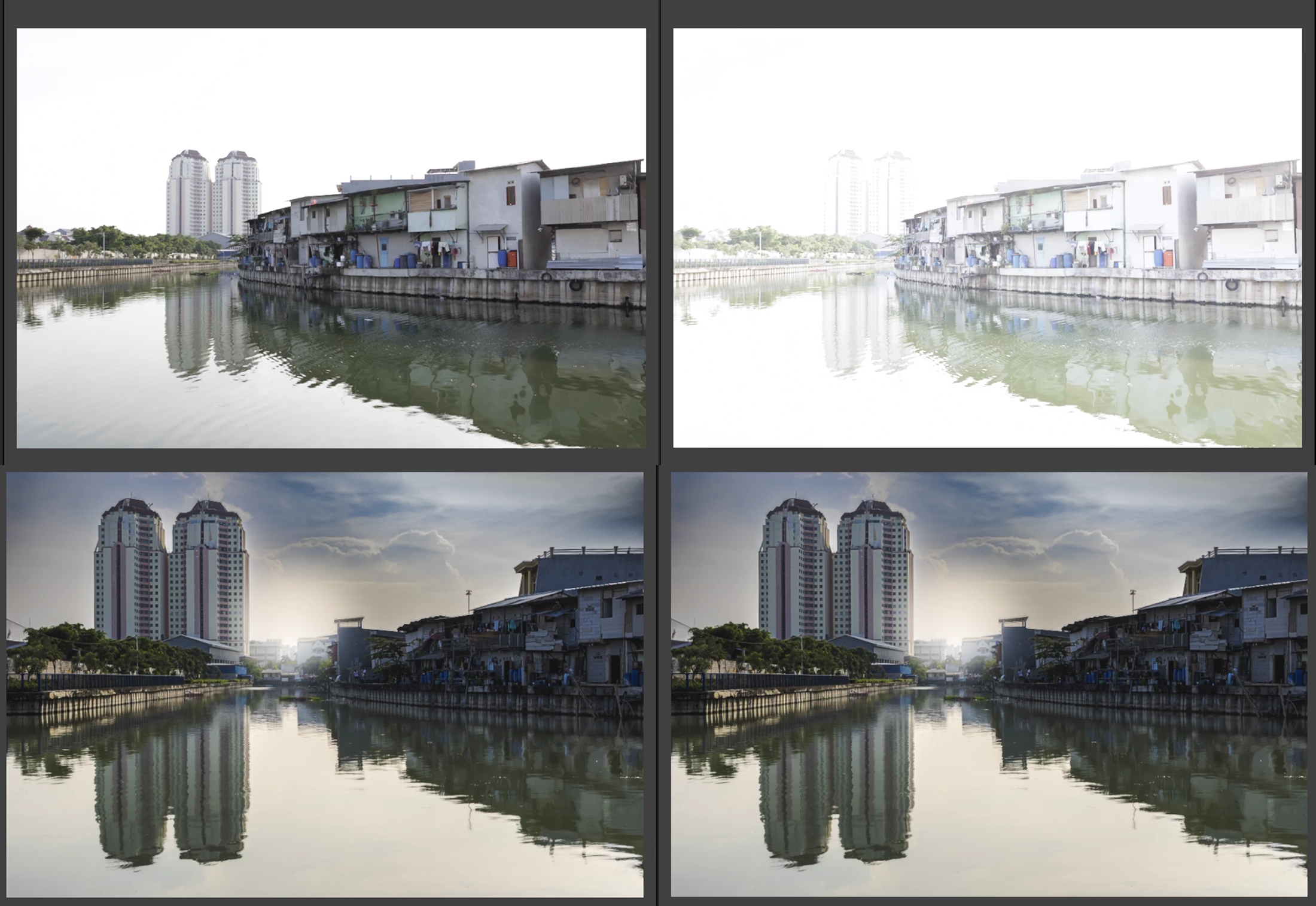

Steps to reproduce:

1- Click on soft proof
2- Click on create proof copy
3- Click on compare button  Before/After Button (Compare is a Library Feature)
4- Click on single photo to show only edited picture
5- Remove proof copy (only from LrC)
6- Click on compare > l  Before/After Button (Compare is a Library Feature)


Result:
L
eft edited phot and right edited photo

Expected:
Left is unedited/Right is edited


Reproduction was done on version 14.5.1 

Mod Comments in Bold

11 replies

Known Participant
October 26, 2025

I got it today, like every version for whatever reason I get it a few days in advance 🤷🏻‍♂ 

ShootingPixelsAndy
Inspiring
October 26, 2025

@Giovanni Stoto  v15 is released? 

Known Participant
October 26, 2025

 I had alread read that, but since today v15 has been released was wondering if this was fixed, although im doubt.

It seems that this bug instead (https://community.adobe.com/t5/lightroom-classic-bugs/p-v14-5-lightroom-has-encountered-problems-reading-this-photo-round-circle-warning-on-images/idi-p/15470236#comments) wqas fixed, so tehre may still be hope 🙂

Rikk Flohr_Photography
Community Manager
October 26, 2025

@Giovanni Stoto please read the pinned post in this thread. It contains up-to-date information. 

Rikk Flohr: Adobe Photography Org
Known Participant
October 26, 2025

@Rikk Flohr: Photography has this been confirmed to be a bug and is someone working on this?

Participating Frequently
October 25, 2025

I am experiencing the same problem.
In my case, I didn't even create a proof copy.
My steps are:

1. Turn on Soft Proofing
2. While in Soft Proofing view, I attempt to make an edit (e.g. change the exposure)
3. A warning dialogue box comes up, asking if I want to A. Undo; B. Make This A Proof; C. Create Proof Copy
4. I think "oops" and choose "Undo"
5. After that, whenever I do a Before/After comparison, the "Before" image is the edited version that I viewed in Soft Proofing, NOT the original unedited image (which is what I want)


Using Adobe Lightroom Classic 14.5

Bob Somrak
Legend
October 20, 2025

There are a couple other operations that replace Before in Before/After.  

One of them is "Read Metadata from File". Its been this way forever so probably as designed but still annoying.

M4 Pro Mac Mini. 48GB
Known Participant
October 20, 2025

@Rikk Flohr: Photography no problem 🙂 and yes apologies for using compare instead of before/after

Rikk Flohr_Photography
Community Manager
October 20, 2025

Thank you @ShootingPixelsAndy for your comment. It enabled me to understand the wrong information provided in the OP.

@Giovanni Stoto  I've corrected your bug report with the information required and altered your steps to be accurate in reproducing the bug.  I've marked those corrections in bold. 

I've logged this with the team.

Thank you for the report. 

Rikk Flohr: Adobe Photography Org
Rikk Flohr_Photography
Community Manager
October 20, 2025

Regarding this specific thread: 

  • No Lightroom Version number was supplied.
  • The instructions provided did not lead to repetition of the reported behavior. 

Either of those reasons would have been sufficient to move the reported bug to discussions.


I highly recommend reading: How to write a bug report. and Shoud I post in Bugs or Discussions?

Both of these are pinned to the top of the Bug reporting page and contain valuable information for successful bug reporting. 

I suspect there are missing steps in your reproduction instructions as you seem to be moving between Library and Develop without mentioning how. (Example: Soft Proof is in Develop and Compare view is in Library)

If you want to attempt to create more complete reproducible instructions, I think the team would be happy to take another look.  Meanwhile, in Discussions, it will have 10X the number of eyes on it. 


Rikk Flohr: Adobe Photography Org
ShootingPixelsAndy
Inspiring
October 20, 2025

I managed to follow the steps and see the bug but I realised that "compare" meant the before after view in develop.