

Carlos_Oliveras
Known Participant
November 20, 2018

P: Converting raw files to lossy DNG sometimes results in purple-cast previews in the Library module

  • November 20, 2018
  • 25 replies
  • 1922 views

I convert whole folders of raw files to lossy DNG on a regular basis, and since earlier this year (at least), I've noticed a problem that affects a very small percentage of the files (sometimes it doesn't happen at all), but it's starting to become a little annoying.

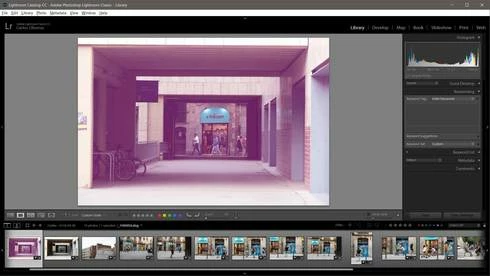
The problem (when it happens) is that some of the resulting lossy DNG files look good in the Develop mode of LR Classic and in Camera Raw. Even the preview from Windows file explorer (and when using image viewers that display the embedded jpg preview) looks ok. But when displaying these problematic files from the Library module in Lightroom Classic, they show a strong purple cast. So, I think there is some problem with the preview generated by LR.

Like I said, this problem happens very rarely, but it keeps happening every now and then. Most of the times I am able to fix the "pink preview" by re-building 1:1 previews, or just removing and reimporting the file. But there must be something going on with the preview generation for lossy DNG files since I also read about it (or a very similar problem) in this thread: https://forums.adobe.com/message/10758722

I am using Windows 10 and the latest versions of Lightroom Classic CC (8.0) and Camera Raw 11.0, but this was happening already with some LR CC 7.x versions. Thanks.
This topic has been closed for replies.

25 replies

Participant
April 28, 2019
Yes, I just tried converting to lossy DNG for the first time and noticed a similar problem.

If you move the spots significantly it prompts it to re-compute any 'dirty' areas properly.
Todd Shaner
Legend
March 2, 2019
Chris Castleberry,  I discovered a similar magenta/pink discoloration issue at the below Lightroom Forum post.  This happens when applying a Spot Removal Tool Clone spot to a raw file and then exporting it to DNG file format with use 'Lossy Compression checked. The returned lossy DNG file  exhibits a strong magenta/pink cast in the clone spot.

EDIT: Just tested this on a Windows 7 system using LR 5.7.1 with Export DNG Compatibility set to 'Camera Raw 7.1 and later' and 'Lossy Compression.' It does NOT exhibit the issue.


Carlos_Oliveras
Known Participant
January 18, 2019
About my original issue, I've noticed an improvement. It probably improved with LR Classic 8.1, but I'm not absolutely sure since when things got better.

Anyway, the thing is that,  while the purple-cast preview generation still happens every now and then after converting a folder of raw images to lossy dng, now it's much easier to correct it:

- If I rebuild the preview manually (Library>Previews>...), it will fix it. Previously, it did nothing - I had to remove the image from the catalog and import it again to have LR really rebuild the preview.

- If I select a "bad" preview image and then switch to the Develop module, the image will be displayed correctly. This was already happening, but the problem was that, when returning to the Library module, the weird preview was displayed again. Well, not anymore - now, the correct preview "sticks", when going back to Library so, if I find any bad preview, I don't even have to rebuild the preview, I can just switch to Develop, then back to Library, and the preview is ok.

While this is not a complete fix, it's enough to quickly correct any "bad" preview, should it happen.

Thanks for your continued improvements in LR Classic.
kenth13086284
Participating Frequently
December 12, 2018
Hi Michelle. Thanks for the info. I'm curious why is 7.2 ok but not v11? Am I loosing some image data using 7.2 to compress verses using v11?
Adobe Employee
December 12, 2018
Thank you Kent for your responses and detailed info! We can reproduce what you're seeing in the Finder/Preview. This appears to be an issue with Apple’s preview software. We’ve logged the issue with Apple. Hopefully they will fix it in an upcoming OS release.

Thanks again.
Michelle
kenth13086284
Participating Frequently
December 12, 2018
Michelle please let me know if you need more information or some kind of log file. I'm happy to help get it fixed.
kenth13086284
Participating Frequently
December 11, 2018
Hi Michelle!

Yes I am sure.


2. Yes every time I convert this cr3 file it is pink when using (v11) with compression on. By this I mean Change Preferences -> Check Use Lossy Compression.

3. If I convert the cr3 file to dng with no compression I dont see pink. (v11). By this I mean Change Preferences -> Uncheck Use Lossy Compression.


4. If I take the dng file from step 3 without pink and run it though v11 again this time with lossy compression on it will also be pink.

5. If I take the dng file from step 3 without pink and run it though v7.2 this time with lossy compression on it will not be pink and it will be compressed.


Basically right now I have to run the file through two different versions of DNG converter first to go from cr3 to dng(uncompressed) then the second to go from DNG to DNG(compressed)


Also to clarify. Some photos turn out pink when being converted and some don't. But they are consistent. The ones that will turn pink always will turn pink no matter how many times I run the software on the cr3 file.

Additional information. They dont all turn pink. Some turn red. Some turn a copper color like a old sepia photo. but whatever color they turn is consistent every time they are converted.
Adobe Employee
December 11, 2018
Hi Kent, we are having trouble reproducing this issue in house on Mac OS 10.14 (and 10.13) using DNG Converter 11.1. We also tried with your .cr3 image - still can't repro. Two questions:1. Are you positive you are using DNG Conveter 11.1.0.112? you can find this info by clicking on "About DNG Conveter"
2. Can you always see this issue with just converting this .cr3 file by itself or with a bunch of other files?
3. Could you provide more details on the exact step you did with "This only happens when using compression"? Perhaps a screenshot?


Thank you.
Michelle Qi
kenth13086284
Participating Frequently
December 11, 2018
Hello. I am also having this issue. Using Adobe DNG converter 11.1.0.112. on Mac OS 10.14. Some images the color is correct but some come out red or pink. This only happens when using compression. If I do a non compressed convert then no color problems occur. 

The strange thing is it's not all of the files only some from my camera turn pink. however when it does happen it's 100% repeatable. I can't ever compress that file without it turning pink or red. 


I'm assuming that Photoshop and DNG converter share a code base and therefore are sharing this bug? Also it seems to be platform agnostic as I'm on OSX and the OP is on windows.

Here are some example files, original, converted uncompressed, and converted compressed.
https://drive.google.com/file/d/1onG6M0QAlypEAQ7X5xC4iaIsOnMN9rhq/view?usp=sharing


UPDATE:
I tried this now.
Convert Cr3 to DNG(uncompressed) with DNG converter 11

Then I used DNG converter 7.2 to convert that DNG(uncompressed ) to DNG(Compressed)

That worked! No color issues. So it seems that the newer DNG converter has a bug that is not in the older software. 


Chris Castleberry can you comment on this? Is this the right place to report this issue or should it be forwarded to somewhere else?


Carlos_Oliveras
Known Participant
November 21, 2018
Thanks for having a look at this and trying to reproduce the problem, Chris. Yes, I am using LR Classic CC 8.0 (build 1193777).

Like you say, it seems like something intermittent. So far it hasn't been a huge problem (in fact, it happens very rarely, and while it's annoying, it's also easy to fix), but from now on, I'll try to pay more attention when converting files, just in case I notice any pattern or possible trigger. If so, I would post any finding in this thread, in the hopes that it can provide some clue. Or maybe it won't happen again! (I'll keep my fingers crossed).

Kind regards,

Carlos