

Carlos_Oliveras
Known Participant
November 20, 2018

P: Converting raw files to lossy DNG sometimes results in purple-cast previews in the Library module

  • November 20, 2018
  • 25 replies
  • 1922 views

I convert whole folders of raw files to lossy DNG on a regular basis, and since earlier this year (at least), I've noticed a problem that affects a very small percentage of the files (sometimes it doesn't happen at all), but it's starting to become a little annoying.

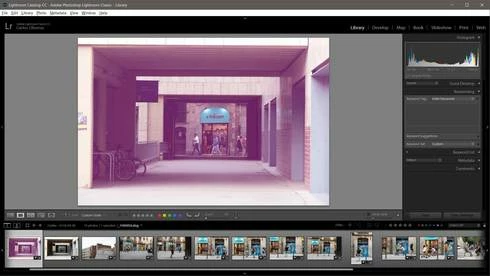
The problem (when it happens) is that some of the resulting lossy DNG files look good in the Develop mode of LR Classic and in Camera Raw. Even the preview from Windows file explorer (and when using image viewers that display the embedded jpg preview) looks ok. But when displaying these problematic files from the Library module in Lightroom Classic, they show a strong purple cast. So, I think there is some problem with the preview generated by LR.

Like I said, this problem happens very rarely, but it keeps happening every now and then. Most of the times I am able to fix the "pink preview" by re-building 1:1 previews, or just removing and reimporting the file. But there must be something going on with the preview generation for lossy DNG files since I also read about it (or a very similar problem) in this thread: https://forums.adobe.com/message/10758722

I am using Windows 10 and the latest versions of Lightroom Classic CC (8.0) and Camera Raw 11.0, but this was happening already with some LR CC 7.x versions. Thanks.
This topic has been closed for replies.

25 replies

ccastleb
Adobe Employee
Adobe Employee
November 21, 2018
Thanks, Carlos. 

I am unable to reproduce this so far, but as you mentioned the behavior seems intermittent. After checking our internal bug database, there was a similar issue fixed for the last public release of Lightroom Classic CC version 8.0. However, there is still the possibility of the bug occurring under certain conditions such as a threading race condition, which might explain the intermittent reproducibility you have been experiencing. If you have updated to Lr Classic CC 8.0 and still see this happening occasionally, please let me know.

Regards,

- Chris
Carlos_Oliveras
Known Participant
November 20, 2018
Hey Chris, thanks a lot for your interest. It's a little hard for me to find examples (because when it happens, I usually rebuild previews until the problem is gone, and also, when I convert, I delete the original raw files at the same time). But thanks to some backup copies, I've been able to locate a couple of raws where this happened later on when I converted them to DNG. 

I don't know if it's relevant, but they were shot in raw+jpeg mode, so I'll include the jpeg just in case. Also, while I only find this issue every now and then, in this case it affected 2 files in a row, and I've found another case where also 2 files in a row were affected. It doesn't seem like a coincidence...

Anyway, you can download the files here (I've included a screenshot of how they look in my LR library):

http://photoshopeando.com/descargas/otros/purple_cast.rar (78 MB)

I will include an image with the settings I use every time I convert a folder of raw files to lossy dng.

Anyway, I am not sure you will be able to replicate the problem with these files because normally, if I remove and reimport the "pinkish" dng file (from LR Classic CC), the issue is gone. In fact, I've tried to re-convert these raw files to dng with a new catalog, and the issue didn't happen. So, maybe there's nothing special about the files themselves... maybe there's something else, but I can't see the trigger or pattern.

Please let me know when you've downloaded the .rar file so that I can delete it from my server (but there's no hurry). Again, thanks a lot for your interest in looking into this.


ccastleb
Adobe Employee
Adobe Employee
November 20, 2018
Hello Carlos,

If possible, will you please post a download link to some examples of source raw+lossy DNG pairs where this is occurring for you?

And please note the exact DNG conversion settings as well.

Thank you!

Regards,

- Chris
Carlos_Oliveras
Known Participant
November 20, 2018
There are both flavors, lossy and lossless DNG. Unfortunately, they both share the same .dng extension, which (in my opinion) is a little confusing. But that's a different story unrelated to this problem, of course.
Maybe this issue happens too with the lossless version of it, but so far I've only experienced it when converting to lossy (which is what I use most of the time).
Participating Frequently
November 20, 2018
sounds odd....
2) I was of the opinion that DNG is "lossless" ???????