
Legend
November 19, 2018

P: Crashes on Launch

  • November 19, 2018
  • 25 replies
  • 1367 views

Lightroom Classic 8.0 has suddenly started crashing shortly after startup, again! This problem really needs to be fixed. I send in crash reports, but get nothing back. Each time this has happened I've been left to fix it myself. On previous occasions I tried various methods to recover and eventually got Lr going again with no real knowledge of what actually fixed the problem. I just tried what appeared to fix it last time, but it didn't work this time. It would be very nice to hear back from Adobe. It would be great to have Adobe tell me they have identified the problem. It would be even better if Adobe told me they have fixed the problem. Meanwhile, I'm paying for a product that doesn't work! Lr Classic 8.0 is broken and needs fixing. As you can see, Lr hasn't even opened a catalogue before crashing.
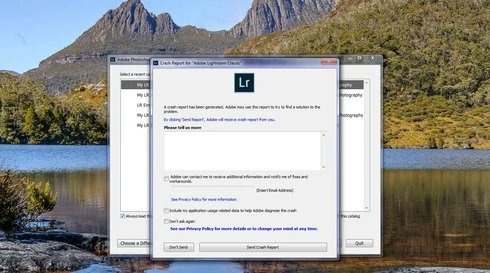
Note: This conversation was created from a reply on: Lightroom Classic 8 crashing on launch.

This topic has been closed for replies.

25 replies

drtonybAuthor
Legend
September 8, 2019
Jeremy, it is good that you have been able to get Lr 8.3.1 running again, but neither you nor any of us should have to go through all this angst. It seems to me that the development team have a very poor record regarding fixing known bugs with some still outstanding after years of being reported.

It might be helpful, maybe, to send your old preferences files to Adobe to see if they can find what is wrong and hopefully get it fixed.

Tony

Participating Frequently
September 8, 2019
For those suffering from the same issue that I was, i. e. LR crashing ALL the time, here's what I did to resolve it.  Can't guarantee that it will work for you, but it seems to have worked for me (2 days without a crash):

1. Uninstalled LR and chose to remove all settings
2. Reinstalled an earlier version of LR (8.2.1 in my case)
3. Went to my preferences folder (in LR open Preferences/Presets/Show Lightroom Develop Presets) which will open File Explorer)
4. Close Lightroom
5. Double click the Lightroom folder, then double click the Preferences folder
6. Rename all of the files (should be 4).  I simply added ".old" to the end of each file name
7. Reboot the computer
8. Start LR

This got LR up and running and it seemed stable.  After it remained running for a day without an issue I opened Adobe Creative Cloud and updated my version of LR to the latest version.  It's been up and running overnight with nary a problem.

Thanks to Anthony Blackett for setting me on the right path.  However, I can't help but feel that if Adobe is charging me $14+/month (US-Canada exchange rate) I should have software that isn't buggy.  Which leads me to my next rant...

Not everyone uses a Mac - in fact, there are more Windows users than there are Mac users.  Can we all please get over the idea that serious users only use Mac hardware?  It's great that Adobe runs well on Mac systems, but let's not forget that most users are on Windows and software updates need to be tested on both Mac and Windows systems before being released.  I cancelled my Kelby One subscription when Scott Kelby opined that Macs were better looking computers and therefore more suited for artistic endeavours.  I swear I'll cancel my Adobe subscription if they try the same crap.

Here endeth my rant.  Good luck.
Participating Frequently
September 6, 2019
Just tried this and it seems to be working!  Awesome... thanks for your help.  It's been up and running now for almost 4 hours, which is about 3 hours and 58 minutes longer than I was getting before.

Still don't trust it though.
drtonybAuthor
Legend
September 6, 2019
My external drive was fine, just the tablet. My Samsung phone didn't cause the problem either. Adobe know about it, but no fix yet.

Have you tried making a copy of your preferences file, then deleting it from its normal location so that a default one is recreated?
Participating Frequently
September 5, 2019
Just my external hard drives. Need them - they're where my photos are.
drtonybAuthor
Legend
September 5, 2019
Jeremy, my crash problem turned out to be my Samsung Tablet plugged into a USB port. Removed the tablet and no more crashes.

Do you have any devices plugged into your computer?
Participating Frequently
September 5, 2019
I'm now using Bridge as a work-around. Wonder if I'll get a credit from Adobe since my subscription doesn't work?
Participating Frequently
September 5, 2019
Yes - all crash except v6, which won't open my catalogue.
Participating Frequently
September 5, 2019
But 8.3.1 is one version back and 8.3 two. Did you try them?
Participating Frequently
September 5, 2019
No.  I have options for versions 8.3.1, 8.3 or 6.0.  The first two crash, the last one can't read my catalogue.  "Find More Versions" link brings up v 6.0.