
Legend
November 19, 2018

P: Crashes on Launch

  • November 19, 2018
  • 25 replies
  • 1367 views

Lightroom Classic 8.0 has suddenly started crashing shortly after startup, again! This problem really needs to be fixed. I send in crash reports, but get nothing back. Each time this has happened I've been left to fix it myself. On previous occasions I tried various methods to recover and eventually got Lr going again with no real knowledge of what actually fixed the problem. I just tried what appeared to fix it last time, but it didn't work this time. It would be very nice to hear back from Adobe. It would be great to have Adobe tell me they have identified the problem. It would be even better if Adobe told me they have fixed the problem. Meanwhile, I'm paying for a product that doesn't work! Lr Classic 8.0 is broken and needs fixing. As you can see, Lr hasn't even opened a catalogue before crashing.
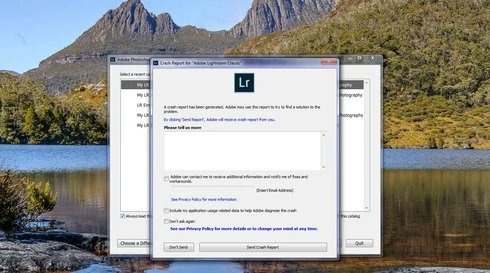
Note: This conversation was created from a reply on: Lightroom Classic 8 crashing on launch.

This topic has been closed for replies.

25 replies

Rikk Flohr_Photography
Community Manager
September 5, 2019
Jeremy, can you revert to any version of 7.x by going to the Down Arrow > Manage >Other versions in the Creative Cloud App?
Rikk Flohr: Adobe Photography Org
Participating Frequently
September 5, 2019
I ended up with LR 6 (2015) but it can't read my catalogue because it's too new.  Kind of screwed here.
Participating Frequently
September 5, 2019
Jeremy, for this moment perhaps the best option is to go back to the previous version so you can finish your project.
Rikk Flohr_Photography
Community Manager
September 5, 2019
Jeremy, I located your crash reports and they reference this known bug. I will escalate it to the engineering team. 
Rikk Flohr: Adobe Photography Org
Participating Frequently
September 5, 2019


Lightroom Classic CC is constantly crashing since last update.  I initially suspected that it was the graphics card acceleration so I finally managed to turn that off (took numerous tries since it kept crashing out and not saving my preferences).  I can now start LR without it crashing every time, but if I try to import or develop photos it still crashes out. 

I've uninstalled an reinstalled LR.  Installed the previous version.  Updated all drivers and applied all Windows 10 updates.  Scanned all drives for errors.  Disabled Skylum plugins.

I've run out of things to try.  I'm working on a project that needs to be completed by Monday (5 days!) and I'm starting to panic.
drtonybAuthor
Legend
April 23, 2019
Hi Prabal,

I also have a Samsung Galaxy S4 Mini phone. When this is connected to my computer (on the same USB port as I use for the tablet), Lr 8.2.1 doesn't crash when launching it after connecting the phone nor does it crash when Lr is already running before the phone is connected. I can also open the Import dialog without Lr crashing with the phone connected. I find this a little strange since it appears to me that the phone and tablet use the same Samsung mobile device driver.

As for other devices like USB memory devices, SD cards and portable hard drives, none of these cause any problems.
Prabal Ghosh
Adobe Employee
Adobe Employee
April 23, 2019
Hi Anthony,
Does this crash happen with other peripheral devices connected ?

~Prabal Kumar Ghosh
drtonybAuthor
Legend
April 23, 2019
Hi Prabal,

I don't know if this crash reported for Lr 8.0 five months ago is the same as the one I experienced two weeks ago with Lr 8.2.1. The latest crash report that I submitted indicated the problem was with a device plugged into my computer. I isolated this to my Samsung Galaxy Tab S 10.5.

See https://feedback.photoshop.com/photoshop_family/topics/lightroom-classic-crashes-on-launch-again

If I have the tablet plugged in before launching Lr, then Lr crashes within about two minutes.

If I launch Lr first and wait for it to be ready, then connect my tablet, Lr doesn't crash. If I open the Import dialog, then Lr crashes almost immediately.

Now knowing what causes this problem, I can easily avoid it for now.

Tony
Inspiring
April 23, 2019
Oops, the background fooled me! Thanks!
Prabal Ghosh
Adobe Employee
Adobe Employee
April 23, 2019
Hi Anthony,

Are still facing this crash in 8.2.1 Lightroom Classic.
Can you make sure if no devices are connected before launching lightroom.

Thanks,Prabal