
Known Participant
Oct 20, 2021 4:52 PM UTC
Needs More Info

P: (Customer specific) LR Classic showing inconsistent details about synching with LR Mobile

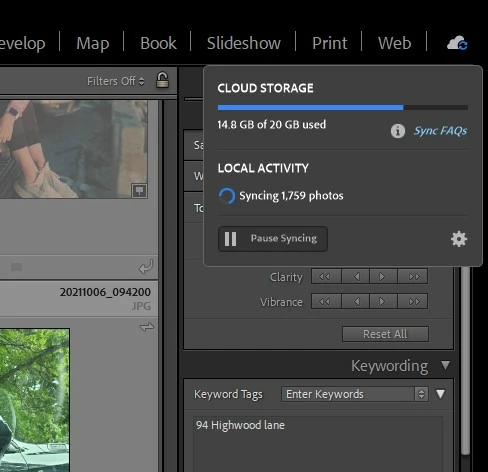
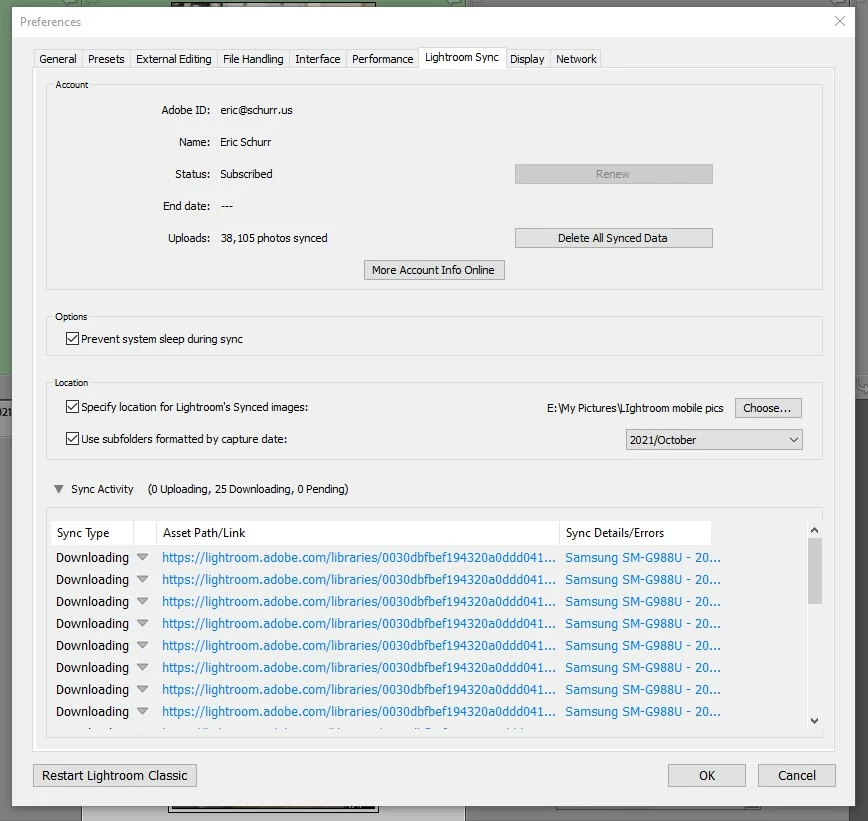
When I click on the cloud icon in the upper right hand of LR Classic it says it is synching 1,759 photos.  If i click on the gear icon and go to the sync dialog it says it is syncing 25 photos.  It's been saying this for many weeks. I can't figure out what photos it's syncing (or not) and what is going on...?
 

This topic is closed to new replies. Start a new post to keep the conversation going.

69 replies

eschurrAuthor
Known Participant
Jun 3, 2023 9:18 PM UTC

Is there no one with a thought on this problem? i can't fix it and i'm not getting any replies from Adobe.

Translate
eschurrAuthor
Known Participant
Apr 12, 2023 4:03 PM UTC

Gosh, i'm hoping someone (espeically at Adobe) has some thoughts on this problem...

Translate
eschurrAuthor
Known Participant
Apr 6, 2023 1:49 PM UTC

I get this message every time i shut down LrC.


Translate
eschurrAuthor
Known Participant
Apr 3, 2023 4:25 PM UTC

Thank you, Rikk.


Here is some additional info:

I’ve been suspecting this for a while but haven’t been able to address it.  But today I paid attention, and my LrC is still stuck on syncing 1,759 photos.


Today when I started LrC  and clicked on the cloud icon it said it was syncing 1,966 photos. Taat made sense because i'd added some new photos. The number went up and down many times, but settled on the number that it has always been stuck on: 1,759.


It seems that the new photos i added synced but there are still 1,759 photos "stuck" somewhere trying to sync, draning resources on both my PC and the Adobe Cloud.

I’m using the latest version (12.2.1) on a Windows PC (the same one I’ve been using during our entire exchange).


I sure would appreciate some help.


Translate
Rikk Flohr-Retired
Adobe Employee
Mar 31, 2023 1:21 PM UTC

Resetting investigation on reopening of the bug. 

Translate
Rikk Flohr: Adobe Photography Org
Rikk Flohr-Retired
Adobe Employee
Dec 20, 2022 4:51 PM UTC

Customer reports fixed

Translate
Rikk Flohr: Adobe Photography Org
Rikk Flohr-Retired
Adobe Employee
Mar 24, 2022 1:11 PM UTC

I've sent you a log collection tool and instructions via email. 

Translate
Rikk Flohr: Adobe Photography Org
eschurrAuthor
Known Participant
Mar 23, 2022 4:35 PM UTC

Rick,  i'm just checking to see if the information i gave you was what you were looking for....

Translate
eschurrAuthor
Known Participant
Mar 12, 2022 7:17 PM UTC

Sadly, it looks like the answer is "no."

I selected a photo that is on my Android phone but not in LrC and made a small edit on LR Mobilee, then moved to a different photo.

I also selected a different photo that is in LR Web but not in LrC and made a small edit in LR Web, then moved to a different photo.


I waited about 10 minutes, and in both sitautions the number of photos appearing in LrC from this album (and in the general library grid view) does not change.

Translate
Rikk Flohr-Retired
Adobe Employee
Mar 11, 2022 3:02 PM UTC

That is telling information. 

If you go to one of those photos and perform a minor edit - then move to a new photo to commit the sync - does that photo then sync to Classic?

If not if you perform the minor edit in Web instead of the Android device does it then sync?

Translate
Rikk Flohr: Adobe Photography Org